
YouTube for Musicians: How to Make Views Compound
Most artists treat YouTube like an archive. The ones whose views compound treat it like a machine with two levers, the click and the watch, and one goal: the next watch. This guide to YouTube for musicians shows you how to work both levers.
Why Your Channel Stalls After Release Week
On release day the visual goes up, the link goes everywhere, and for 72 hours it looks alive. Then the graph goes flat and stays flat until the next release. Nothing is wrong with you or the song. You fed the machine once a quarter and expected a habit.
YouTube’s job is to keep people watching inside a session. It tests your video on a small group, reads what happens, then decides whether to show it to more people. Release week gives it a small sample and then silence, so it has nothing to learn from.
Who This Is For
You know what an Art Track is. You have claimed a profile before. You open Studio without being told to. This guide skips setup and covers YouTube for musicians who already have a catalog and need demand.
What You’ll Learn
- The two levers YouTube pulls, and what changes them
- What an Official Artist Channel fixes, what it breaks, and how to avoid a split catalog
- How to read your traffic sources and your retention curve like a producer
- The two monetization doors, and why one of them eats most artists alive
- A cadence built on one shoot and a week of posts
- The 48 hour, 7 day, and 28 day review rhythm
What YouTube Is Actually Measuring
The machine has four steps: impressions, click, watch, then the next watch. YouTube measures every step, and you can fix every step.
- Impressions are how often your thumbnail gets shown. You don’t buy impressions. YouTube hands them out based on topic fit and past performance.
- Click through rate is the share of people who click. It tells YouTube whether your packaging deserves more impressions.
- Retention tells it whether the video delivered what the title promised.
- The next watch is the prize. If people keep watching after your video, even someone else’s, YouTube counts the session as a win and comes back to you next time.
Playlists, end screens, and a deep catalog all serve that last step: keep the person watching after your song ends.
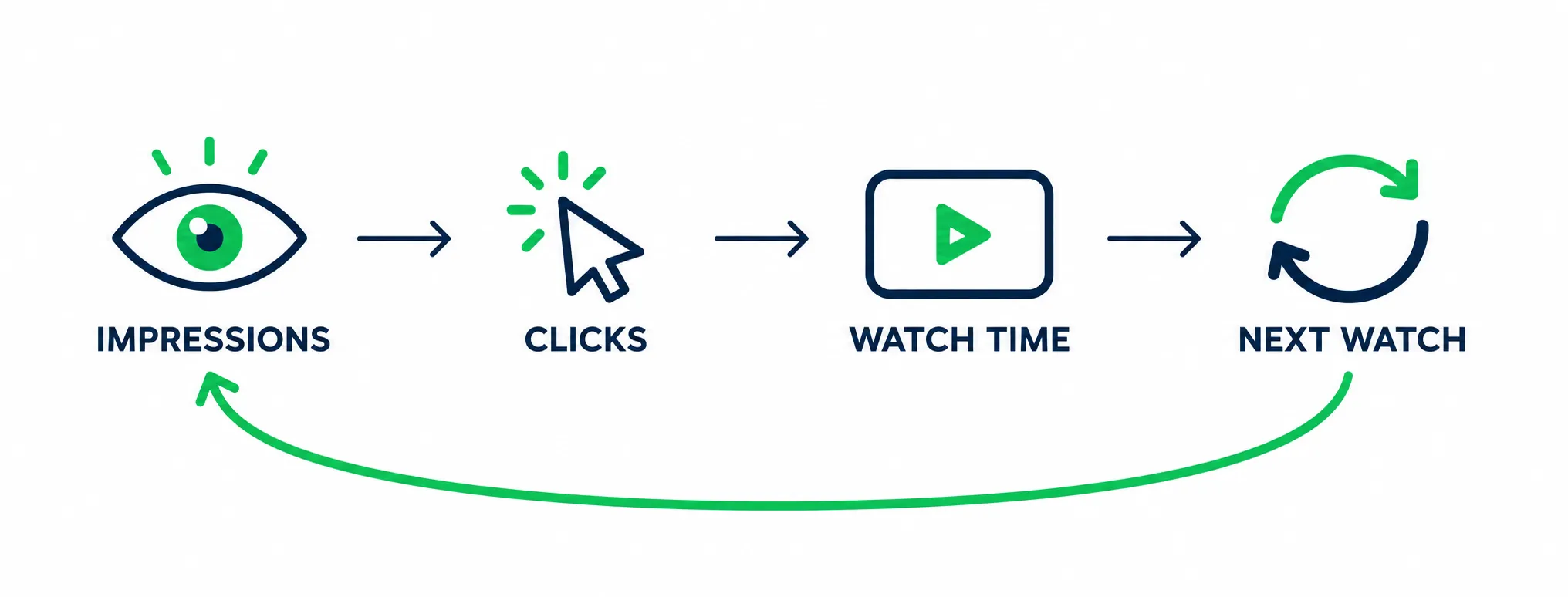
Each stage hands the next one its job. Only the last one buys you more reach.
The Three Jobs Your Channel Does For You
The machine works for YouTube. You need it working for your career too.
- Prove demand. Full watches and new subscribers. This is what a booker, a brand, or a label partner looks at.
- Feed discovery. Search and suggested traffic that shows up every month without you paying for it.
- Feed the list you own. An email address or a follower you can reach directly when the next release drops.
Track only number one, and the other two stall.
More than 8 in 10 U.S. adults use YouTube (Pew Research Center). Your future listeners are already there. They aren’t typing your name. You can meet them in four places:
| Surface | How people get there | What you control |
|---|---|---|
| Your channel and videos | Search, suggested, home feed | Titles, thumbnails, the first 30 seconds, playlists |
| YouTube Music | Album and song browsing, library adds, artist page | Release delivery, metadata, artist profile, catalog order |
| Shorts feed | Swipe feed, mostly people who do not know you | The first two seconds, the hook, the loop, the caption |
| Other creators’ videos | Your song used inside someone else’s upload | Your rights setup and your catalog metadata |
Most stalled channels live on one line of that table. The catalog sits there while the artist waits on the algorithm.
Key takeaway
Claim The Channel That Represents You
An Official Artist Channel (OAC) is the artist version of your channel. One distributed release plus a qualifying partner relationship usually gets you in.
What An OAC Actually Changes
- Your releases, subscribers, and topic channel content pull into one place
- You get a Releases tab and a music note instead of a standard checkmark
- Your catalog sorts by album and single, the way fans browse
- You control the artist avatar, sections, and discography order
- You get artist level analytics for releases and audience
It won’t change how a single video ranks, and it won’t pay you more. It makes your catalog look like a catalog instead of a pile of leftovers.
How To Qualify
Straight from YouTube’s help page:
- You own and run one channel for the artist or band, focused on the music
- At least one official release has been delivered by a distributor or label
- Your channel follows YouTube’s policies and community guidelines
- Plus one of these: a YouTube Partner Manager, membership in the YouTube Partner Program, a label network with a Partner Manager, or a distributor listed in the YouTube Services Directory
There is no subscriber minimum and no view requirement.
The Part That Bites People: Split Catalogs
Your releases attach to an artist profile by name. One release with an ampersand instead of “and”, a stray “The”, or a feature written into the artist field can create a second profile. Now your discography is split in half, and neither side looks like a real catalog.
Open your distributor dashboard and check every release. Same spelling, every time. Fix mismatches in the metadata at the source, not by re uploading songs.
Then handle the duplicate problem. If you also posted the song to your channel yourself, you now have two versions of the same audio fighting for the same searches. Unlist the homemade one once the official release is live, and let the Art Track do its job.
How To Request It
Half the articles out there still say to email artist support or post three music videos first. That advice is stale.
The request comes from your label, your distributor, or a music service partner. Ask your distributor first. Many of them submit it for you when they deliver a release.
The same help page notes that if your artist channel has no public video, the request can get rejected or bounced into extra verification. Upload one real video before you ask.
Topic Channels, Explained
When your distributor delivers music, YouTube builds a topic channel automatically. That’s why your name sometimes shows up twice, once as a topic channel and once as the channel you post from.
Don’t re upload your catalog to your main channel to fix that. The merge that comes with the OAC request fixes it. The YouTube for Artists hub walks through what changes after the merge, including the Releases tab and channel sections.
How Discovery Works On YouTube
Two kinds of viewers find you, and they want different things.
| Searcher | Browser | |
|---|---|---|
| How they arrive | They type a song, an artist, or a question | The home feed, suggested videos, or Shorts |
| What they want | The exact thing they searched for | Something that keeps them watching |
| What wins | Clear titles, exact names, useful content | Hooks, thumbnails, story, format |
| What to publish | Song titles, versions, breakdowns, tutorials | Story driven videos, sessions, Shorts, behind the scenes |
Music videos mostly get shown to browsers. Everything else you make can be built for searchers. That’s the part most artists skip, and it’s the part that still pulls views six months from now.
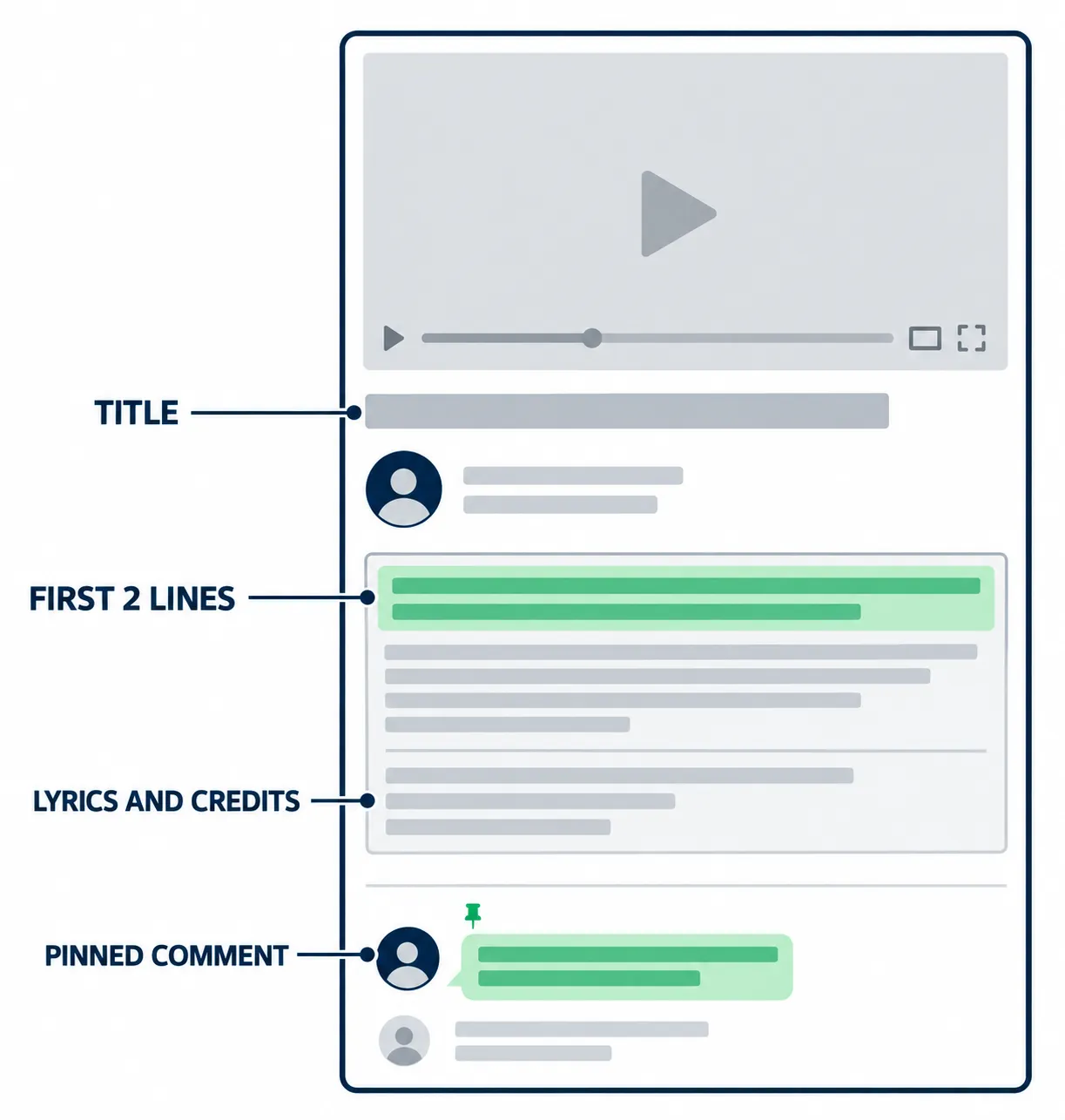
Four zones do the work on every upload. Most artists only fill in one.
Your Traffic Sources Are Telling You What To Fix
This is the fastest diagnosis in Studio. Open a video, go to Reach, then Traffic sources. Each line points at a different problem.
| Source | What it means | What to do about it |
|---|---|---|
| Browse features | YouTube is testing you on the home feed | Strong click rate means it keeps testing. Weak click rate means fix the thumbnail |
| Suggested videos | Another creator’s audience found you | Check which channels send you traffic and make more videos that fit beside them |
| YouTube search | Your catalog is working as a library | Make more videos that answer the same kind of query |
| Shorts feed | A different pool with a different audience | Use it for reach and subscribers. Don’t expect deep fans from it |
| External | Your own marketing worked | Find which link drove it, then put more weight there |
| Playlists | Someone let your catalog run | Build the playlist they clearly wanted |
If browse and suggested carry your traffic, your packaging is doing the work. If search is flat, you have releases but no library.
Read The Retention Curve Like A Producer
Open Engagement and look at the shape, not the number.
- A cliff in the first 30 seconds is your intro tax. If half the room leaves before the first chorus, fix the video before you blame the algorithm.
- A long flat stretch means people are in. That’s the section to repeat in the next video.
- A bump means people replayed something. That’s where your Short should have been cut from. A replay is the strongest signal a music video can send.
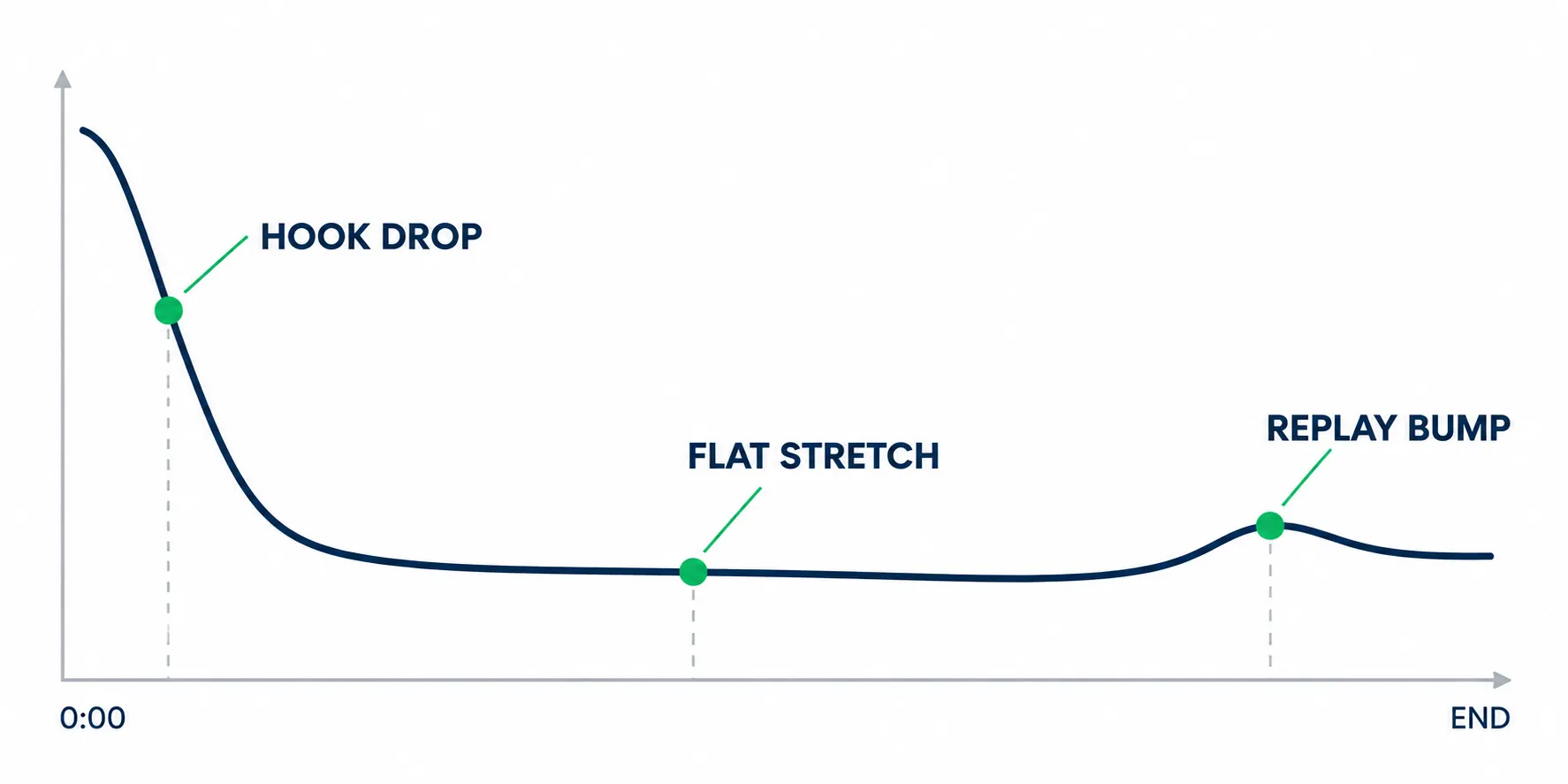
Three shapes, three fixes: the hook, the middle, or the replay moment.
Early data on a new video is noisy. Don’t judge a video on day one, and don’t rebuild your strategy off 400 impressions.
Titles: Match The Query, Not The Mood
- Artist name and exact song title first, spelled the same way your metadata spells it
- Add the words people type into search: acoustic, live session, slowed, demo, how I made
- Stay near 60 characters so it doesn’t get chopped on mobile
- Skip the mood titles. Nobody is searching for your new era
Descriptions Do Two Jobs
The first two lines are the pitch. Most people never click “more”, so say what the video is and ask for one thing.
Everything under that is inventory for search: lyrics, credits, gear, location, timestamps. Lyrics pull a pile of search traffic and they keep people on the page longer.
Test Your Packaging Instead Of Guessing
Studio can run the test for you. You can test title only, thumbnail only, or both, with up to three versions.
Two rules make the result mean something:
- Change one thing at a time. Swap both and you learn nothing.
- Let it run on real impressions. A test on 800 impressions is a coin flip.
Thumbnails: Judge Them At Feed Size
A thumbnail in a feed is roughly 168 pixels wide. At that size, detail disappears.
- One face or one object. Not five things screaming at once
- Three words max, readable when it’s tiny
- Same look across uploads so returning viewers spot you in the feed
If you want a system for testing creative without guessing, our content strategy framework shows how to score a series before you scale it.
Key takeaway
Build A Format Mix You Can Actually Keep
Aim for a few formats you can keep making that still work a year from now.
What Each Format Is For
- The official visual. Music video, lyric video, or visualizer. One clean asset per release, named properly.
- Live performance. A session, an acoustic take, a stripped version recorded at the venue. This is where new listeners decide if you’re real.
- Process and story. How the song got written, where the beat came from, why the second verse changed. Search friendly and cheap to film.
- Shorts. One idea per Short. A hook, a punchline, a moment from the session.
- Community. Polls, questions, replies. Anything that keeps the channel from going silent between releases.
You need all five across a release cycle, though not every month.
The Two Doors Into Monetization
YouTube gives you two ways in: 1,000 subscribers plus 4,000 qualified watch hours in a year, or 1,000 subscribers plus 10 million qualified Shorts views in 90 days (official thresholds).
The second door sounds easier, but ten million views in three months takes a viral machine, and most artists never get close.
Watch hours from the Shorts feed don’t count toward the 4,000.
A three minute video needs roughly 80,000 full views to reach 4,000 hours. A 20 minute session needs about 12,000.
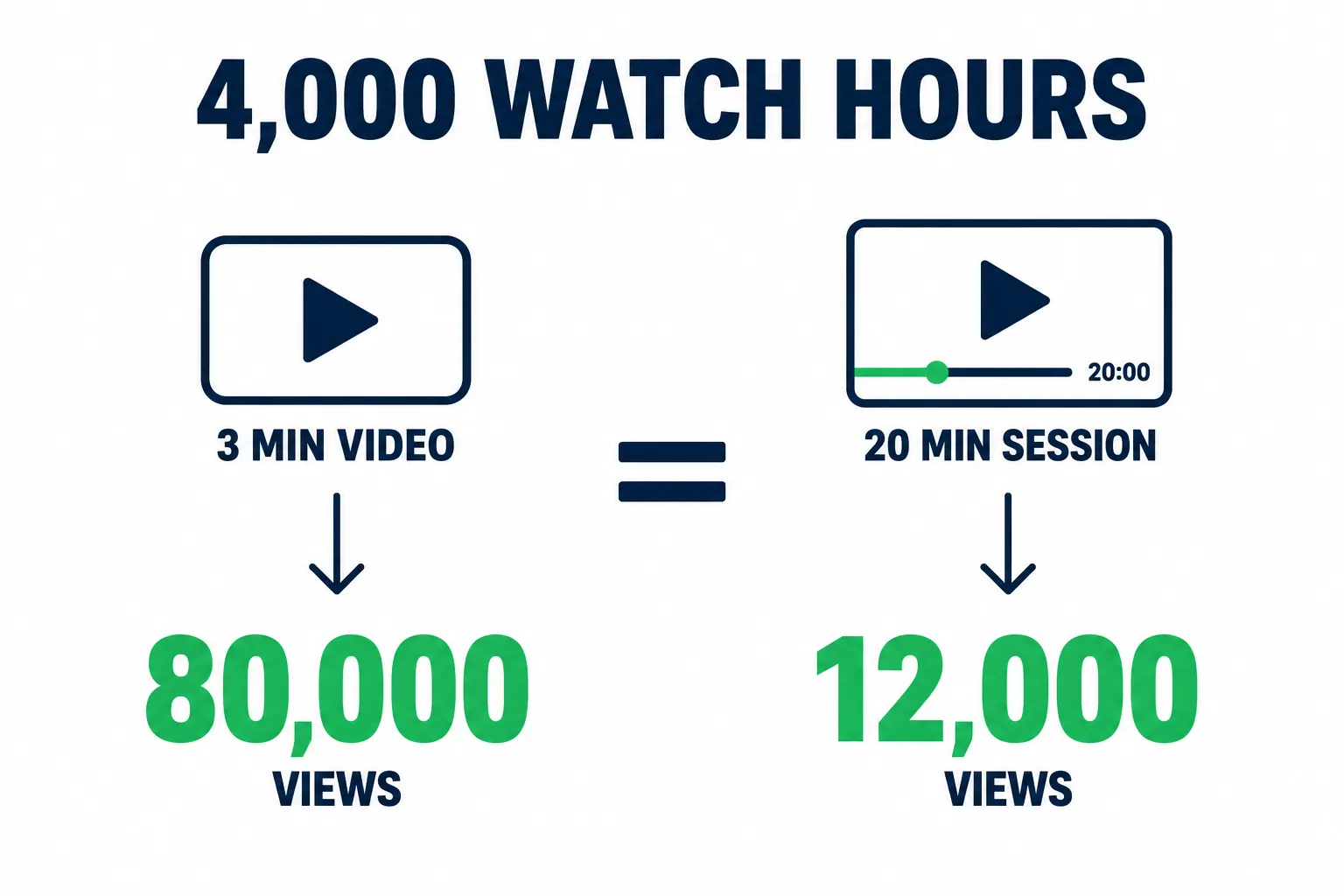
Same watch hours, very different view counts. Format choice moves the target.
That makes your format mix a business decision too. The full money picture, including Content ID and YouTube Music royalties, lives in our monetization guide.
Shorts: What They Can And Can’t Do
Shorts reach a different audience. Most of those viewers don’t know you, and few will become fans from one clip. Shorts are good for reach, subscribers, and fast hook tests.
They won’t build watch hours or teach anyone your song. YouTube’s Shorts basics cover the format itself. The strategy is on you.
Use the remix tool. You can cut a Short straight from your own long form upload, and the Short links back to the original. That’s free distribution for a video you already paid to make.
A Cadence That Survives Real Life
The shape that fits a real week:
- One long form video every two weeks
- Three Shorts a week, cut from the same footage
- One community post a week between releases
Batch it and that’s about four hours of editing a week. Protect those hours. Everything else on this list can flex.
When You Have Nothing To Post
This is where channels die. You’re three weeks out from the next single, the last video is done, and you’ve got nothing.
Three things that always work:
- A one take video from rehearsal, filmed on your phone, posted as is
- A reply to a real comment, answered on camera
- A breakdown of one small piece of the song, like the drum bus or the harmony stack
None of those need a shoot day, and all of them feed the searchers.
One Shoot, A Week Of Posts
Plan the cut list before you record, not after.
One session shoot can hand you:
- The full video for your channel
- Two Shorts, one from the hook and one from the best unplanned moment
- Vertical clips for TikTok and Reels, same cuts
- Three stills for thumbnails and stories
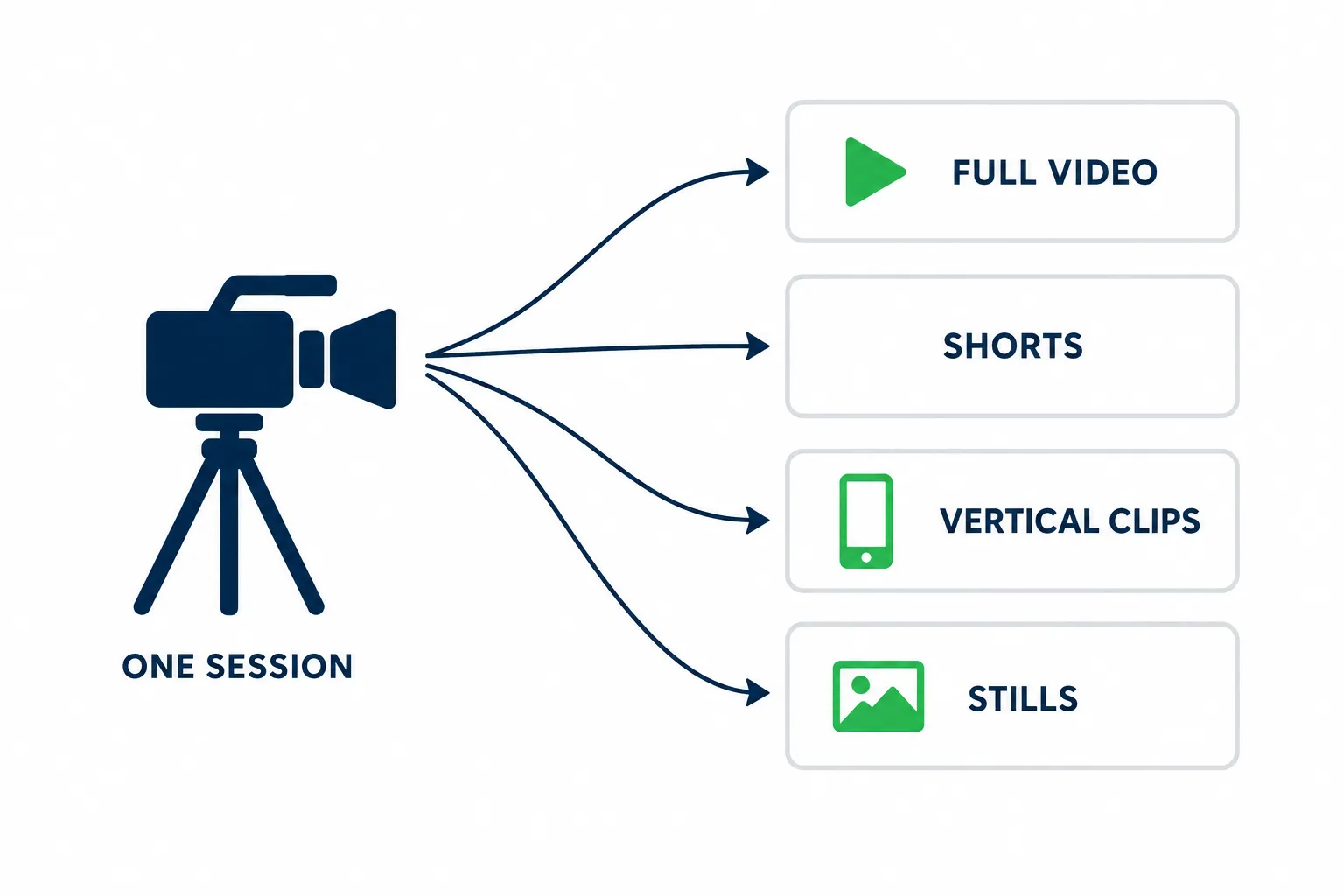
The cut list decides which of these you walk away with.
Turn Views Into Fans You Own
A view is a stranger walking past. A fan is someone who comes back twice.
Five things move a viewer toward that second visit:
- Pin your own comment. One sentence and one link. Most artists leave that space open for spam
- Use end screens on every long video. Send people to the song, the session, or the playlist instead of back to your channel page
- Watch your end screen clicks. The number lives in the Interactions report. No clicks means they didn’t want more, which is a catalog problem, not a video problem
- Reply in the first hour. Early comments tell the algorithm what the video is about. They also tell you what confused people
- Give people one link, not five. One smart link that routes to streaming, tickets, or merch beats a wall of URLs
When a new release drops, update the description and end screen on your last three videos. Almost nobody does this, even though that old traffic is cheap and already warm.
The handoff matters more than the view count. Someone who moves from your video to your Spotify artist profile can be reached again. Someone on your email list can’t be taken away by an algorithm change.
If the capture step is your weak link, fix that before you spend another dollar on reach. The music website checklist covers the pages and forms a serious artist site needs.
When Paid Reach Helps, And When It Wrecks A Channel
Paid reach multiplies what a video already does. If it holds people, a push puts it in front of more of them. If it doesn’t hold anyone, you bought a bigger flat line.
Who sees your song matters more than how many see it.
A good push targets people who already behave like your audience. Same genre, same language, same cities, same listening habits. Those viewers watch longer and they subscribe for the music. Their behavior is the signal YouTube reads when it decides to show you to strangers for free.
Bad paid reach does the opposite. Cheap views from the wrong country, an unrelated audience, a burst that dies the hour the budget runs out. You get a spike, dead subscribers, and a muddied audience profile that makes your next release harder to place.
Hold any campaign to four questions:
- Who exactly sees this, and why them?
- Do you report watch time and subscriber quality, or just views?
- Can we shift the targeting if the fit is wrong?
- What happens after the spend stops?
If impressions keep climbing once the money stops, the campaign fed the channel. If everything dies with the budget, you rented a spike.
Good answers to those questions are specific. Look for real YouTube Ads run through Google Ads, targeting that shifts toward viewers who watch, subscribe, and return, watch time reporting next to subscriber quality, and results you can check in your own YouTube Analytics. If a provider can’t answer them, you’re buying a number instead of an audience.
Read YouTube Studio On A Schedule
Refreshing Studio every day will make you crazy and teach you nothing. Pick three moments instead.
- 48 hours. Impressions and the shape of the retention curve. Nothing else means much yet
- Day 7. Click through rate, average view duration, and subscribers from this video. Now you can judge the packaging
- Day 28. Traffic sources and returning viewers. This tells you whether the video has legs or it was a spike
| Metric | Good looks like | If it’s bad, change this |
|---|---|---|
| Impressions click through rate | 4% to 10% on a music video | Thumbnail first, title second |
| Average view duration | Half the song or better | The first 30 seconds |
| Traffic from search | Any steady share | Title wording, plus videos that answer real queries |
| Subscribers per video | Roughly 1 per 100 to 200 views | The reason to come back, said out loud at the end |
| Returning viewers | Climbing across a release cycle | Format consistency |
| Comments per 1,000 views | Around 5 or more | Ask one real question, then pin a good answer |
Those ranges are directional. Use them to find problems, not to grade yourself against an account in a different genre. YouTube’s Analytics overview shows where each report lives.
Ignore these: total views, one viral spike, and subscriber count by itself. If you want the wider picture that ties YouTube data back to campaigns and listener quality, pair this with our music analytics guide.
Fix The Five Problems That Stall Music Channels
These come up in almost every artist thread about YouTube, and all five have a fix.
- Views but no subscribers. Nobody has a reason to come back. Give each video one job, end it with the next step, and keep the look consistent.
- The audience trap. One off topic video that pops trains YouTube to show your channel to people who don’t want your music. The next three releases pay for it. Keep the off topic ideas on a second channel.
- Covers that get claimed. A claim sends the ad money to the rights holder, and some songs get blocked or muted in certain countries. Great for discovery, useless as a revenue line. How claims work is different from a distribution license.
- Shorts only. Views climb, watch hours stay flat, and Shorts feed hours don’t count toward the long form door. Bridge every Short to one long video.
- Nothing after release week. Plan the release as a quarter long campaign, with 30, 60, and 90 day re-cuts mapped out before launch.
That plan belongs inside your release process, not bolted on at the end. Our music release checklist walks the sequence, and YouTube’s own multi format release strategy shows how the platform expects a rollout across formats.
The 90 Day Channel Ramp
Weeks 1 and 2: fix the foundation. Request the OAC if you qualify. Audit the artist name spelling across every release. Set a trailer for new visitors and a different featured video for returning subscribers. Build one playlist per release.
Weeks 3 and 4: publish for searchers. Two process videos built on questions your listeners already ask. The goal is query coverage, not virality.
Weeks 5 to 8: run the release. A premiere to pull live chat, the official visual, three Shorts cut with the remix tool, one community post, and a pinned comment with your link. If the release is still being planned, our pre release strategy maps the 30 days before launch.
Weeks 9 to 12: double down or retire. Find the two videos that drove the most subscribers and returning viewers. Make more of those. Kill the format that didn’t move. Run your first recycle cut at 30 days.
Only add paid reach once something already works for free. When you’re ready for that layer, start with the music promotion budget calculator so the spend is tied to a goal instead of a feeling.
Key takeaway
FAQ
Do I still have to set up the Official Artist Channel myself if my distributor delivers my music?
No. The request has to come from your label, your distributor, or a music service partner in the YouTube Services Directory. Your distributor sends music to a topic channel on its own, but the artist upgrade is a separate ask. Start with your distributor, and check your artist name spelling first, since a mismatch can split your catalog into two profiles.
How many subscribers do I need before I can get an Official Artist Channel?
None. There is no subscriber minimum. You need a channel about your music, at least one release delivered by a distributor or label, and a qualifying partner relationship, like a distributor on the approved list or partner program membership. What gets requests rejected is having zero public videos.
Does an Official Artist Channel change my views or revenue on non music videos?
It does not. The upgrade changes how your catalog looks: the music note, the Releases tab, and your topic channel content merged in. Views and revenue follow the video itself, not the badge. A vlog still performs like a vlog.
Why do my videos get views but no new subscribers?
A view means the thumbnail worked. A subscriber means the video promised something they want again. Check your end screen clicks, then check whether your uploads connect to each other. Usually there is no recurring format and no clear next step at the end. Give one reason to come back, then say it out loud.
Is it still worth posting covers on YouTube to grow?
Yes, if you know what you’re getting. Covers reach people who are already searching that song, and that is real audience. Expect a claim from the rights holder, which sends the ad money to them, and expect some songs to be blocked in certain countries. Post covers to get found, then send those viewers to your own songs.