
Music Website Checklist: Turn Attention Into Demand
A serious music website turns borrowed attention into demand you can see, own, and use.
At your stage, the problem is rarely a missing bio or music player. This music website checklist covers the harder problems underneath:
- Campaign traffic lands on a page built for everyone.
- Strong numbers appear with no market, date range, or source.
- Fans click out to Spotify, tickets, or merch, but nobody tracks which source drove the action.
- The email list grows, but new fans are not tagged by song, city, or campaign.
- A booker sees streaming traction but cannot tell if it means anything in their room.
The site should connect five things:
Traffic source → visitor intent → useful proof → clear action → signal your team can keep.Break that chain anywhere and the site may look good while doing very little.
Who This Is For
This is for an artist or artist led team with real activity behind the name. You have releases, listeners, content, show history, audience data, or some proof that people care. You may have a manager, producer, label services partner, or booking contact helping.
You already know you need a site. What you need to know is whether it turns your momentum into a stronger fan bond, a better campaign result, or an easier industry yes.
What You’ll Learn
- How to map each traffic source to the right page and action
- How to design release and campaign pages around intent
- How to present proof with enough context to support a decision
- Which fan, booking, and revenue actions to measure
- How to use UTM tags without wrecking your campaign data
- How to own branded search without creating thin or competing pages
- How to keep the site accurate across releases, shows, and team changes
This page stays focused on the website. Use the music release checklist for the rollout. Use the EPK guide for musicians for the full press kit. Use the music marketing strategy guide for channel and audience planning.
Music Website Checklist: The Operating Model
Before you audit colors, copy, or page order, check whether the site has a working operating model.
| Layer | Question | Pass condition |
|---|---|---|
| Source | Where did this visitor come from? | Your links keep the source, campaign, and creative name. |
| Intent | What are they likely trying to do? | The landing page matches the reason they clicked. |
| Proof | What would make the next action feel safe? | The page shows proof tied to the visitor’s decision. |
| Action | What should happen next? | One main action is obvious and works on a phone. |
| Signal | What will the team learn? | The useful action is measured, not only the pageview. |
| Follow up | Can the relationship continue? | The fan can join an owned list with useful source context. |
| Owner | Who keeps this path accurate? | One named person owns the page, data, and next update. |
This is a better test than asking if the site looks professional. A page can look expensive and still lose the traffic source, show the wrong proof, measure nothing, and leave the team with no follow up.
Key takeaway
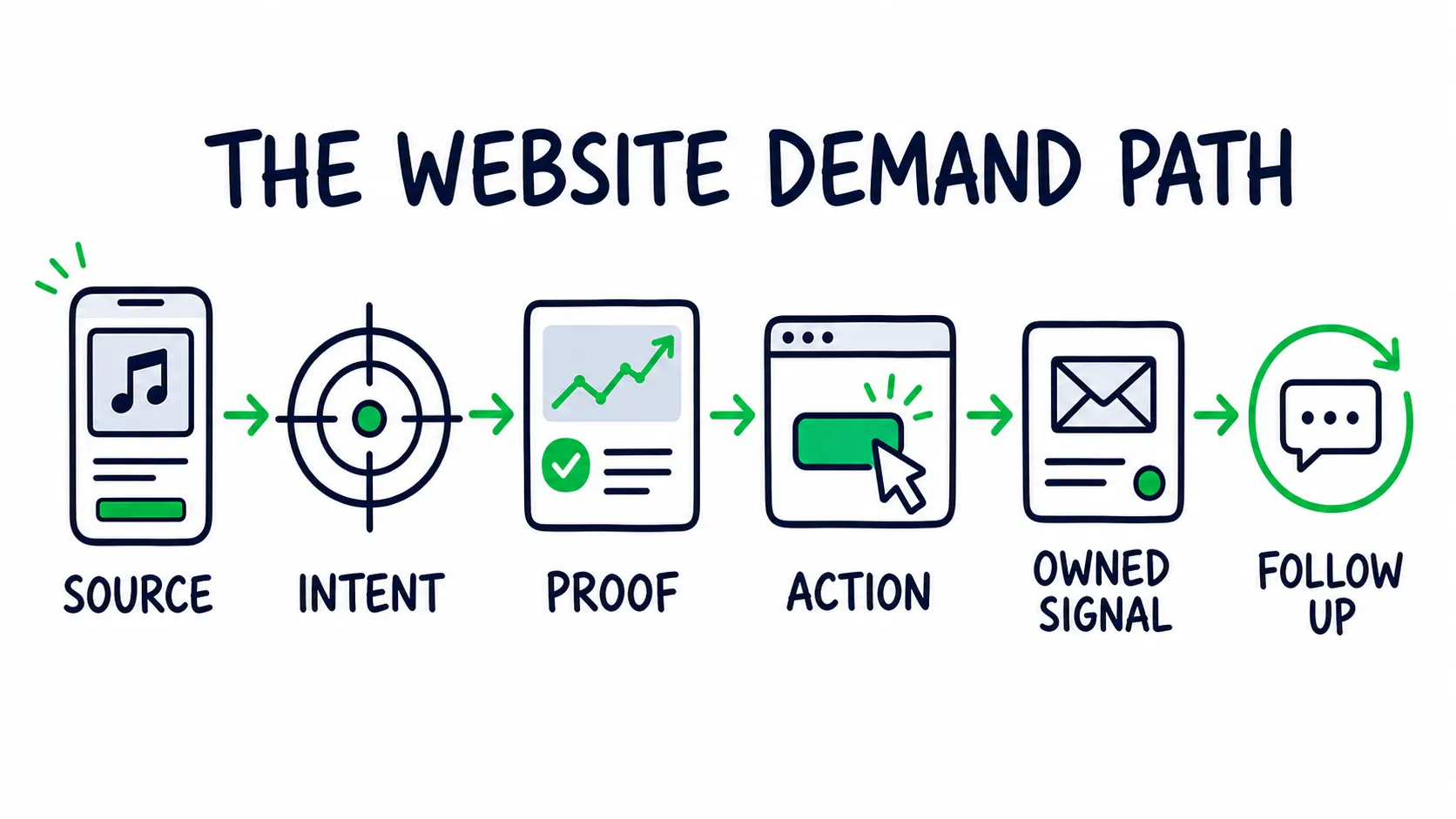
A strong website keeps the full demand path connected, from the first click to the next follow up.
Map Traffic Before You Plan Pages
Start with the traffic you already have or plan to earn.
| Source | Likely intent | Best landing page | Main action to measure |
|---|---|---|---|
| Short video clip | Hear the full song or understand the moment | Matching release page | Play or outbound stream click |
| Artist profile link | Go deeper after listening | Current music or fan hub page | Email signup, ticket click, or catalog visit |
| Paid release campaign | Complete one campaign action | Dedicated release landing page | Stream, watch, presave, or signup |
| Fan email | Get the promised update or offer | Exact show, merch, or release page | Ticket, merch, or content action |
| Google search for the artist | Confirm identity and see what is current | Homepage | Current campaign action |
| Booker, press, or partner email | Check fit and reduce risk | Direct EPK or opportunity page | Contact or asset download |
Open your analytics. List the top five sources from the last useful campaign window.
For each source, write down:
- The page it reaches
- The promise made before the click
- The main action on the page
- The event that records that action
- The person who checks the result
If a Spotify campaign promises one specific song, open on that song. If a Spotify campaign rotates several songs to find the best first track for new listeners, send it to a page that lets the listener pick. If a YouTube ad campaign runs on a live clip, keep that visual and angle on the landing page. This message match cuts the thinking a visitor has to do after the click.
Your homepage is the default route for broad or branded interest. Send campaign traffic to the page that matches its promise.Use the Homepage as a Branded Search Router
Most homepage visitors arrive with broad interest. They searched the artist name, clicked a profile link, or followed a general mention.
They are asking:
- Is this the right artist?
- What matters right now?
- Where should I go next?
The homepage should answer those questions without trying to finish every job on one screen.
Give the First Screen Four Jobs
The first screen needs four parts:
- Identity: the artist name and a current image
- Context: one line about the sound, release, tour, or story that matters now
- Action: the main move you want from broad traffic
- Proof: one small signal that makes the action feel earned
For example:
New single “Glass Houses” out now. Played twice on BBC Radio 1. Listen and join the release notes.
That line gives the visitor a current story, outside proof, and a next move. “Enter the experience” does none of that.
The rest of the homepage should route people by intent:
| Block | Job | What to avoid |
|---|---|---|
| Current campaign | Move broad interest into the main release, show, or offer | Several campaigns fighting for the same spot |
| Fast proof | Show that real people care | A row of logos with no source or context |
| Shows or project | Help active fans move now | Expired dates or vague “coming soon” copy |
| Short story | Place the artist in a clear lane | A full life story before the music |
| Fan capture | Keep the relationship | A generic “subscribe for updates” box |
| Industry route | Give professionals a direct path | Making them search the footer for an email |
Keep deeper music, booking, press, and campaign work on their own pages. The homepage should point to them, not copy them.
Give Each Artist Website Page One Career Job
You do not need more pages. Each important search or visitor need should have one best page.
| Page | Intent it owns | Career job | Main outcome |
|---|---|---|---|
| Homepage | Artist name and broad interest | Confirm identity and route current demand | Current campaign click |
| Release page | Song, EP, album, or campaign interest | Turn one project into plays, context, and fan capture | Play, platform click, or signup |
| Shows page | Tour, city, venue, and ticket interest | Convert active demand and show live history | Ticket click |
| About page | Artist bio, sound, and background | Give search, press, and fans one official story | Deeper music or EPK visit |
| EPK page | Booking, press, sync, or partner review | Reduce the risk behind a work decision | Contact or asset download |
| Contact page | Direct professional intent | Route each inquiry to the right owner | Qualified message |
| Store or fan page | Direct support intent | Turn demand into revenue or a closer fan relationship | Purchase or member signup |
This structure also protects against cannibalization. The homepage should not compete with the about page for the full artist bio. A release page should not copy a broad music page. The EPK should not become a second public homepage.
If two pages target the same query, compare their story and action. Pick the stronger page. Merge or redirect the weaker one.
Build Campaign Pages Around Message Match
A campaign page should repeat the promise that caused the click.If the clip promises a raw live moment, open on that moment. Do not swap it for polished art and a long bio. If the ad promises the new single, do not open on a list of twelve releases.
Use this order:
- Repeat the promise: same song, image, line, or angle as the source
- Deliver the action: play, watch, presave, buy, or get tickets
- Reduce doubt: one relevant proof point
- Give context: the short story, credit, lyric, or live detail that adds meaning
- Keep the relationship: a signup tied to the project or city
- Offer a fallback: normal links when an embed, app, or login fails
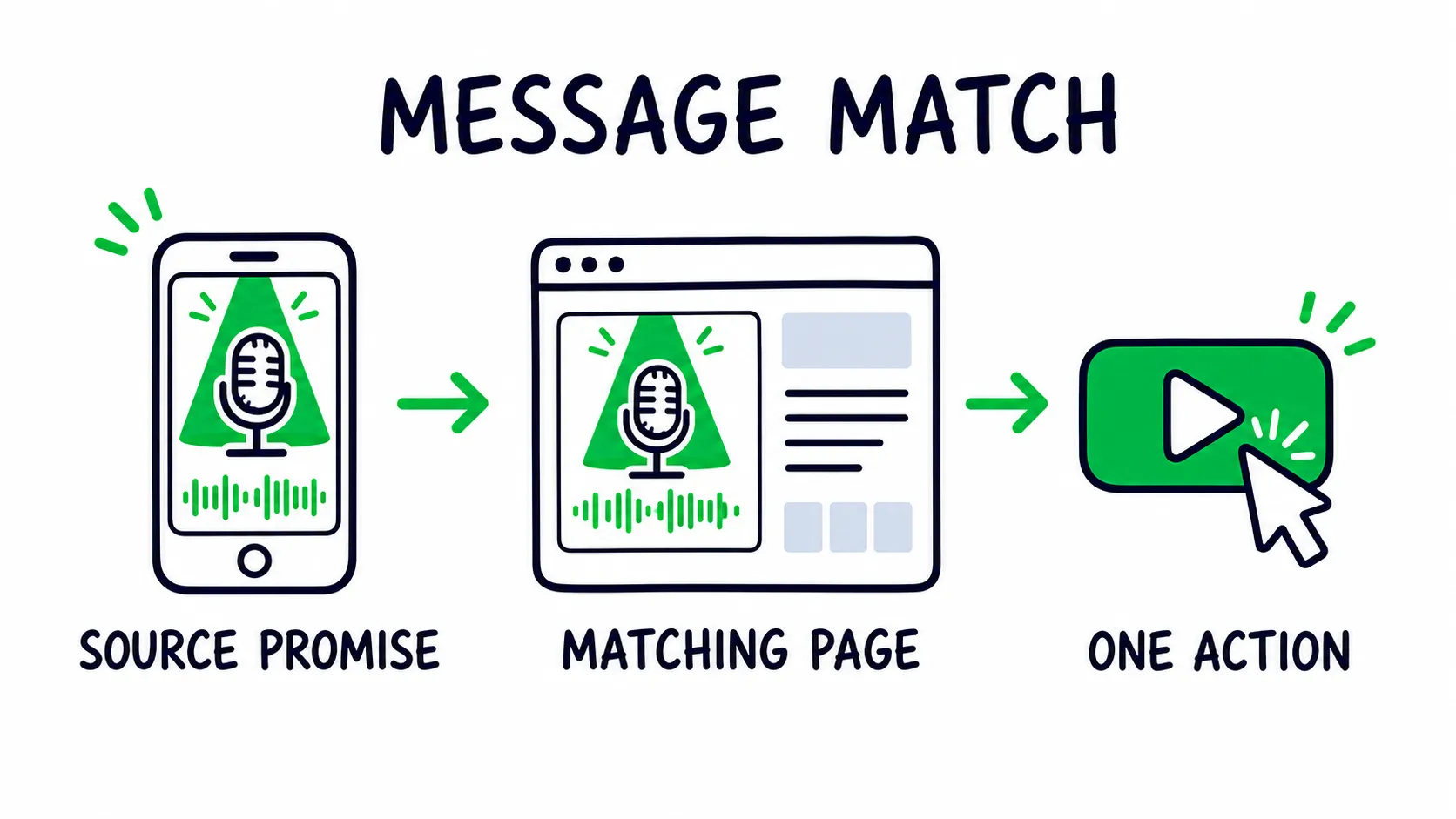
The visual promise should stay recognizable from the source through the page and its main action.
The first media choice depends on the source. Traffic from a lyric clip may need the full lyric video, and traffic from a live ad may need the full performance. A cold listener may need the easiest entry song, while an existing fan may want the new release first.
The lyric video versus music video guide can help choose the asset. If YouTube is part of the path, the YouTube monetization guide for musicians covers rights and channel setup.
Keep autoplay off. Use a still preview for heavy video. Place a normal link below each player. Test every action while logged out and on mobile data.
Build the release page on an evergreen URL. When the active push ends, keep the credits, story, links, and useful search value. Remove expired campaign language instead of deleting the whole page.
Check the campaign math before building a large page system around an untested offer. The music promotion budget calculator can help.
Turn Traction Into Decision Proof
Show the proof that lowers risk for the person reading, not every good number you have.
A useful proof block has five parts:
- Claim: what you want the reader to believe
- Evidence: the number, clip, sale, quote, or result
- Context: market, room, source, campaign, or audience
- Time: when it happened and over what period
- Relevance: why it matters to this decision
Context turns weak claims into proof a buyer can use:
| Weak proof | Proof a buyer can use | Why the second version works |
|---|---|---|
| “250,000 streams” | “250,000 streams across three releases, with repeat growth in Atlanta and Charlotte” | Shows a pattern and market, not one large total |
| “Sold out shows” | “Sold 180 of 200 tickets at the same Atlanta room on two separate dates” | Gives the booker room size, city, and repeat demand |
| Press logo strip | One useful quote with the article link and date | Lets the reader check the source and angle |
| “50,000 followers” | Growth source plus replies, saves, clicks, or buyers from the same audience | Connects reach to behavior |
| “Great live act” | One clean live clip showing the room, crowd, and full performance | Lets the buyer judge without trusting the claim |
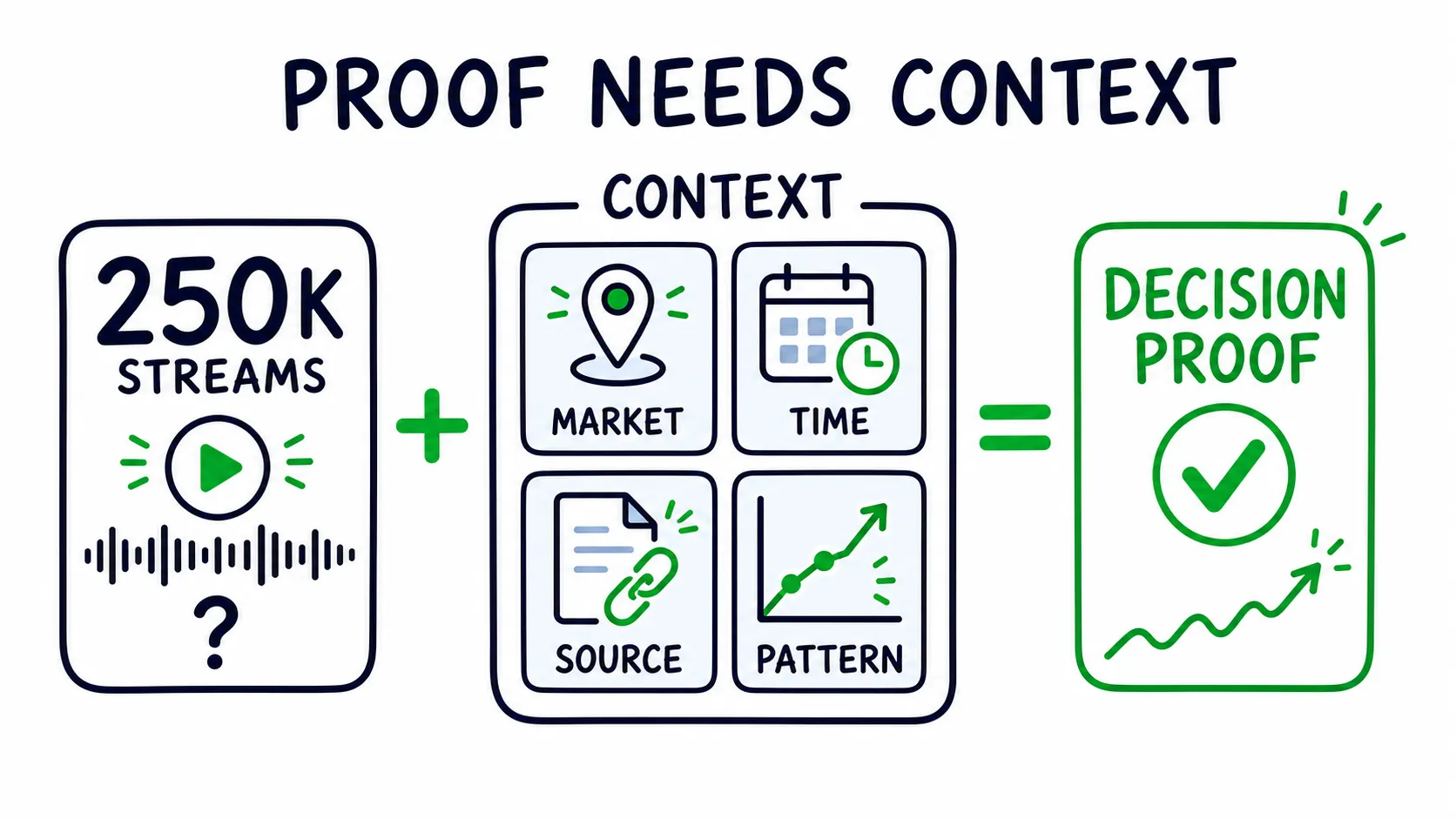
A headline metric becomes useful only when market, time, source, and repeat pattern make it verifiable and relevant.
Do not use all five examples on every page. A fan does not need your booking case. A writer does not need a dashboard tour. A venue buyer usually cares more about local draw and live delivery than global streams.
If Spotify data supports a claim, review the source and quality first. The free Spotify audit can help spot weak signals. The Spotify for Artists guide explains the platform data behind the headline number.
Date active metrics. Keep the source link. Remove private fan details. A raw dashboard screenshot with no date range or explanation is not proof.
Keep the EPK Focused on the Decision
The public website serves many jobs. The EPK should serve one work decision at a time.
For booking, the reader needs three kinds of proof:
| Proof group | What belongs there | Question it answers |
|---|---|---|
| Performance proof | Best live clip, recent bills, room fit, set length | Can this artist deliver live? |
| Demand proof | Local ticket history, city listeners, repeat buyers, useful press | Is there a reason to book them here? |
| Operating proof | Direct contact, stage needs, approved photos, fast files | Will this be easy to move forward? |
Put the strongest answer first. A live clip and market result may make the booking case faster than a long origin story.
Use a direct URL. Keep the page free from fan popups and store offers. Make approved files easy to preview and download. Show a direct contact even when a form is available.
Apple Music for Artists explains why an electronic press kit matters. Our EPK for musicians guide covers proof order, reader versions, files, and outreach.
Capture Fan Context, Not Just an Email
A list becomes more useful when you know what brought the fan in.
Do not ask the fan to fill out a survey. Save the source, campaign, landing page, and offer in the background when your email tool allows it.
Match the signup promise to the page:
| Page context | Better reason to join | Context worth saving |
|---|---|---|
| Release page | Demo, alternate version, lyrics note, or next release update | Song and campaign |
| Show page | First access to tickets in that city | City or region |
| Store page | Early access to the next drop | Product or collection |
| Behind the scenes page | Studio notes or private clips | Content theme |
| Homepage | A clear artist letter with a stated schedule | Broad or branded source |
The welcome email should deliver the promise right away and give the fan one useful next move, like hearing the full song, saving a show date, or replying with their city.
Check these:
- The form explains what arrives and how often.
- The source and campaign pass into the email record.
- The success message confirms what happens next.
- The first email arrives and its links work.
- The artist or team can export the list.
- Access is limited to people who need it.
- Unsubscribing is simple.
If you email fans in the United States, read the FTC’s CAN SPAM compliance guide. Check the rules that apply to fans in other places.
Keep the path to tickets, merch, music, memberships, or support short. The guide to making money with your music can help you match the offer to current demand.
Measure Actions That Change a Decision
A pageview tells you a page opened. The actions below tell you whether the site helped.Build a small event plan around actions the team will use:
| Fan or industry action | Event to record | Decision it supports |
|---|---|---|
| Starts the featured song or video | music_play or video_start |
Which source and page create real interest? |
| Clicks to Spotify, Apple Music, YouTube, or Bandcamp | Outbound click |
Which platform and release path win the next step? |
| Joins the email list | newsletter_signup |
Which song, city, offer, or source grows owned demand? |
| Sends a booking or press inquiry | generate_lead |
Which proof page creates qualified interest? |
| Clicks a ticket link | ticket_click |
Which city, source, or page moves live demand? |
| Buys from the site | purchase |
Which campaign creates revenue? |
| Downloads a press photo or file | file_download |
Which industry assets are being used? |
Google Analytics can measure outbound clicks when enhanced measurement is set up. It also defines events such as generate_lead and purchase in its recommended events.
The custom names above are examples. Keep the final names short, lowercase, and stable. Do not rename the same action every campaign.
Use One UTM Naming Rule
UTM tags keep campaign sources from collapsing into vague traffic buckets.
Use at least:
utm_sourcefor the platform or partnerutm_mediumfor the channel typeutm_campaignfor the release or campaignutm_contentfor the exact clip, ad, email link, or button
Example:
?utm_source=instagram&utm_medium=organic_social&utm_campaign=glass_houses&utm_content=live_clip_03Google’s official campaign URL guidance explains the fields and warns that naming is case sensitive.
Set one naming rule before launch. Use lowercase. Keep the same spelling across ads, emails, creator links, QR codes, and partner posts.
For example, instagram, Instagram, and ig can split one source into three rows. Never put a fan’s name, email, or other private detail in a UTM tag.
Test redirects too. A short link that drops the UTM values breaks the chain before the visit reaches analytics.
Read the Pattern, Not One Number
Traffic intent changes the conversion rate, so a universal benchmark for artist websites tells you little.
Compare sources that had the same goal:
| Pattern | Likely meaning | Next check |
|---|---|---|
| High visits, low action rate | The promise and page may not match | Source creative, first screen, button, load time |
| Low visits, high action rate | The page may work, but reach is weak | Distribution, budget, partner volume |
| High stream clicks, weak signup | The music path works, but the owned offer is weak or too early | Offer, placement, welcome promise |
| EPK visits, few inquiries | Outreach fit or proof order may be weak | Reader type, first proof, local relevance |
| One source wins across actions | That source may deserve more budget or content | Traffic quality, repeat result, cost |
Use action rate for the page, then look at the quality after the click. Cheap traffic that never saves, joins, buys, or replies is not a win.
Own Branded Search Without Creating Cannibalization
For a growing artist, branded search is a trust check. Fans, bookers, writers, and partners search the name to confirm the official story. Your site should give search engines one clear source for the artist, releases, shows, and approved facts.
Give each page its own search job:
- Homepage: artist name and current official activity
- About page: artist bio, genre, city, and core story
- Release page: exact song, EP, or album title
- Shows page: tour, city, venue, and ticket details
- EPK page: artist name plus press kit or booking intent
Use the artist name, spelling, image, links, and core facts the same way across the site and official profiles.
Google’s SEO Starter Guide covers clear titles, crawlable links, useful pages, and site structure.
Then use the Search Console Performance report to check:
- Which artist name searches create impressions but few clicks
- Which page Google shows for each branded query
- Whether two pages appear for the same intent
- Which release, city, image, or video searches are growing
- Which page titles need a clearer promise
If two pages keep appearing for the same query, choose the page that should own it. Improve that page. Link to it clearly, then merge or redirect the weaker copy.
Do not create thin pages for every genre or city to catch keywords. A city page earns its place with show history, local proof, photos, or useful fan details.
If the site supports structured data, use facts that also appear on the page. Useful Schema.org types may include MusicGroup, MusicAlbum, MusicRecording, and Event. A solo artist can also use MusicGroup. Use sameAs links to connect official profiles when the setup supports it.
Markup can explain visible facts to a search engine. It cannot rescue thin content or invented proof.
Protect Conversion With Speed and Accessibility
When a visitor is one tap away from leaving, a slow or hard-to-use page costs you the action.
Test the homepage, active campaign page, show page, and EPK with PageSpeed Insights.
Google’s Core Web Vitals guidance gives three useful goals:
- Main content appears within 2.5 seconds.
- The page reacts within 200 milliseconds.
- Visual movement stays below 0.1.
Use a simple media budget:
- One important image or media preview near the top
- Smaller image files for smaller screens
- Still previews before heavy video players
- Players and tracking loaded only on pages that use them
- No autoplay audio
- A normal link when an embed fails
Then test the full path with mobile data, not only office WiFi.
Accessibility protects the same path:
- Useful images have useful alternative text.
- Decorative images use empty alternative text.
- Form fields have visible labels.
- Buttons describe the action.
- Text contrast stays strong.
- Menus and forms work with a keyboard.
- Videos carry captions when words matter.
The W3C alternative text decision tree helps decide what each image needs.
Finish by using a different email address to send every form. Check the inbox, success message, reply address, spam folder, and phone keyboard.
Remove Conversion Leaks and Signal Debt
Every stale claim, broken path, and duplicate page makes the artist look less current than the real career.
Signal debt builds when the site keeps old work but nobody owns the cleanup.Keep and Strengthen
- One named action for each traffic source
- Proof with a source, date range, and market
- Evergreen release pages with current links
- Tracked paths to music, tickets, fan capture, and contact
- One owner for every form and professional inquiry
Remove or Repair
- Generic campaign traffic sent to the homepage
- Large totals with no source or context
- Duplicate pages competing for the same search intent
- Forms that enter an inbox nobody checks
- Old campaigns still presented as current
Also remove fake urgency, autoplay media, and unverified press logos. Repair heavy embeds with no fallback. Close empty store or fan pages.
Run the Website Like a Career Asset
The site runs on two clocks. The campaign clock changes what you want people to do. The truth clock changes what is accurate.
A release page may stay useful for years, while the “out now” banner expires fast. A press quote may stay useful, while the listener total beside it needs a date range.
| Trigger | Change | Owner must verify |
|---|---|---|
| Campaign starts | Landing promise, main action, UTM naming, event tracking | Source, page, action, and report connect |
| New release | Homepage, release page, music links, bio, EPK facts | Every play and platform link works logged out |
| New show | City, venue, ticket link, age rule, status | Phone ticket path and tracking work |
| Show ends | Move the date into live history or archive it | No expired ticket button remains |
| New proof | Replace weaker proof instead of stacking more | Claim, source, market, and date match |
| Team changes | Contact routes, account roles, recovery access | The right person gets each test message |
| Quiet month | Speed, broken links, forms, data, backups | Each issue has a name and due date |
Assign four owners, even if one person holds all four roles:
- Content owner: current story, releases, shows, proof, files
- Conversion owner: main actions, forms, email offers, campaign pages
- Data owner: events, UTM rules, reports, privacy checks
- Access owner: domain, billing, accounts, recovery, backups
Store access in a shared password manager controlled by the artist or approved team.
Add page and tracking tasks to the music release checklist so the site update ships with the rollout instead of trailing it.
Prioritize by Career Risk, Not Design Taste
Do not turn a failed audit into an automatic redesign.
Fix the issue that can lose money, trust, data, or an opportunity first.
| Priority | Risk | Examples | Validation |
|---|---|---|---|
| 1 | Revenue or opportunity loss | Dead ticket link, failed booking form, wrong contact, broken checkout | Complete the action and confirm receipt |
| 2 | Bad or missing data | No campaign tags, lost redirects, untracked outbound clicks | Trace one test visit from source to report |
| 3 | Message mismatch | Ad, email, or clip lands on a page with a different promise | Compare source and first screen side by side |
| 4 | Weak decision proof | Global totals for local booking, logos with no source, stale metrics | Add context, date, source, and reader fit |
| 5 | Experience and polish | Slow media, poor contrast, clutter, weak spacing | Test on a real phone and slower connection |
Key takeaway
Music Website Checklist FAQ
Do musicians still need a website if they already use Linktree and social media?
Yes. Keep Linktree if it routes profile traffic well. It solves a narrow job: sending one click toward several outside platforms.
Your website handles the jobs that need more context, proof, ownership, and measurement: release pages, local ticket paths, email capture, booking proof, press files, search visibility, and campaign data by source.
Use both. The link page routes profile clicks, and the website converts visitors and keeps the signal.
Is a musician website the same as an EPK?
No. The website serves fans and several kinds of industry visitors. An EPK is one focused page for a work decision, such as booking a show or covering a release.
Build the EPK inside the website and give it a short direct URL. Remove fan offers that do not help the work decision. The EPK guide covers the proof and version system.
Should an EPK be a webpage or a PDF?
Use a webpage as the main version. Music and video work there, links stay live, and one update fixes the copy for everyone.
Keep a short PDF for people who ask for a file or need it offline. Add a version date and the live EPK link so an old attachment still points to current facts.
What do bookers actually look for on an artist website?
Bookers judge fit, live delivery, local demand, and operating risk. Show a strong live clip, the right past bills, room or market proof, current music, and a direct contact. If you share listener data, tie it to the buyer’s city and a clear date range. A large global total does not prove local ticket demand.
What should I show if I do not have strong press coverage yet?
Use behavior and patterns instead of trying to imitate press authority: repeat ticket buyers, a growing city, direct fan replies, strong save and follow behavior, or a useful support slot. A live clip with real crowd response or a local quote can also work.
Label the source and time window. Small, relevant proof is stronger than a large number that does not answer the reader’s question.
Make the Website Earn Its Place
Use this music website checklist as a test of the whole system. For every important path, ask:
- What brought this person here?
- What decision are they trying to make?
- What proof lowers the risk?
- What action should happen next?
- What signal will the team keep?
When those answers connect, the website feeds the artist’s growth, booking, fan ownership, and revenue. Start with any priority 1 issue from the table above.