
Spotify Countdown Page: How to Plan the Pre-Save Window
A Spotify Countdown Page is a demand multiplier with an audience gate in front of it.
It takes listeners who already care and puts your release in their library on day one, with nothing for them to remember and no link to open later. That conversion is the reason to build one. The rest of the feature is logistics.
Spotify built the page to close a gap it named at launch: artists were teasing releases on social apps while the listening happened somewhere else. The announcement described the page as moving the hype to where streams happen, which is a job a link in your bio cannot do.
The Short Answer
You need 3,000 monthly active listeners. You also need a new album or EP delivered through DDEX, plus Admin or Editor access in Spotify for Artists.
Publishing costs nothing, so the gate here is audience rather than budget. The page collects pre-saves, previews the tracklist, and hosts short vertical clips and tagged merch. On release day, every pre-save turns into a push notification and an automatic library add.
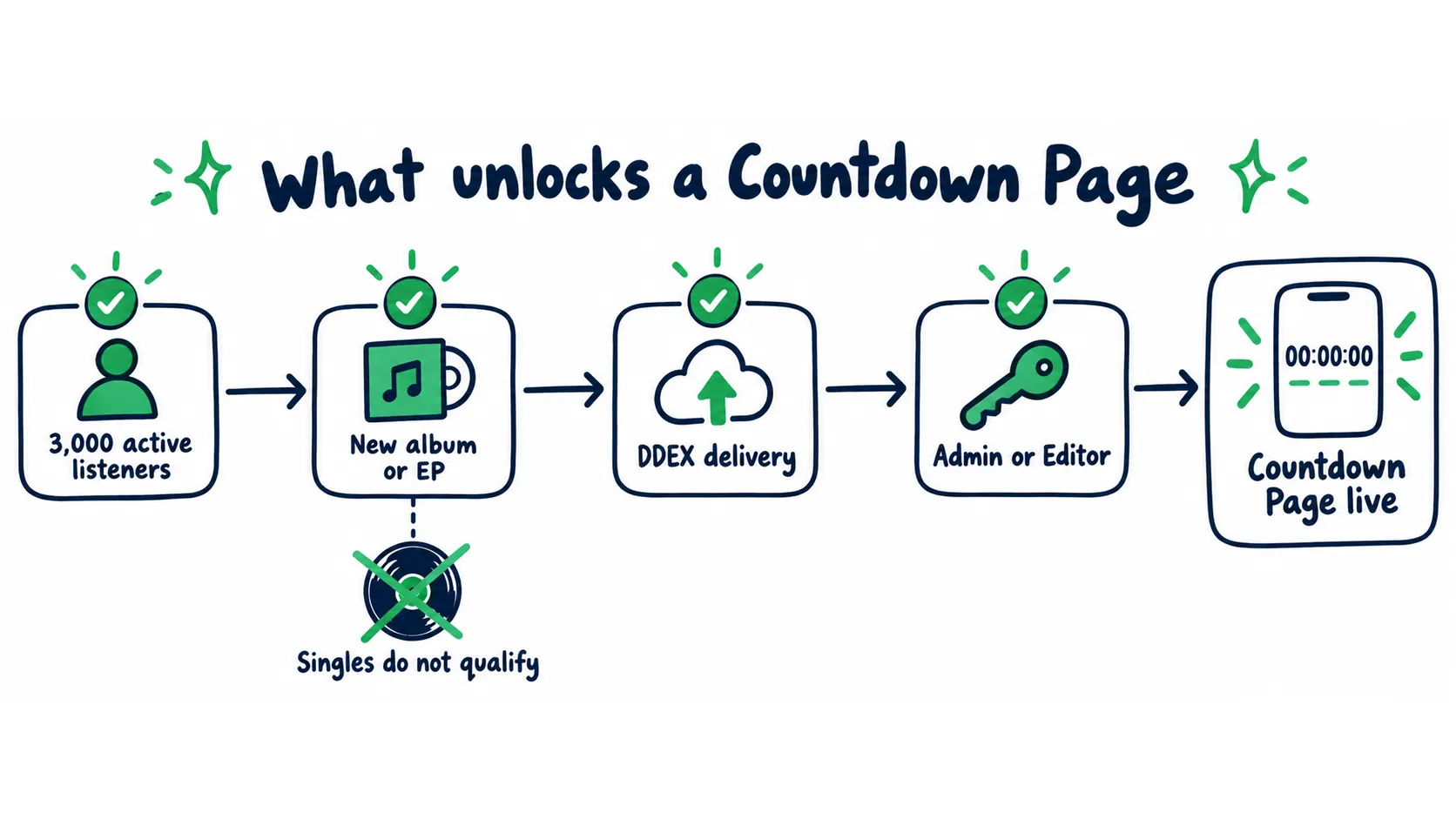
All four checkpoints have to pass. Singles stop at the second one.
What You’ll Learn
- What a pre-save is worth in week one streams, so you can price the effort
- How to read the 3,000 listener gate and where it belongs in your release calendar
- The EP trade-off when your catalog plan runs on singles
- The credit order rule that decides who owns the asset in a collaboration
- The deadline chain that starts at delivery instead of release day
- How to measure page conversion and what to capture before the page comes down
- What to run instead when you sit below the gate
What a Countdown Page Does to Week One
A pre-save gives you three things at once:
- A save sitting in the listener’s library
- A push notification when the release goes live
- A song waiting for them when they open the app on release day
Release week is when Spotify forms its first read on a song. It is also the week your warm audience either shows up or does not. The page gives you a floor of day one plays from people who opted in before release day.
Spotify’s Countdown Pages overview publishes a few numbers that make this easier to plan:
| Published number | What it gives you |
|---|---|
| About 60% of listeners who pre-save an album stream it during week one | Your pre-save count works as a rough forecast of week one listeners |
| Nearly 1 in 7 pre-savers become super listeners by the end of release week | The page pulls your most active segment, not casual traffic |
| 6x more pre-saves than an off platform buy link on one label team’s roster | Fans convert better inside the app where they already listen |
Those ratios let you price a campaign before you spend anything. Say a push brings 4,000 listeners to the page. At a 4% conversion rate, that is 160 pre-saves. Spotify’s week one rate turns those into about 96 pre-savers playing it in week one, plus roughly 23 listeners headed for your super listener segment. The math only holds when the traffic fits your catalog.
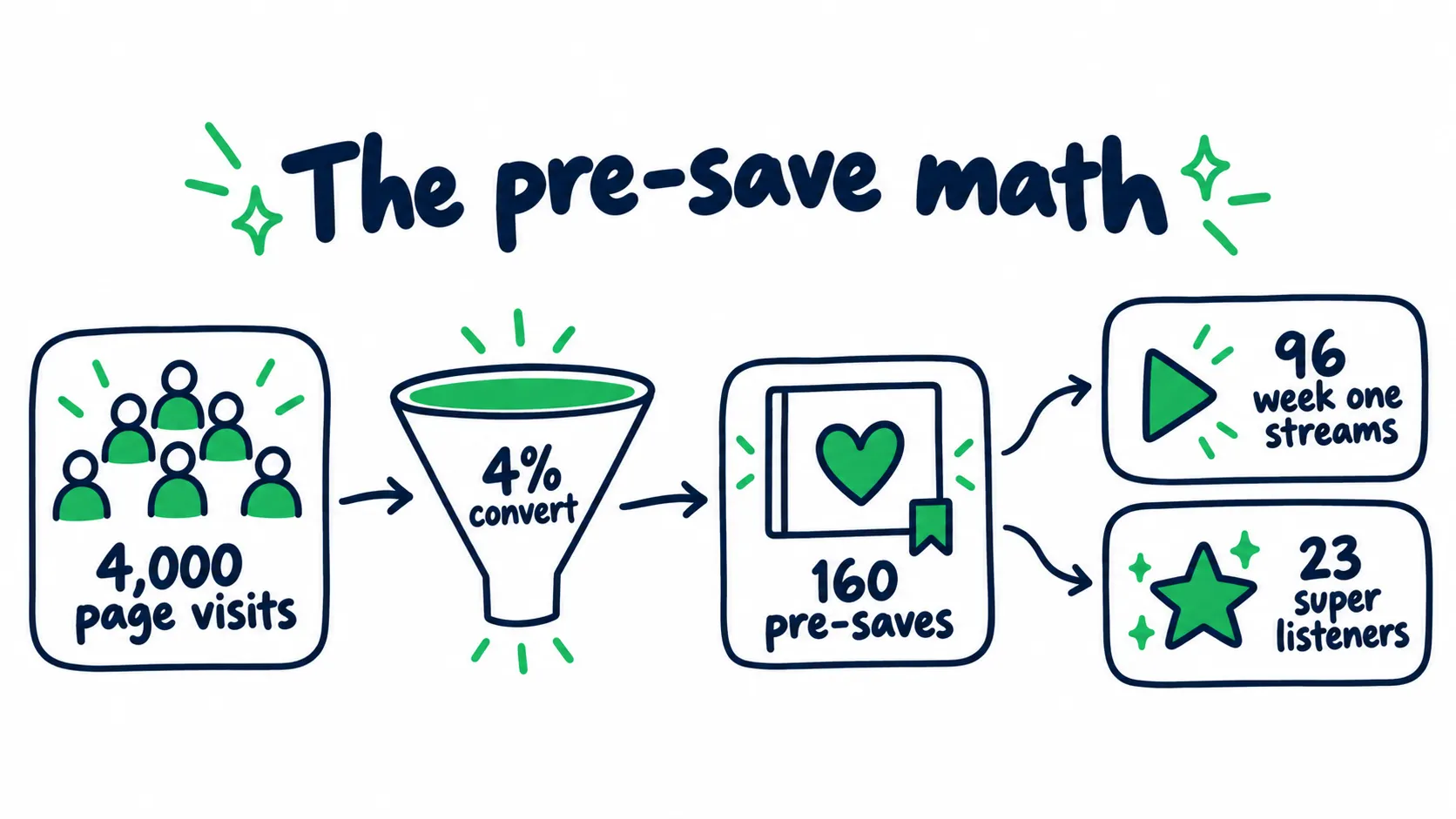
Spotify’s ratios running through a 4% conversion rate. Swap in your own numbers after your first release with the page live.
Key takeaway
The 3,000 Listener Gate Is a Demand Check
Spotify sets the requirement at 3,000 monthly active listeners. Find it under Audience, then Segments, then monthly active listeners.
Two details catch people out.
Monthly active listeners is a different number from your public monthly listeners, with its own window and calculation. Our breakdown of Spotify monthly listeners covers that gap. Spotify documents the segments in its guide to listener and follower stats.
The number has also moved. Plenty of guides still repeat the old 5,000 requirement, while Spotify’s live page says 3,000. Anchor your calendar to the official Countdown Pages requirements instead of third party articles. A planning mistake here wastes asset work you could have finished in advance.
The gate is a demand check on your last 28 days of listening. The page works by notifying your warm base, and under the line, notifications reach too few people to move release week.
Read your position against it:
| Your position | What the gate is telling you |
|---|---|
| 2,000 to 3,000 active listeners | Build the base before the album cycle starts, then plan the release around the page |
| Large overall audience, under 3,000 active | The constraint is retention. Look at repeat listening and saves |
| Comfortably above 3,000 active | The page is available, and your constraint moves to assets and traffic |
The EP Trade-Off
Only new, original albums and EPs qualify. Singles are excluded. So are deluxe editions, anniversary editions, reissues, remasters, and compilations. Split rights releases get limited support.
If your plan runs on singles, you have to decide whether three or four finished songs are worth bundling into an EP to unlock the page.
Ship the EP
- Your active listener count can clear the gate this cycle
- You have three or four finished songs that belong together
- You can carry a six week content window without stalling
- The story lands harder as one push than four small ones
Ship the single
- The songs are separate ideas for separate audiences
- You sit far below the gate, so the EP does not unlock anything
- Your cadence matters more than any single campaign
- Extra masters would push the release date back
The costs are two or three more masters, more splits to clear, more content to produce, and a longer runway before anything is out. The benefit depends on your base.
A page that converts 200 pre-saves is worth building an EP around. A page that converts 12 is not.If the EP gathers singles that are already out, ask your distributor to confirm it is being delivered as a new release. Spotify says the page supports waterfall releases, where singles land over time.
If the songs are not a body of work, run the single instead. Use it as the lead into one. Our lead single guide covers how to sequence that, and the pre release strategy maps the weeks around it.
The Credit Order Rule in Collaborations
If a release has more than one main artist, only the first named main artist can create the page, and it only appears on that artist’s profile. That makes the credit order a business term hiding inside a technical rule.
In a collaboration, one party gets a marketing asset the other cannot build, plus the data that comes with it.Settle it before delivery:
- Fix the artist order in writing
- Name who runs the page and who reads the numbers
- If you sit second, decide what you trade for it
If you sit second, you can still run a pre-save link with email capture, set an Artist Pick on your own profile, and give the track a Spotify Canvas. What you cannot claim is the page data or the notification list.
Our guide to music collaboration covers the other decisions worth locking early.
The Deadline Chain Starts at Delivery
The option to build the page appears only after your distributor delivers the release, and it can take up to 72 hours to show up.
The chain:
- Your label or distributor delivers the release through DDEX, the industry’s standard delivery format.
- The option to create a page shows up in Spotify for Artists within 72 hours of delivery.
- You publish. Spotify’s data says pages live at least 7 days before release see nearly double the pre-saves.
- Release day arrives, and the page comes down with the clips.
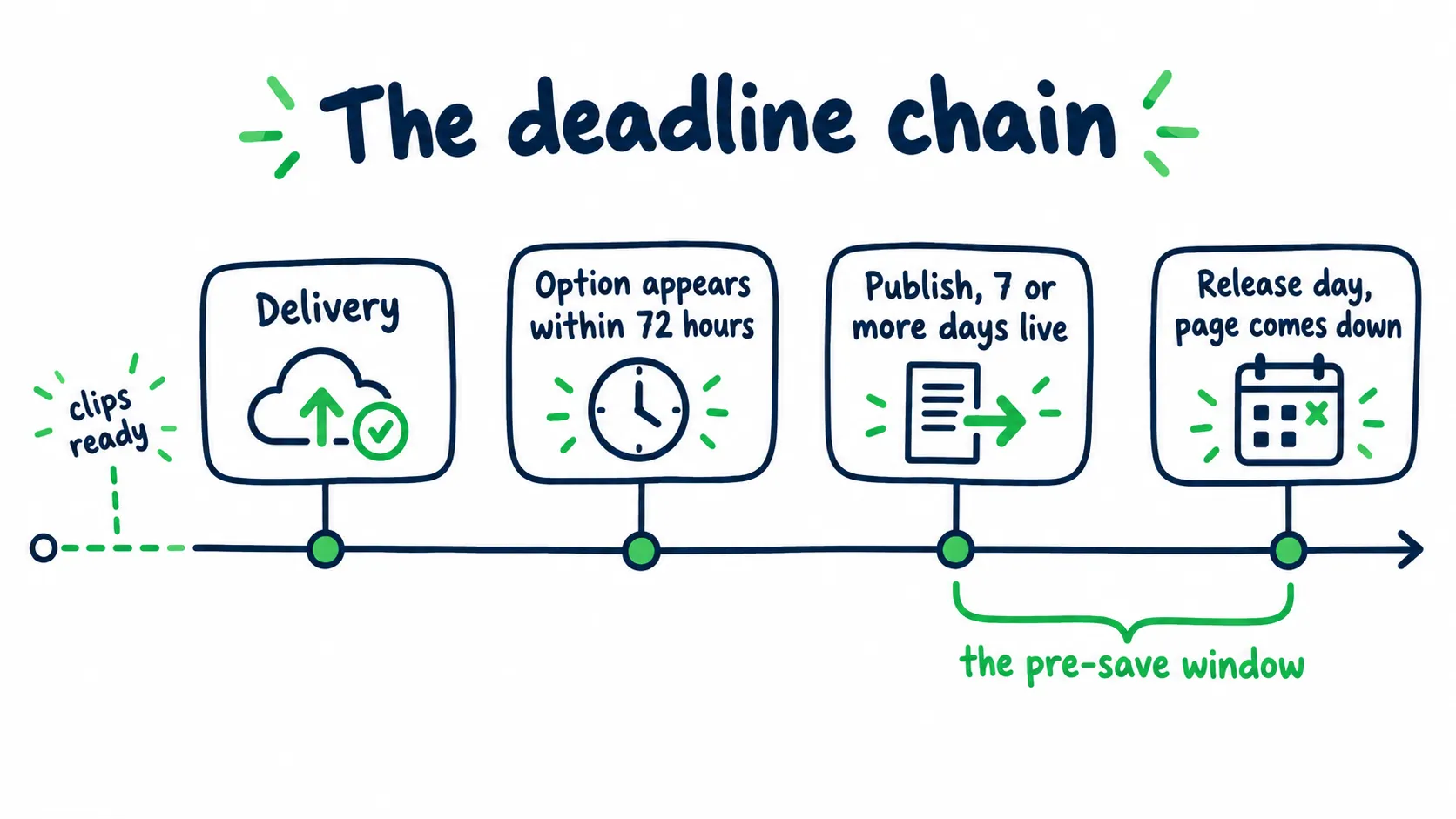
The clips are due before delivery. The pre-save window is everything between publish and release day.
Plan it as a deadline problem. Your vertical clips have to be finished before delivery, because the option can appear within a day or take the full three.
For a team, the ownership map looks like this:
| Timing | Owner | What has to be done |
|---|---|---|
| Six weeks out | Artist and producer | Masters, metadata, artist order, page decision |
| Four to five weeks out | Artist and content lead | Vertical clips cut from content you already make |
| Delivery window | Manager or distributor contact | DDEX delivery confirmed, countdown eligibility confirmed in writing |
| Delivery plus 72 hours | Whoever holds Admin or Editor access | Publish the day the option appears, set Artist Pick |
| Final 7 or more days | Marketing | Traffic pushed to the page while it is live |
The clicks are quick. Go to Music, then Upcoming. Select the release, click Get started, add clips, tag merch, publish. Access sits with Admins and Editors. Confirm yours before the week you need it. Our Spotify for Artists guide covers the access levels. The music release checklist covers everything else that has to land before the date.
If You Found This Late
The page only needs to be live before release. A full six week runway is optional.
| Time to release | What still works |
|---|---|
| 7 days or more | Publish now and push traffic. This is the window Spotify’s data favors |
| 3 to 6 days | Publish anyway with one or two clips, skip merch, and put the budget into traffic |
| Under 3 days, or already out | The page is gone for this cycle. Screenshot what exists and build the next album or EP around it |
Where the Page Gets Seen, and How to Compete for the Space
Once published, the page appears on your artist profile, in Search, on Home, in the Now Playing view, and in the Upcoming Releases hub.
The hub is the competitive surface. It carries two shelves:
| Shelf | How it works |
|---|---|
| For You | Up to 10 personalized pages, built from listening history and ordered by release date |
| Top 10 Countdowns | The 10 most pre-saved pages globally, refreshed daily at 12 PM UTC |
Top 10 Countdowns ranks by volume. That favors large activated bases, so a mid-size artist rarely lands there by accident. Spotify also highlights the top 10 every Wednesday across its channels. Artists on the list get a share card by email.
If you are within reach of that list, plan your push around the Wednesday highlight. A push that peaks on Tuesday or Wednesday gives you the best shot at the weekly spot, while the same budget spread flat is less likely to land. That reading comes from how the shelves refresh, so test it on your own release rather than treating it as a rule.
For most artists, the For You shelf is the realistic target, and it is a better one than it looks. Because the shelf is personalized, the listeners who see your page are the ones whose history already points at your sound. That is a closer match than a generic impression, and it is why page traffic behaves differently from playlist traffic.
Assets: Clips, Merch, and the Profile Slot
Countdown clips are short vertical videos. Spotify’s countdown videos guide sets the format:
| Requirement | Rule |
|---|---|
| Shape | Vertical |
| Audio | Required |
| Length | Longer than 3 seconds, shorter than 30 seconds |
| Resolution | At least 1280 x 720 pixels |
| Where they play | The Spotify mobile app, in more than 70 markets |
| After release | Removed with the page |
Two operational details matter more than the specs. First, the clips come down with the page on release day. Keep your masters elsewhere and treat the page as a distribution surface.
Second, you do not need to shoot anything new. Vertical clips from the content you already produce work here. Pull the three that carry the story of the song. Keep each one under 30 seconds.
Merch runs through Shopify. Products publish to a Spotify sales channel. The store allows up to 250 items, and a new item can take up to an hour to appear. Spotify’s guide to publishing merch from Shopify covers the setup. If your store is not live, skip merch this cycle.
Artist Pick is the profile slot that can carry the page. It sits at the top of your profile and stays live for up to 180 days. The image needs to be at least 690 x 500 pixels. Our Artist Pick guide covers the flow. Spotify’s official page lists the specs.
Measurement: Capture It Before the Page Comes Down
Spotify gives you two different sets of numbers.
| Stage | What you can see |
|---|---|
| While the page is live | Total listeners who pre-saved, plus unique visitors to the page |
| After release | Total pre-saves, impressions, and the share of pre-savers who streamed in the first 7 days |
The number worth building a habit around is your own conversion rate: pre-saves divided by unique visitors. Track it release over release. A drop means the traffic got weaker or the assets stopped carrying the story. A rise means your audience fit improved.
Two limits are worth planning around.
The page also hands you no geography, no traffic sources, and no emails. An off platform pre-save link gives you all three, at the cost of converting worse than the page does inside the app.
Key takeaway
After release, compare the share of pre-savers who streamed in week one against your overall release engagement number. If pre-savers convert at a higher rate than your general audience, the page found warmer listeners than your other traffic, and that is a result worth repeating. Spotify documents the metric in its guide to understanding release engagement.
If your last release ran without a page, that is the cleanest baseline you will get. Compare week one streams and super listener conversion to see what the page added.
What Actually Moves the Active Listener Number
The gate counts listeners inside a 28 day window. That one detail rules out most of what artists spend money on.
A spike of one time plays will not hold the number up, because listeners who never return drop out as the window slides forward. Only repeat behavior keeps the count where it is, so the goal is listeners who come back rather than more streams.
Two kinds of traffic can look identical on release day and behave nothing alike a month later.
| Listeners who fit | Listeners who do not | |
|---|---|---|
| Where they come from | Places where people hunt for music in your lane | Blind volume and guaranteed stream services |
| First ten seconds | They keep playing | They skip, and Spotify reads it as a bad match |
| Effect on the 28 day window | Saves, follows, and replays hold the count | One play, then out as the window moves |
| Risk | Normal listener behavior | Streams that break Spotify’s rules and put the release at risk |
Good promotion runs as a learning process, and the audience intelligence loop is the version worth copying. Any campaign you run or buy can be judged against its four rules.
- Start from music evidence, in separate pockets. Similar artists, scenes, and the listener groups that already save you, each tested as its own group so you learn which fit worked. The same logic applies to playlist placement: a curator whose audience matches your sound beats a slot on a playlist nobody browses
- Watch the skip rate before the stream count. It tells you whether the fit is right while the numbers still mean something. Rotate two or three fitting tracks, because the song you picked is not always the best first song for a new listener
- Move budget toward chosen behavior. When a listener group saves, follows, and replays, the next round belongs there instead of spread evenly. Cheap taps and raw streams are not the goal
- Verify in your own dashboard and keep the learning. Streams, saves, follows, and active listeners should all show up in Spotify for Artists. If a number only exists in a report someone emailed you, treat it as unproven. The groups and tracks that won carry into the next release
Key takeaway
A campaign worth paying for tests more than one track, moves budget toward listeners who save and follow, and shows every result in your own Spotify for Artists. It should leave you knowing which song is the best entry point for new fans and which listener groups and countries respond, so your next release starts warmer and closer to the gate.
Below the Gate: Build the Base First
The gate counts active listeners, so the fix is a base that grows. Which promotion you run matters more than how much you spend.
Judge every campaign by what it leaves behind: followers, saves, and listeners who come back.The stack that works under the gate:
- A pre-save link with email capture, so every campaign builds a list you own
- An Artist Pick pointed at the release, so profile visits turn into plays
- A Canvas on every track, so streams carry motion. Here is how Spotify Canvas works
- Editorial pitching and Release Radar prep, since followers are the cheapest warm audience you can build
- Saves as your early signal. They predict long term listeners better than raw streams. Our guide to Spotify saves covers how to read them
- Repeat listening, because repeats hold a listener inside the 28 day window
When the budget question comes up, spend against the base instead of the single spike. Our music promotion budget calculator shows what each level realistically buys. The Spotify algorithm launch playbook covers how to run the first weeks so the release keeps working after launch.
Testing audience fit costs very little. Curator networks that accept free submissions charge nothing but the time it takes to send the song. The response tells you whether the audience bites.
Spotify Countdown Page FAQ
Why can’t I create a Countdown Page for my release?
Work the checks in order.
Delivery first. If the release is not under Music, then Upcoming, your distributor has not delivered it yet. The option appears within 72 hours of delivery.
Release type second. Singles, deluxe editions, rereleases, remasters, and compilations do not qualify.
Audience third. You need 3,000 monthly active listeners under Audience, then Segments.
Access last. Only Admins and Editors can create the page.
If all four pass and the option is still missing, ask your distributor to confirm the release was delivered as countdown eligible.
Is it worth turning a single into an EP to unlock the page?
Only if your base can use it.
The page converts demand that already exists. If you sit far below 3,000 active listeners, an EP buys you the format without the page. Let the songs decide the release type.
If you are near or above the gate and the tracks belong together, the trade is usually worth it. The EP unlocks a longer campaign window and a pre-save asset a single cannot carry.
My collaborator is the first named main artist. Can I still use the page?
Not for that release, and not on your profile.
Only the first named main artist creates the page, and it lives on their profile. If the page matters to you, settle the credit order before delivery.
If you are second in the order, trade for it or replace it. A pre-save link that captures emails, an Artist Pick on your profile, and a Canvas on the track cover the same ground. What you lose is the page data.
What numbers should I capture before release day?
Screenshot the Upcoming analytics the day before release.
Capture the pre-save total, the unique visitors, and your conversion rate. That view rolls off after release, and the final count is easy to lose.
Run your own pre-save link alongside the page to keep emails and traffic sources. At the end of week one, compare the share of pre-savers who streamed to your overall release engagement.
Why do some tracks look unplayable on the page?
It is usually ingest time.
Artists report that tracks you already released can take 24 to 48 hours to become playable. That happens even when your ISRCs and metadata match the originals. Some listeners on free accounts also see them differently from Premium listeners.
Wait two days, then check on another account. If the tracks still will not play, ask your distributor to confirm the ISRCs against your original releases.