
Email Marketing for Musicians: Turn Fans Into Streams and Sales
Your email list is the one audience you can reach on release day without asking an algorithm first.
Most artists know that. Most still treat the list like a junk drawer: a few hundred addresses from old shows, one email when something drops, and no idea who’s in there.
The short answer
Email marketing for musicians works when you run it as a small system:
- Collect emails where fans already act: shows, Bandcamp, your website, and release offers.
- Tag every fan by city, song, and source when they join.
- Send four kinds of email: a welcome, a release sequence, show announcements by city, and a monthly letter.
- Measure bot-filtered clicks and sales, because open rates are no longer reliable.
Why it’s worth the effort
One UK jazz and hip-hop artist tracked every channel on a self-released album. With 900 subscribers, they found email “vastly outperformed social media for conversions.” They had sold 110 of 300 vinyl copies a week after release, and 46 fans had bought three or more releases.
Radio play helped that album too. Email was the channel they singled out for sales.
What You’ll Learn
- Where the best subscribers come from, and how to tag them
- The four emails every artist needs, with what goes in each
- A release email plan timed to how Spotify works
- Which numbers to trust now that open rates are inflated
- The sender rules that keep you out of spam
- What the law asks of your emails in the US and the UK
Is email marketing still worth it for musicians?
Yes, because email reaches fans on your schedule, and it turns into tickets, merch, and release-day plays better than a social post. A post reaches whoever the feed picks. An email goes to every fan who signed up, as long as you stay out of spam.
It also does jobs no platform does for you:
- Release day. An email puts your fans on the new song in its first hours, with a direct ask to save it.
- Shows. A list tagged by city tells you who to invite, and gives a promoter proof that people will come.
- Sales. Vinyl, merch, and Bandcamp sales come from people who care enough to buy. Those are the people who join lists.
- Insurance. If an account gets hacked, banned, or buried by an algorithm change, the list still works. Our guide on promoting music without social media covers the other channels you own.
Key takeaway
How do you build an email list as a musician?
Collect emails at the moments fans are already acting: at shows, when they buy or follow on Bandcamp, on your website, and around a release. Each source brings a different kind of fan, so tag them as they come in.
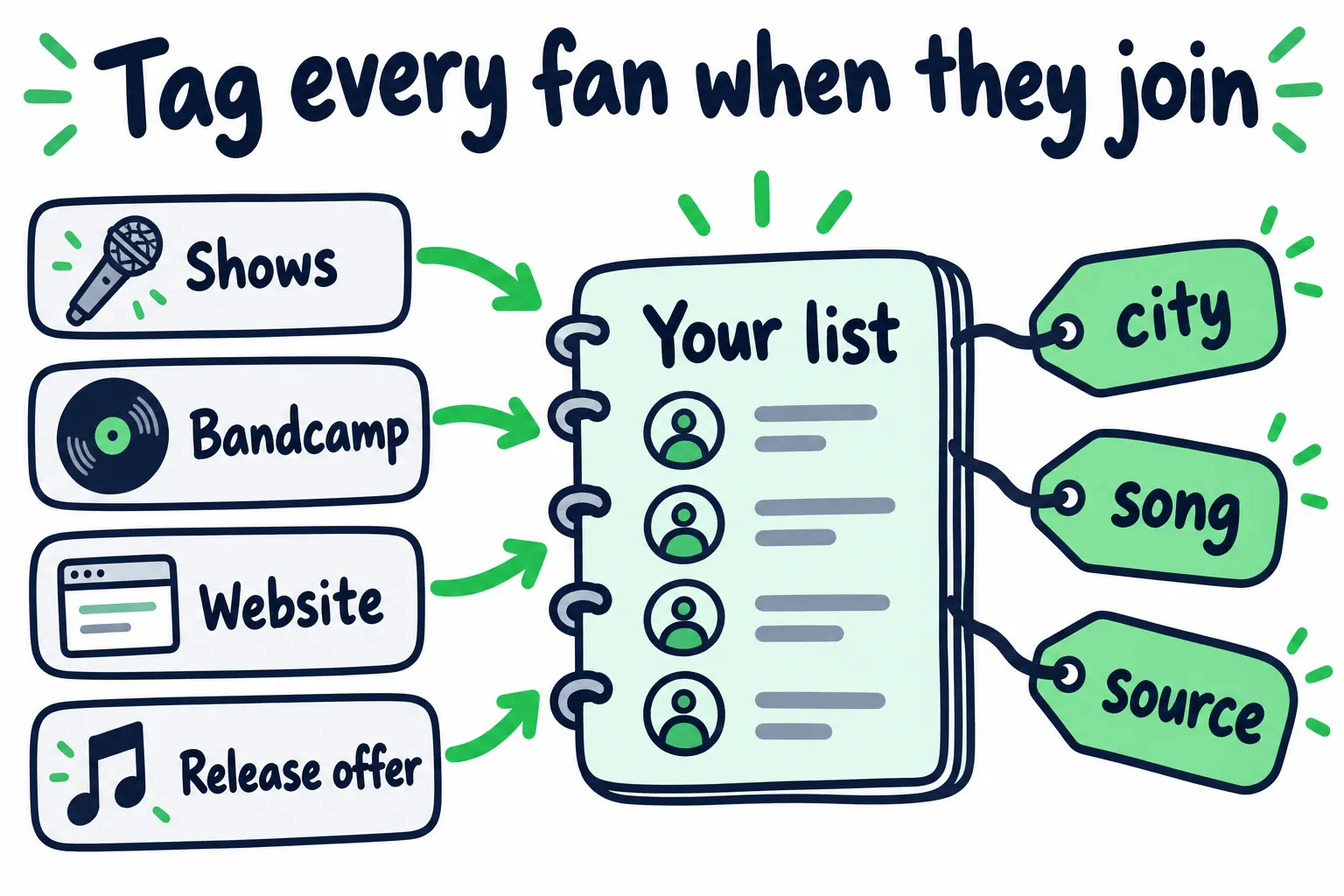
A tag added at signup saves you from guessing later.
| Source | How to collect | Tag it with | Why it matters |
|---|---|---|---|
| Shows | A QR code at the merch table, mentioned once from the stage | City | Your next show in that city starts with a list |
| Bandcamp | Buyers and followers get the option automatically (Bandcamp). Free downloads can require an email | Buyer or follower | These fans already paid or asked for updates |
| Your website | One signup with a clear promise and schedule | Source page | Catches people who searched for you |
| Release offers | A demo, a lyric sheet, or a voice memo in exchange for an email | Song | Shows which song pulled them in |
At shows, give a reason tied to the room. “First access to tickets next time we’re in [city]” works better than “join my newsletter,” and it hands you the city tag. Say how often you’ll write, so nobody worries about getting buried.
Pick which cities to push. Check your top cities in Spotify for Artists before a run of shows. The cities where people already listen are where a list turns into ticket sales fastest.
For release-page and website offers, and what to save behind each signup form, use the music website checklist.
Countdown Pages won’t give you emails
Spotify’s Countdown Pages are great for album and EP pre-saves, but Spotify shows you how many people pre-saved, not who they are (Spotify). If you want the email, ask for it directly.
Judge signups against visitors
A band on Reddit compared 415 subscribers to over 70,000 social followers and asked how other artists compare. A commenter warned against using that total: the same person can follow you in several places, and many recent followers may never have seen the invite.
Track how many people reached the signup page and how many signed up. If visitors don’t sign up, fix the offer. If nobody visits, ask more often.
What should musicians send in their emails?
Send four kinds of email: a welcome, a release sequence, show announcements by city, and a monthly letter. Each one has one job and one link.
| When | What goes in it | The one link | |
|---|---|---|---|
| Welcome | Right after signup | Deliver what you promised, say who you are in two lines, and ask them to reply with their city | The thing you promised |
| Release sequence | Around each release | The story behind the song, then release day, then reasons to keep listening | The release |
| Show announcement | When dates go up, only to that city | Date, venue, and any early access | Tickets |
| Monthly letter | Between releases | What you’re working on, a song you love, a photo, your latest release | Whatever matters most this month |
Write like a person. The UK artist above found that, across their channels, “personal stories and vulnerability consistently outperformed promotional content.” A paragraph about why you wrote the song beats a poster with a play button.
Keep one ask per email. If you ask fans to stream, follow, buy a shirt, and share, most will do none of it.
Send the welcome right away. The band from the 415-subscriber thread only emailed when they had news. A commenter pointed out that anyone joining between releases “might wait quite a while” to hear from them. An instant welcome fixes that.
How do you plan release emails around Spotify?
Send the first email at least 7 days before release, a short one on release day, and two more in the three weeks after. That timing lines up with how Spotify surfaces new music.
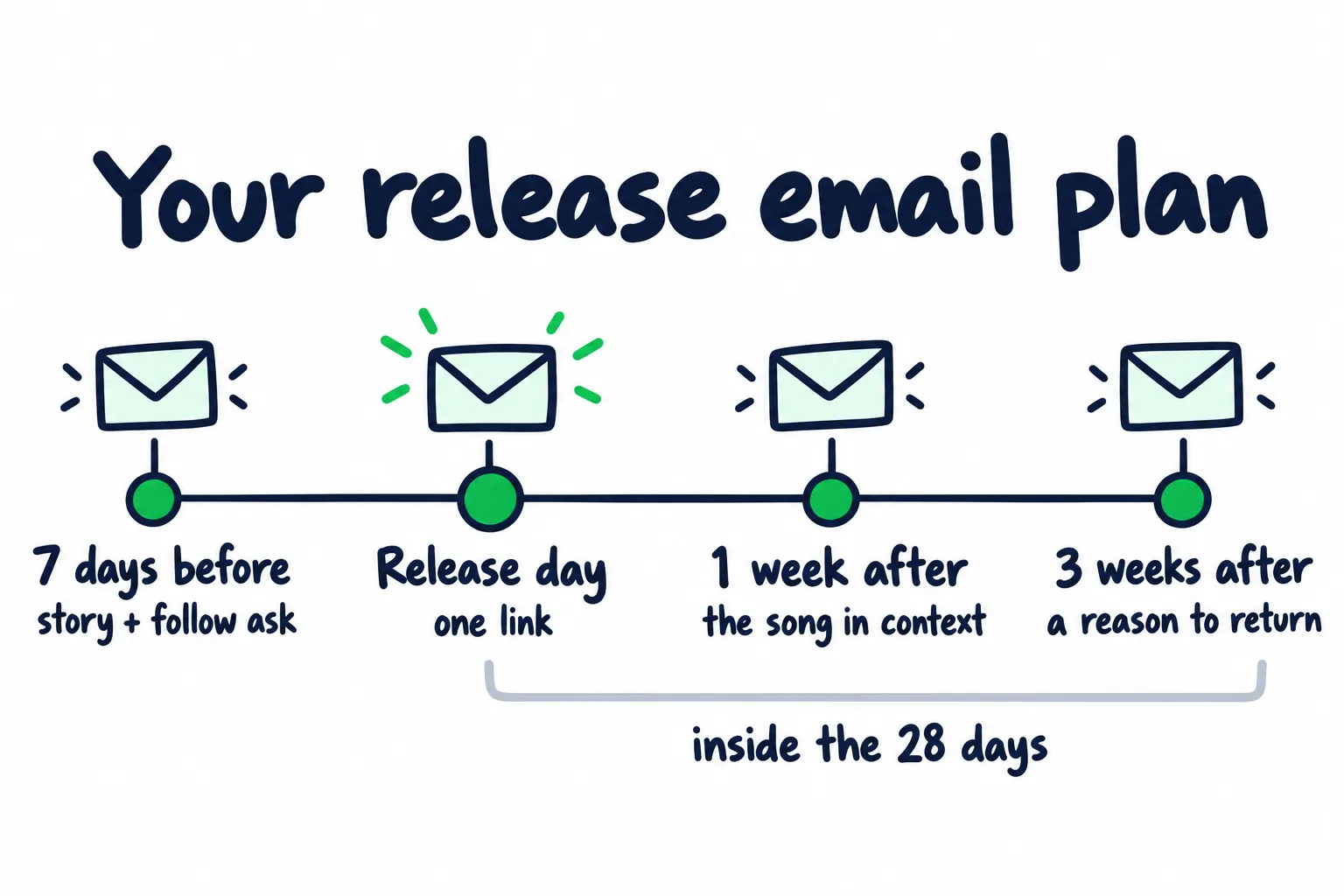
Four emails per release, each with a different reason to listen.
- Tell the story behind the song and give the release date.
- Ask fans to follow you on Spotify. If you pitched the song at least 7 days early, it lands in your followers' Release Radar.
- A short email with one link to the release page and one ask: save it.
- Saved songs live in the fan's library. Plays from the library, the release page, or your profile count as active listening.
- Share a demo, a lyric note, a live take, or the song you wrote it after.
- Link a second song for anyone who liked the first.
- Give a new reason to listen before the 28-day window closes: a video, an acoustic version, or a show.
- Ask one question and invite replies.
Here’s why the timing works:
- Release Radar goes to followers. If you pitch a song at least 7 days before release, Spotify adds it to your followers’ Release Radar (Spotify). An email that turns subscribers into followers widens that reach. Our Release Radar guide covers the details.
- Release day is when people look. Spotify says artist profiles get 77% more visits when new music drops (Spotify for Artists).
- Monthly listeners last 28 days. A fan who plays the song again inside that window stays in your count. Our monthly listeners guide explains how to plan return moments.
- Most streams come later. Spotify says 75% of a release’s first-year streams come after the first month (same fan study). Your monthly letter reaches that long tail, so keep linking the latest release in it.
Releasing every month? The week-3 email will run into the next release’s first email. Merge them: one email that closes out the last song and introduces the next.
Releasing an EP or album and past 3,000 monthly active listeners? Add a Countdown Page to the first email.
How often should musicians email their fans?
At least once a month, plus the four emails around each release. Less than that and people forget why they signed up. More than that works only when each email has something new in it.
A rough rhythm for an artist releasing every one to two months:
- Release month: the four release emails, plus any show announcements for the right cities.
- Quiet month: one monthly letter.
- Tour: announcement, on-sale, and a last-call email, each sent only to that city.
Watch your unsubscribe rate after each send. MailerLite’s median for music and musician accounts is 0.23% per email (MailerLite). If yours climbs well above that every time, you’re sending too often or sending things people didn’t sign up for.
How do you segment your email list?
Split your list by city for shows, by song for releases, and by buyer status for merch and vinyl. If your Berlin fans get every Chicago show email, they learn to ignore you, or unsubscribe.
| Segment | Use it for | Example |
|---|---|---|
| City | Show announcements and presales | Only fans tagged Chicago get the Chicago date |
| Song | Similar new releases | Fans who joined for your acoustic single hear about the next acoustic one first |
| Buyers | Vinyl, merch, and bundles | Repeat buyers get the preorder a day early |
| Not clicking in 6 months | A short check-in, then removal | “Still want to hear from me?” with one click to stay |
Treat repeat buyers as your core. The UK artist’s 46 fans with three or more purchases are a small group, and the artist is now thinking about building around them with smaller vinyl runs. Spotify’s version of that group is your super listeners.
Use the replies. When your welcome email asks for a city, every reply is a tag you didn’t have to guess.
Which email marketing numbers should you track?
Track bot-filtered clicks, sales, unsubscribes, and spam complaints. Treat open rates as a rough signal at best. Apple Mail can load your email before anyone reads it, so many “opens” aren’t people.
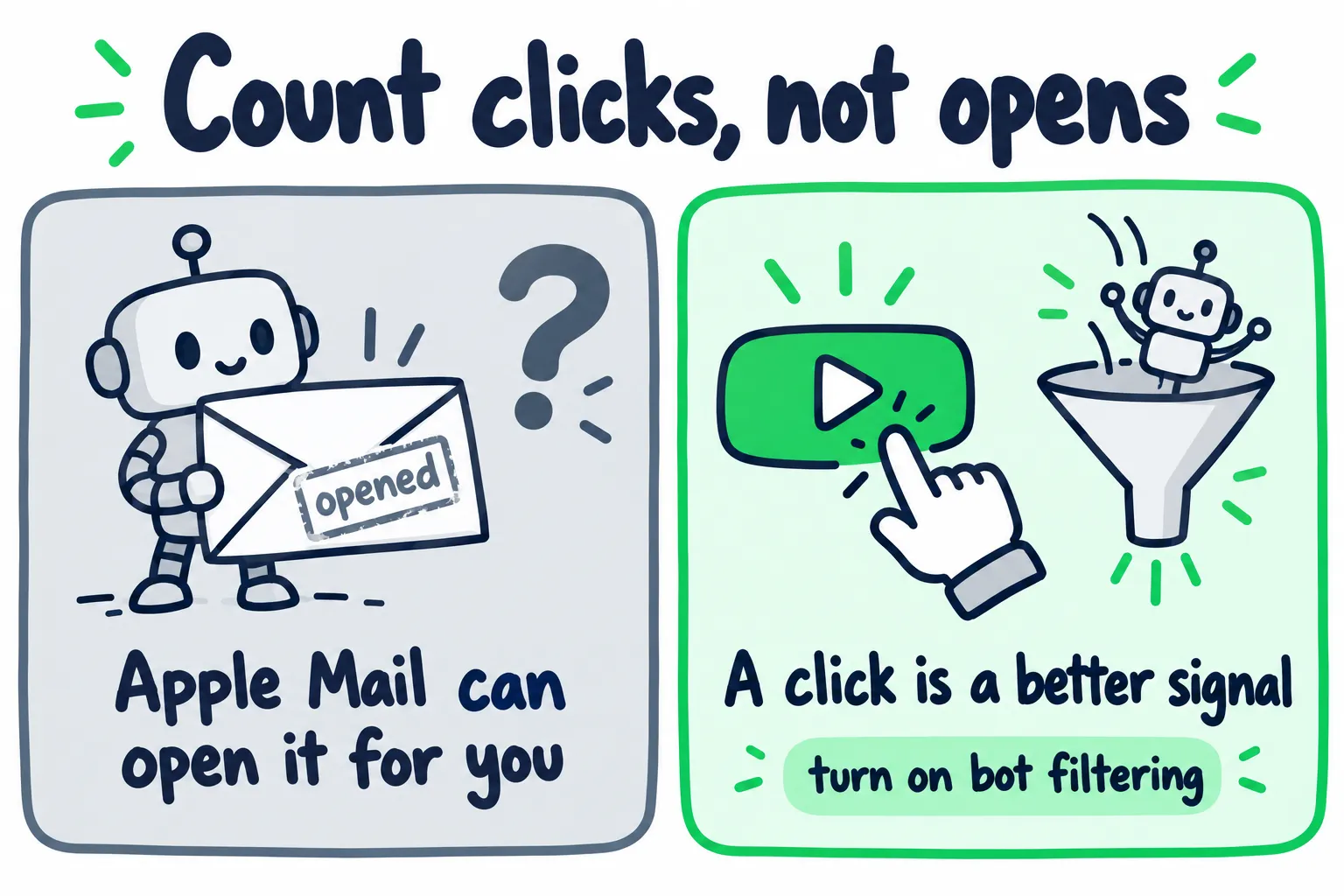
Apple Mail can register an open with nobody reading. Clicks are a better signal once bots are filtered out.
Mailchimp says Apple Mail Privacy Protection reports emails as “opened” regardless of what the reader does, while clicks and purchases aren’t affected (Mailchimp).
Clicks aren’t perfect either. Mailchimp says security tools often click links or open emails before your contacts do, which inflates click counts. Its bot filtering is on by default and hides most of that activity, but not all of it (Mailchimp). Turn on your platform’s bot filtering, and back up clicks with sales and replies.
You can see the gap in MailerLite’s benchmarks. Across a year of campaigns, music and musician accounts had a median 45.93% open rate but a 1.7% click rate. Use 1.7% as a rough check, then compare each send to your own last few.
| Number | What it tells you | Watch out for |
|---|---|---|
| Clicks, with bots filtered out | How many people did what you asked | Security scanners can click too, so confirm with sales and replies |
| Sales and ticket buys | Whether the list pays its way | Use a link or code per email so you can tell sends apart |
| Unsubscribes | Whether you’re sending the wrong thing or too often | A rise after every send |
| Spam complaints | Whether people forgot they signed up | Anything near 0.3% puts your delivery at risk |
| Replies | Who’s paying attention, and their cities | Answer them, or stop asking |
| Release-day plays | Whether the release email moved listening | Check your profile and active listeners in Spotify for Artists |
| Opens | A rough signal at best | Inflated by Apple Mail |
How do you keep your emails out of spam?
Send from your own domain, set up email authentication, make unsubscribing one click, and keep spam complaints well under 0.3%. Gmail and Yahoo enforce these rules, and one send to a big list can put you in the stricter tier.
What the terms mean: SPF, DKIM, and DMARC are short text records you add where you bought your domain. They prove your email platform is allowed to send as you. Postmaster Tools is Google’s free dashboard for your spam rate. At low volume it may show nothing, so watch your platform’s complaint rate too.
Google’s rules for anyone sending to Gmail (Google):
- Everyone: set up SPF or DKIM, and keep the spam rate in Postmaster Tools below 0.3%. Google recommends staying under 0.1%.
- Over 5,000 messages a day to Gmail: set up SPF, DKIM, and DMARC, and support one-click unsubscribe in marketing emails.
Once more than 5,000 of your fans use Gmail, one release-day email to everyone puts you over that line. Set up authentication before you need it. Your email platform’s help docs walk you through it, and it’s a one-time job.
Three habits keep your list healthy:
- Only add people who asked. Importing contacts from your phone, or emails from people who bought a ticket elsewhere, is how spam complaints start.
- Clean out people who never click. Send a “still want these?” email to anyone silent for six months, then remove those who don’t answer. Use your platform’s bot-filtered numbers, since a scanner’s click can make a dead address look active.
- Use your own domain. Many email platforms won’t send from a free Gmail or Yahoo address, or rewrite it, because those addresses fail authentication when someone else’s servers send them. An address like hello@yourbandname.com avoids that.
What does the law require for musician emails?
In the US, every marketing email needs your postal address and a working opt-out. In the UK, you need the fan’s consent to email them. The EU and Canada generally require consent too.
United States (CAN-SPAM) (FTC):
- The law doesn’t require consent, but it does require honesty and an exit.
- Include a valid postal address. A PO box registered with the US Postal Service counts, so you don’t have to share your home address.
- Make the subject line honest.
- Give a clear way to opt out, and honor it within 10 business days.
United Kingdom (PECR) (ICO):
- You need specific consent to send marketing email to individuals.
- The exception is the soft opt-in. It covers people who bought something similar from you before. You must have offered an easy opt-out when you collected their email, and in every email since.
Keep each fan’s signup source and date. That tag doubles as your record of how they joined.
The simple rule that covers most of it: only email people who asked, tell them how often you’ll write, and make leaving easy.
Which email platform should musicians use?
Pick a platform that lets you tag fans, run automatic welcome and release emails, and export your list whenever you want. Prices and free tiers change often, so judge each platform by what it costs at the list size you expect next year.
| Feature | Why you need it |
|---|---|
| Tags or groups | City, song, and buyer segments |
| Automations | The welcome email and release sequence send on their own |
| Signup forms and landing pages | QR codes at shows and release offers |
| Custom domain authentication | SPF, DKIM, and DMARC for delivery |
| Easy import and export | Bring in Bandcamp lists, and leave with your fans if you switch |
| Price at your next list size | The free tier you start on may not cover where you’re heading |
Check whether the free tier includes automations. A free plan without a welcome email costs you the most important send.
How does email fit with the rest of your promotion?
Email brings back fans you already found, but it doesn’t reach anyone new. Your list grows only as fast as new people discover the music, at shows, on playlists, and through targeted reach.
So plan both sides. Use the reach side to put the song in front of new listeners, and the release emails to bring the ones who connect back again. Our guide on how to get more monthly listeners on Spotify covers the reach side, and our guide to making money from your music shows where a list pays off in vinyl, merch, and memberships.
When too few new people are finding the music, that’s a reach problem, and reach on Spotify is what our Spotify promotion is for.
FAQ: Email Marketing for Musicians
How do I start an email list as a musician?
Pick a platform with automations, set up one signup with a clear promise, and add a QR code to your merch table. Turn on Bandcamp’s mailing list option if you sell there.
Then write a welcome email that delivers what you promised and asks for the fan’s city.
Can I move my Bandcamp mailing list to an email platform?
Yes. Export it from the Mailing list section of your Bandcamp Tools page (Bandcamp), then import it into your email platform.
Tag those fans “Bandcamp” so you know they came from buyers and followers.
What should I put in my first email to a new fan?
Deliver what you promised, like the demo or the presale code. Add two lines about who you are, one link to your best song, and a question about where they live.
Their reply tells you which city to tag them with.
Is it legal to add fans to my email list?
In the US, the law doesn’t require consent, but every marketing email needs your postal address and a way to opt out. In the UK, you need consent, except for past buyers under the soft opt-in.
Either way, emailing people who never signed up brings spam complaints, and those hurt delivery to your whole list.
Do email open rates still matter for musicians?
Not much. Apple Mail can mark emails as opened before anyone reads them, so open rates look higher than they are.
Judge emails by bot-filtered clicks, sales, replies, and release-day plays in Spotify for Artists.