
How to Get Creators to Use Your Song and Turn Views Into Streams
Getting creators to use your song is easier than most artists think. Getting their viewers to play it on Spotify is the hard part.
Views are cheap now. An artist manager in r/musicmarketing put music clipping campaigns at about 50 cents per 1,000 views, then warned that 300,000 of those views can barely move your streams.
The short answer
To get creators and influencers to use your song, and get something back from it:
- Set up the sound first, so creators can find it, use it, and credit you on every app.
- Pick 10 to 15 seconds that make someone else’s video better.
- Ask creators in the right niche, for free first, then pay small amounts once you know what works.
- Count the videos people make with your sound, and the saves, not the views.
Why views aren’t the goal
Watching a video isn’t the same as listening to a song. Research firm MIDiA found that of people who followed an artist on TikTok after discovering them, only 26% went on to listen to more of their music (MIDiA). On other social apps, it was 45%.
Uses alone don’t guarantee streams either. One artist had almost 100 creators use a clip of their song. Ten months later, the song had under 20,000 Spotify streams.
So this guide treats creator promotion as a chain: the first videos, then strangers making their own, then saves, then plays. Each link can break, and each one has a fix.
What You’ll Learn
- The setup checks that stop creators from losing your song, or you losing the credit
- How to pick the clip and find creators whose videos fit it
- A free message that gets creators to say yes
- What creators charge, and how to judge the price
- The labeling rules for paid posts on TikTok, Instagram, and YouTube
- Which numbers show it’s working, and how to carry it over to Spotify
Does getting creators to use your song lead to streams?
It can, when lots of people make their own videos with the sound. A few big posts with lots of views rarely move Spotify for long.
TikTok’s report with Luminate found that 84% of songs that entered the Billboard Global 200 went viral on TikTok first (TikTok). That’s TikTok’s own study, and it’s about hits. Below that level, the results get uneven:
- Uses pile up on a few songs. A study of TikTok and Spotify data found the top 10% of songs got 96% of TikTok creations and 76% of Spotify streams (arXiv). When one major label’s catalog left TikTok, the Spotify losses landed mostly on songs that were already viral.
- One big video fades fast. A poster in r/musicbusiness had a video reach 2 million views. Streams spiked for 10 days, then went back to normal.
- Videos created is the number to watch. A commenter in that thread made the same point: a sound used in a million videos changes your life, and one video with 2 million views doesn’t.
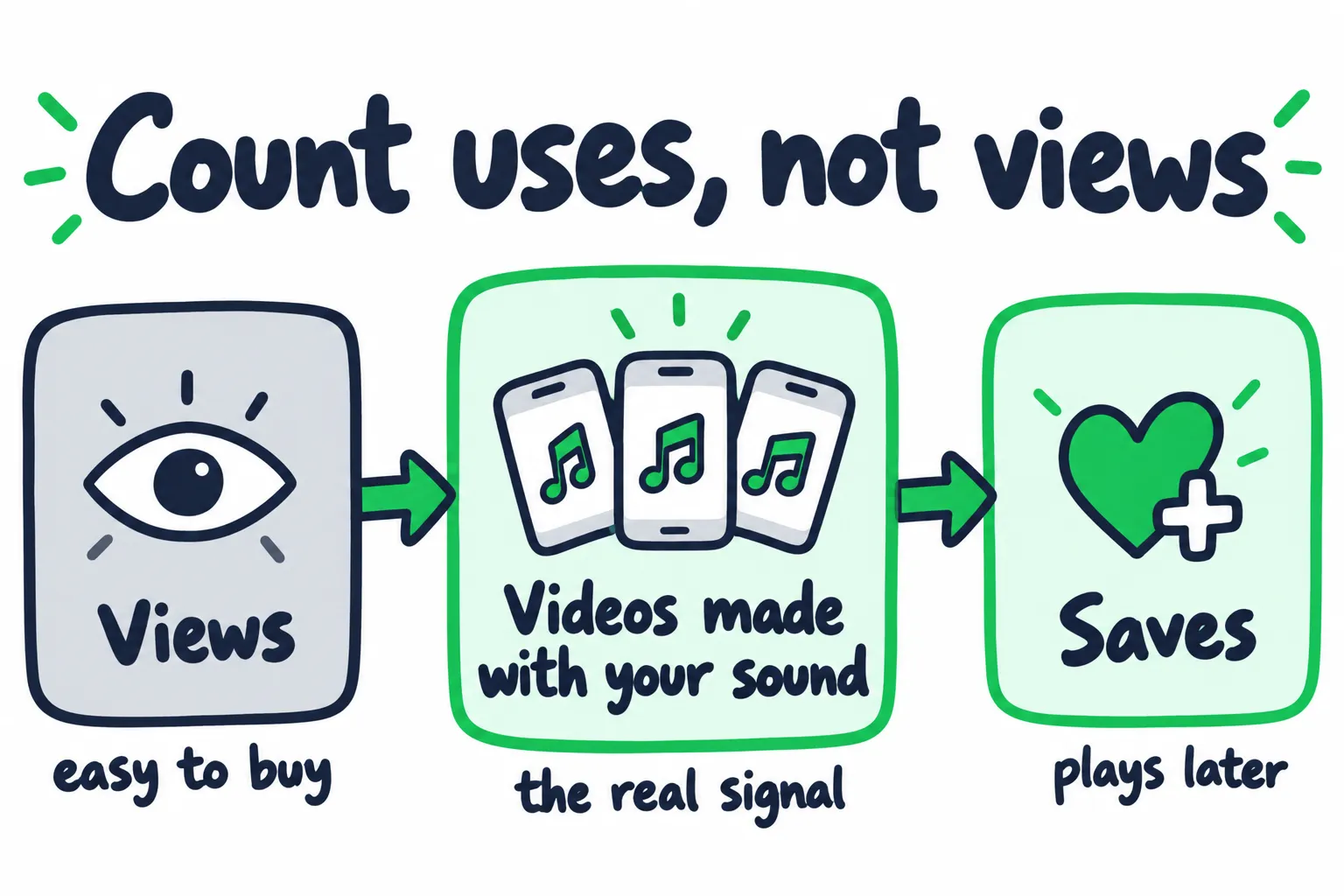
Each step to the right is harder to fake and closer to a fan.
TikTok’s payments work the same way. CD Baby says TikTok revenue comes from videos created with your sound, not from views, so 1,000 videos earn more than one video with a million views (CD Baby).
Key takeaway
How do you set up your song before you ask creators?
Get the song into each app’s music library, send creators the official sound, and check who’s allowed to use it. Skip this and creators can’t find the song, some pages can’t use it, or the uses land on someone else’s upload.
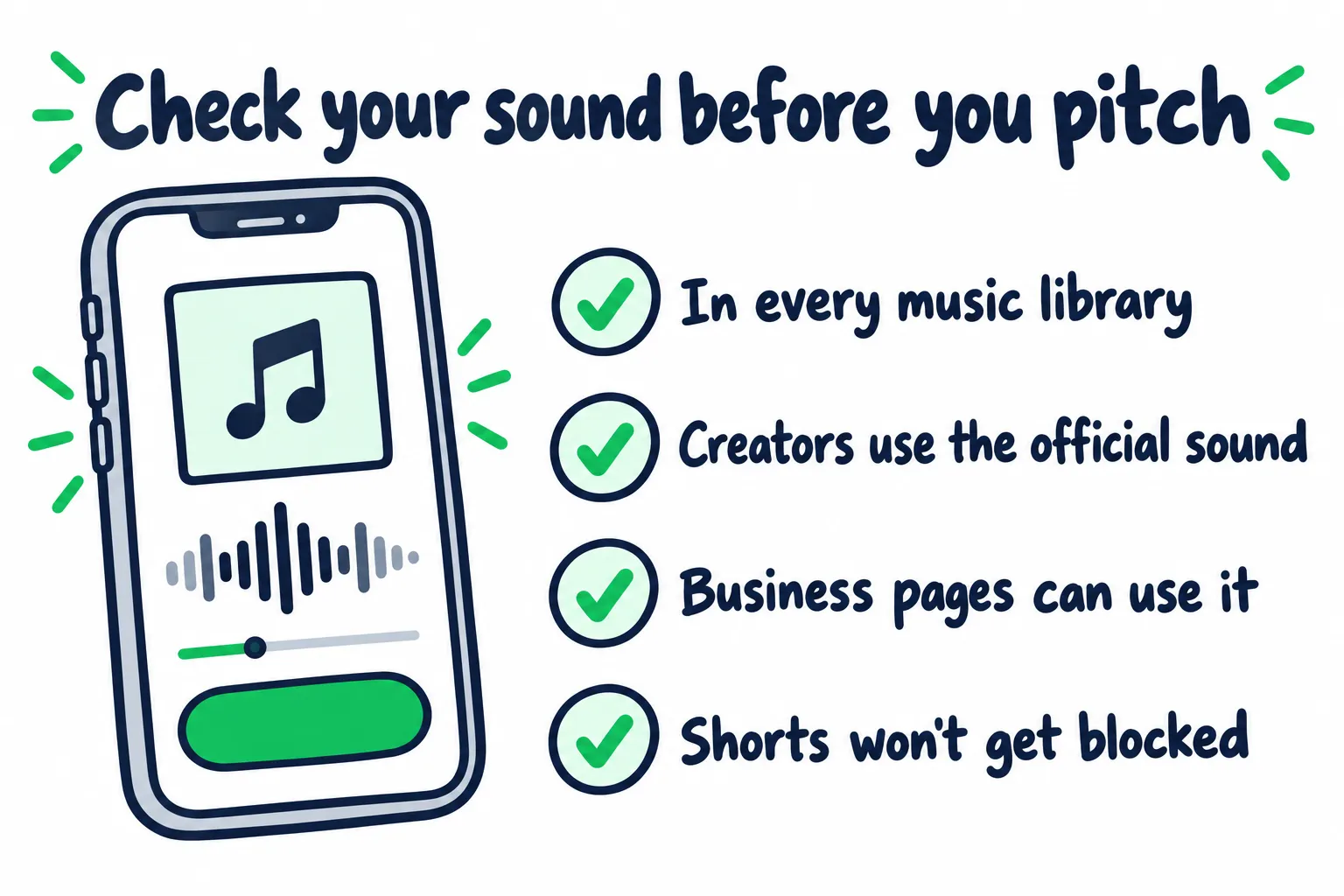
Four checks to run before you message a single creator.
| Where | What can stop creators | What to do |
|---|---|---|
| TikTok | The song isn’t delivered yet. Business accounts only see commercial sounds | Pick TikTok at your distributor. Ask about the Commercial Music Library |
| TikTok, if you publish your own songs | No publishing license, so the music can go missing | Opt into TikTok’s publishing license (DistroKid sends you to the Harry Fox Agency) |
| The song isn’t delivered yet. Some business accounts can’t use the music library | Pick Instagram and Facebook at your distributor | |
| YouTube Shorts | Your own Content ID claim blocks Shorts over one minute | Point creators to the Shorts audio library. Allowlist claimed videos |
| All three | Reuploads saved as “original sound” | Send the official sound link every time |
Get it into every library, then search for it yourself
Most distributors deliver to TikTok, Instagram, and Facebook when you pick those services on the upload form. Timing varies: TuneCore says about 5 days for TikTok (TuneCore), DistroKid says 1 to 3 weeks (DistroKid), and CD Baby says to allow at least 30 days.
If you publish your own songs, there’s one more step. DistroKid says self-published songwriters need to opt into TikTok’s publishing license through the Harry Fox Agency, or the music can go missing from TikTok (DistroKid).
Then search the song in each app. If you can’t find it, a creator can’t either.
Send the official sound every time
When people use a reupload of your song saved as “original sound,” those videos can miss your credit and your pay. One rights holder in r/musicbusiness said 99% of the uploads using their hit were bootlegs. They switched to a distributor that promised to catch reuploads. A manual check found it missed 6 of 7 videos with millions of plays.
Fixing it later is slow:
- Claiming takes work. At DistroKid, you can ask to claim an original sound only with its paid Social Media Pack, once the sound is in over 1,000 videos, and with the exact time range where your song plays (DistroKid).
- Reupload videos may not pay. DistroKid says you won’t earn from those videos at all without the Social Media Pack (DistroKid).
So prevent it. Copy the link from the share button on your official sound page, and send that to every creator.
Check who’s allowed to use it
The normal music libraries are for personal, non-commercial use, and that shuts out a lot of pages:
- TikTok business accounts only see songs from the Commercial Music Library, a separate catalog cleared for brands (TikTok). A creator on a business account who tries your song sees “Not Licensed for Commercial Use” (CD Baby). Plenty of theme pages run business accounts.
- Instagram says “certain business accounts” can’t use its music library (Instagram).
- Boosting is stricter. TikTok’s Promote tool only boosts videos with original sound or commercial sounds (TikTok). Instagram partnership ads can’t include licensed music (Instagram).
To open your song to business pages, ask your distributor about TikTok’s Commercial Music Library. TikTok has named Believe, DistroKid, and Vydia among the partners that let artists opt in (TikTok). In TikTok’s example, INJI’s “Gaslight” went in through DistroKid, and businesses made 57% of its 3 million video creations.
Know the trade before you opt in. The library is free for businesses, so brands get to use your song in their posts without paying you a fee. Ask your distributor whether it still offers the program, and what you earn when brands use the song.
Keep YouTube Shorts from getting blocked
If your distributor runs Content ID for you, its system can claim creators’ Shorts too. YouTube blocks any Short over one minute that has an active copyright claim (YouTube).
- Point creators to the Shorts audio library. YouTube suggests using music from it to avoid claims (YouTube).
- Learn your distributor’s allowlist. DistroKid can allowlist single videos once they’re claimed, but not whole channels (DistroKid).
Our YouTube monetization guide explains how Content ID works for musicians.
Which part of your song should creators use?
Pick 10 to 15 seconds that do one job in someone else’s video: land a cut, say what the video is about, or set a mood. Creators don’t need your favorite part. They need the part that makes their video better.
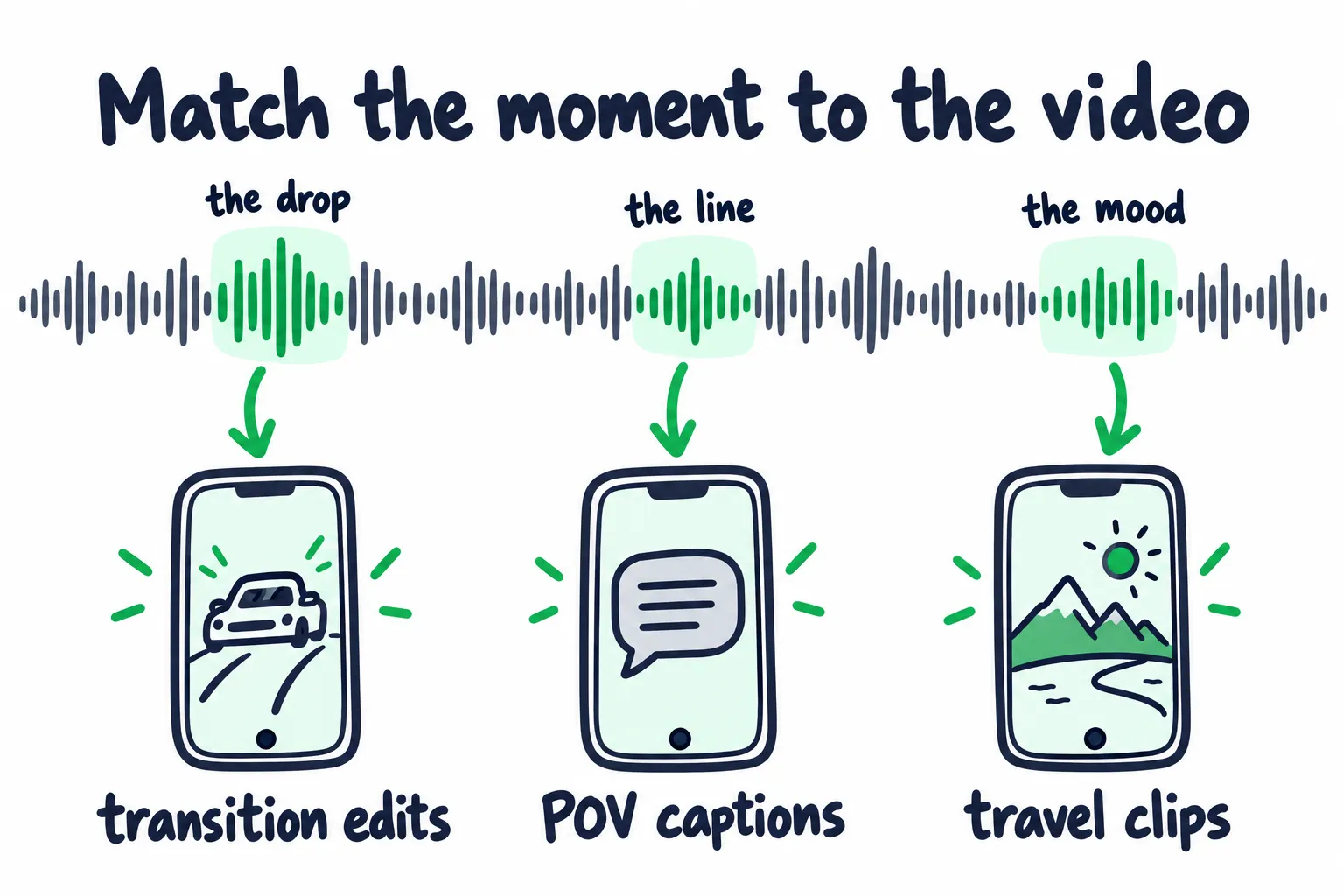
Different moments in one song fit different kinds of videos.
| Song moment | What it does for a creator | Pages that use it |
|---|---|---|
| A drop or beat switch | Marks the cut in a transition or reveal | Car edits, outfit changes, sports clips |
| A line that sounds like a caption | Says what the video is about | POV, storytime, quote pages |
| A steady mood | Sits under the video without fighting it | Travel, cooking, film edits |
| A chant or call | Gives people something to do | Dance, challenges, gym |
Three ways to get the clip right:
- Test it on your own posts first. The moment that gets comments and saves on your account is the one to hand out. Our TikTok guide shows how to find the song moment.
- Set where the TikTok clip starts. TuneCore lets you pick a start time, and the clip runs 60 seconds from there. CD Baby says creators can use up to 15 seconds of its 60-second clip, and the timing can only be set before delivery. Check your distributor’s rules before release day.
- Write one video idea per niche. Give creators something they could shoot in 10 minutes. For example: on-screen text says “the moment you stop texting them back,” and the line hits at 0:47. That’s easier to say yes to than “use my song.”
How do you find creators who will use your song?
Look for pages whose videos already fit your clip, starting with the creators who use songs like yours. Fit beats follower count.
A simple way to build the list:
- Open the sound pages of 3 to 5 songs by artists your listeners also play. Note the creators whose videos got copied, and the ones whose comments ask what the song is.
- Search the feeling or topic of your song. Hashtags and keywords about the song’s subject turn up creators who don’t post about music at all.
- Log each creator with their niche, followers, any fee, the post date, and the uses after 14 days. That log tells you which niche to grow.
The second step comes from an artist in r/musicmarketing who took the core value in their song, searched it as a hashtag on Instagram, and messaged accounts whose posts fit, without checking follower counts first. Creators started saying yes, one with 400,000 followers. They didn’t have to be music pages. For a song about loving someone with an addiction, the artist planned to reach people posting about that experience, like a psychologist.
Reach and results don’t line up neatly. A theme-page manager said some posts with 1 million views brought about 1,000 followers, while some with 10,000 views brought 300, depending on the type of content.
| Creator type | Good for | Watch out for |
|---|---|---|
| Niche creators | An audience that already cares about your song’s topic | Slower, one message at a time |
| Edit and theme pages | Getting other editors to copy the sound | Many run business accounts |
| Clipping campaigns, paid per 1,000 views | Cheap reach | Viewers came for random clips, not music |
| Agencies | Many pages at once | Packages that cost thousands and promise nothing |
Before you ask or pay, check four things:
- The comments. On their posts that use songs, do people ask what the song is?
- Where their audience lives. Ask for a screenshot of their top countries. A page owner in r/musicmarketing described an artist accepting big creators who didn’t post in English to get more views. Views from places you don’t play or sell won’t build your audience.
- Past results. Ask for proof that a page’s past posts moved numbers, as one commenter advised, before you send money.
- The account type. A business account may not be able to use your song at all.
How do you ask creators to use your song for free?
Send a short, personal message with the official sound link, the exact seconds, and one idea that fits their videos. Smaller creators say yes more often than most artists expect.
An artist in that same thread asked about 4 small creators. They did it for free, and one song got 93 uses.
A message you can adapt:
Hi [name], your video about [specific video] stuck with me. I wrote a song called [title] that fits that kind of video, especially 0:42 to 0:55.
Here’s the official sound: [link]
One idea if you want it: [one-line video idea]. No pressure at all. If you use it, I’ll share it.
A few rules that help:
- Send the sound, not a Spotify link. On Instagram, search your song, tap Audio, and share the audio page. On TikTok, share from your sound page.
- Message about 10 creators per niche, then compare which niche spread the sound.
- Follow up once, after a week. Then let it go.
- When someone uses it, show up. Comment, share it, and thank them. Other creators see the sound in action.
How much does it cost to pay creators to use your song?
Prices run from as low as $25 for a small creator to around $10,000 for top creators. In NPR’s reporting, one creator with 1.1 million followers charged $300 to $600 per video. Clip pages and clippers usually charge per 1,000 views instead.
Treat these as data points, not a rate card:
| Who | What they charged | Source |
|---|---|---|
| Small creators, under 10,000 followers | As low as $25 to use a song in the background | Tubefilter |
| One music creator, about 80,000 followers | $150 to $400 per song promo post | NPR |
| One creator, about 1.1 million followers | About $300 to $600 per video | NPR |
| Top creators | Around $10,000 per video | Tubefilter |
| Clipping campaigns | About 50 cents to $2 per 1,000 views | r/musicmarketing, NPR |
| Seeding agencies | Packages starting around $5,000 to $10,000, with nothing promised | r/musicbusiness |
Cheap views are easy to buy. One campaign manager got over 15 million views for under $150 and said the conversion was bad.
Judge the price by uses, not views. Divide what you spent by the number of new videos strangers made with your sound in the two weeks after.
Say you pay six creators $50 each. That’s $300. If 40 other people then make videos with the sound, you paid $7.50 per use. If nobody does, you bought six ads. Size the test with our music promotion budget calculator, and see where creator posts fit next to other costs in how much music promotion costs.
What to agree on before you pay
- The official sound, the exact seconds, and a volume people can hear
- Your name and the song title in the caption or pinned comment
- When it goes up, like within 7 days
- The platform’s paid label turned on
- The video stays up for at least 30 days
- A link to each video, plus their stats after a week
- Payment after you see the live link, or half before and half after
- If you’ll boost it later, their permission, and a song that’s allowed in ads
Do paid song posts need to be labeled?
On TikTok and Instagram, yes, because their rules require it for paid posts. The FTC is less clear-cut about a song playing in the background.
- TikTok counts content as branded when it promotes someone else “in exchange for payment or any other incentive.” Creators must turn on the commercial content disclosure setting (TikTok).
- Instagram says all branded content must use the paid partnership label (Instagram).
- The FTC said a paid song in the background “may not” need a disclosure, but it judges each case on its own (Tubefilter). If the creator talks about the song or recommends it, the FTC’s endorsement rules apply. As the advertiser, you can be held responsible for a missing disclosure too (FTC).
Plenty of creators skip the label. Five music influencers told NPR they often take money for song promos without disclosing it, and one said creators fear the label hurts performance (NPR).
TikTok says otherwise. It says the Paid partnership label “will not affect the way TikTok recommends content,” and that undisclosed branded videos can lose their place in the For You feed (TikTok). Put the label in your deal.
How do you spot a fake creator campaign?
Walk away from anyone who guarantees views, uses, or streams, or can’t show you every video.
Warning signs:
- Guaranteed “sound uses” or a promise to go viral. TikTok bans selling services that “artificially boost engagement,” and it removes fake likes and followers (TikTok). Uses from burner accounts teach the app nothing about real fans.
- No list of pages before you pay, and no links after.
- Views from markets you don’t care about, with no audience screenshots.
- Stream packages on the side. Fake plays put your Spotify catalog at risk. Our Spotify artificial streaming guide covers what can happen.
- Offers that arrive right after a video takes off. A band in r/musicmarketing had a video featuring their new song pass 500,000 views. Days later, a fake Apple Music curator asked them to pay to stay on a playlist that didn’t exist.
Before you pay any service, run the 12-question audit.
How do you know if creator videos moved your streams?
Write down your numbers before the first video goes up. Then compare uses, saves, and Spotify listening over the next two to four weeks.
- In Spotify for Artists, note the song's daily streams, listeners, and saves.
- Note the video count on your sound page.
- Log each creator's post date and link.
- Watch for people you never contacted using the sound.
- Count new videos from strangers in each niche.
- Put more into the niche that spread. Change the clip or niche where nothing spread.
- Compare the song's streams and saves with your baseline.
- Check whether listening from libraries and playlists grew, not just total streams.
| Where | What to check | What it tells you |
|---|---|---|
| TikTok for Artists | Views, posts, and creator engagements per song | Whether the sound is spreading. Needs a certified TikTok Artist Account (TikTok) |
| Your sound page | New videos from people you didn’t contact | Whether it spread past the creators you asked |
| Spotify for Artists | The song’s saves, and streams from listeners’ own libraries and playlists | Whether TikTok saves turn into plays |
| Your profile | Followers and top cities | Whether new listeners stick around |
Why the library line matters: when a viewer taps Add to Spotify on TikTok, the song lands in their Liked Songs (Spotify). Plays from Liked Songs count as active listening in Spotify for Artists. Our monthly listeners guide explains active and programmed listeners, and our Spotify saves guide shows how to read your save rate.
Then read the result:
- Strangers are using the sound: add creators in the niche that spread.
- Creators posted, nobody copied: change the clip or the niche before you spend more.
- Lots of uses, flat Spotify: people love the clip, but the full song may not deliver on it. Test a different moment, or put your effort behind a song where the whole track holds up.
To separate real lift from noise, like a playlist add landing the same week, use the methods in our music analytics guide.
How do you turn creator momentum into Spotify listeners?
Make the song easy to find from every video, then reach more listeners on Spotify itself. Most viewers won’t do the work for you: MIDiA found under a third of TikTok users have ever used Add to Music App.
While the sound is moving:
- Get your TikTok Artist Account. Approval turns on your Artist Tag and Music Tab, and it gives you TikTok for Artists. You need at least one song delivered to TikTok, and review can take up to 30 days (CD Baby).
- Have creators name the song. The song title and your name in the caption or pinned comment give viewers something to search on Spotify.
- Pin the song as your Artist Pick, so profile visitors land on it.
- Post your own videos the right way. Add the song from TikTok’s sound library, not as an original sound. DistroKid says uploading your own music as an original sound may get the video muted (DistroKid). If your account is a business account, switch it to personal first.
- Have the next release ready. Followers you win now get your next song in their Release Radar. For an album, TikTok’s Pre-Release tool lets fans pre-save it to Spotify or Apple Music.
Our TikTok guide covers the content side of turning views into streams.
Then reach listeners where they already listen. MIDiA found that 74% of people whose favorite place to discover music is a streaming service go on to stream more from that artist, compared with 48% for TikTok (MIDiA). People who find music on a streaming app are already in listening mode, one tap from saving the song.
Creator videos show you which moment works. Reaching more listeners on Spotify itself is what our Spotify promotion is for.
FAQ: Getting Creators to Use Your Song
Is it worth paying influencers to use your song?
As a small test, yes, once the sound is set up and you know which clip works. Start with a few niche creators.
Judge the spend by how many strangers make videos with the sound afterward. If a few paid posts don’t get copied, more money won’t fix it. Change the clip or the niche first.
Do I get paid when people use my song on TikTok?
A little. TikTok pays through your distributor, per video made with your sound, not per view. One artist said about 40,000 videos used their songs and the money still wasn’t noteworthy.
Register your songs with a PRO too. Our royalties guide covers how TikTok royalties work.
Why can’t creators find my song on TikTok?
Most often it isn’t live there yet. Depending on your distributor, that takes anywhere from about 5 days to 30 or more, so deliver well before you reach out.
If you publish your own songs, check that you’ve opted into TikTok’s publishing license. And if the song is live but a creator still can’t add it, they’re probably on a business account, which only shows commercial sounds.
How do I get my song into TikTok’s Commercial Music Library?
Ask your distributor whether it offers an opt-in. TikTok has named Believe, DistroKid, and Vydia among its partners for this.
Once your song is in, brands and business pages can use it for free, and videos with it can be boosted through TikTok’s Promote tool. Ask what you earn from those uses before you opt in.
Can creators use my song on YouTube Shorts without a copyright claim?
Usually, if they add it from the Shorts audio library, which YouTube suggests for avoiding claims. Ask your distributor how your songs get into that library.
If a creator adds the song another way and your distributor runs Content ID, the Short can get claimed. A claimed Short over one minute gets blocked until the claim is released or you allowlist the video.