
Smart Links for Musicians: Set Them Up So Clicks Become Streams
Your smart link can’t see a single stream. It only sees the tap toward Spotify, and that’s where most ad money leaks.
Smart links for musicians are built to fix that gap as far as it can be fixed: one page for every service, plus tracking that tells your ads which taps to look for. Set up badly, they count clicks that never become plays.
One artist in r/musicmarketing saw 800 recorded conversions and zero streams. Meta had turned on every placement, and the money went to Facebook taps that never became plays.
The short answer
How to use smart links so they help your release:
- Use a smart link with every service in your emails, posts, and video descriptions, and as the music link on your link-in-bio page.
- For ads, send people to a landing page that tracks the tap to Spotify, and make that tap the conversion your campaign optimizes for.
- Test the exact link on a phone, inside the apps your ads run on.
- Check Spotify for Artists for the same dates and countries before you trust any number from the link tool.
What You’ll Learn
- What a smart link for music is, and when a direct link works better
- What to look for in a smart link tool, including free options
- How to set up tracking that counts the right tap
- How to test a link before you spend
- Whether pre-save links are worth it
- How to read the numbers, and where clicks leak
What is a smart link for music?
A smart link is one URL that opens a page with your song on every streaming service, so each fan picks their own app. Most also track who tapped what, and some collect pre-saves before release.
There are four kinds of links you’ll use around a release:
| Link | What it does | Use it for |
|---|---|---|
| Smart link | One page with every service, plus click tracking | Emails, posts, and video descriptions |
| One-button landing page | One page with a single “Listen on Spotify” button and a tracking pixel | Ads where Spotify growth is the goal |
| Direct link | Opens the song or profile in Spotify | Playlist pitches and press |
| Link-in-bio page | A page with all your links: music, merch, shows, email | Your social profiles, with the smart link as the music link |
You don’t need a paid tool to start. DistroKid’s HyperFollow page is free with its plans, is created for every upload, and switches from pre-save to store links on release day (DistroKid).
When should you use a smart link instead of a direct Spotify link?
Use a smart link when fans choose where to listen, and a one-button page when you’re paying to grow on Spotify. For pitches, send the direct link.
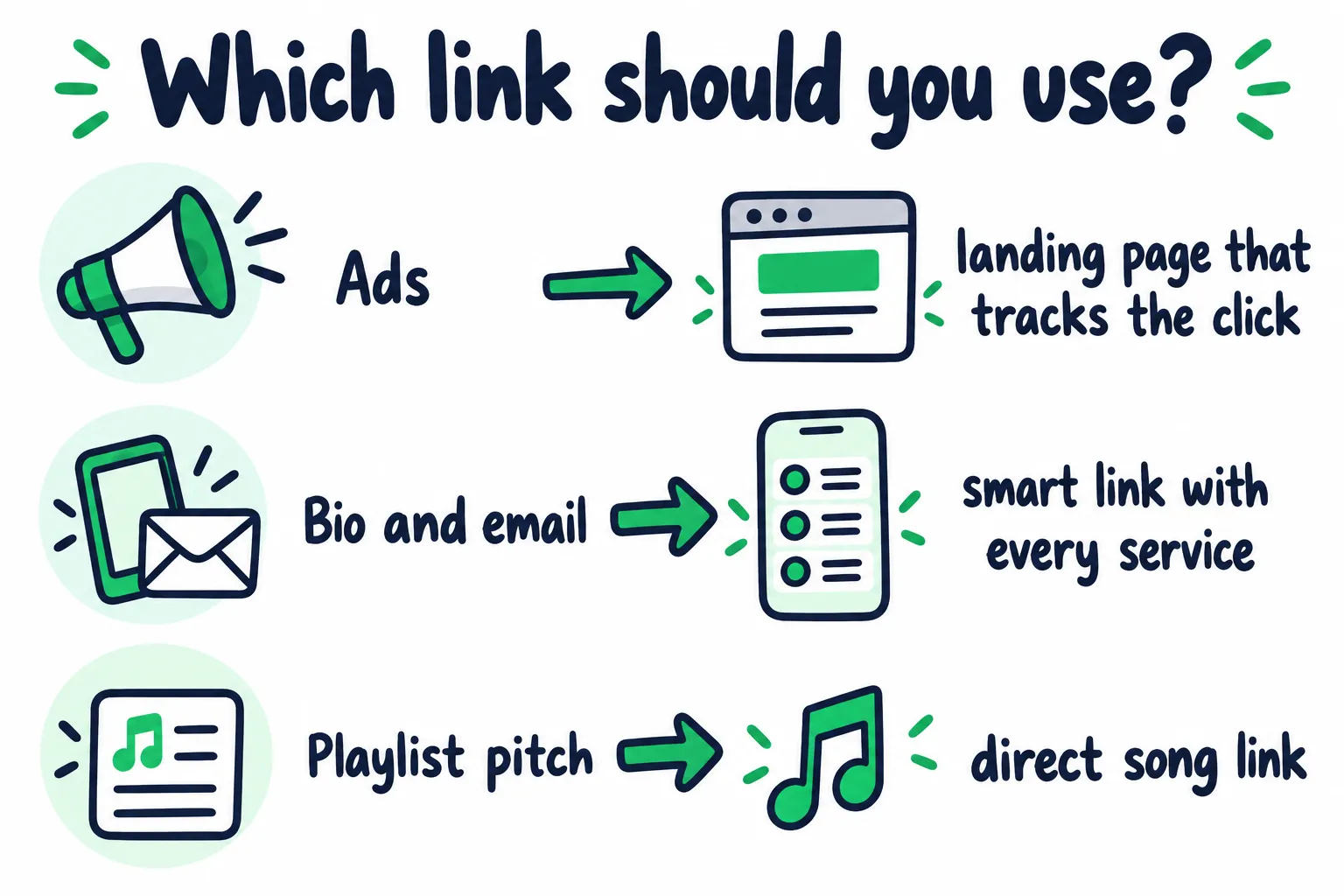
Pick the link by where it’s going.
In ads, extra buttons cost you. One artist in r/SpotifyArtists ran ads to a page with Spotify, Apple Music, and YouTube Music. Only about half the conversions went to Spotify, and over 40% went to Apple Music, which nearly doubled the cost of each Spotify click.
A commenter explained why. If every button fires the same conversion event, Meta gets rewarded for any click, so it isn’t learning to find Spotify listeners. They suggested two fixes:
- Test a page with only Spotify, if Spotify is the goal of that campaign.
- Judge the campaign by cost per Spotify click, since Apple Music and YouTube Music clicks make the blended cost look cheaper than it is.
If your tool can’t hide services, use its separate event for Spotify clicks as the conversion. Never use an event that fires on any button.
Why not link ads straight to Spotify? Meta can’t see anything that happens inside Spotify, so it can only optimize for the tap on the ad. A landing page lets it learn who goes on to tap through to Spotify. Our monthly listeners guide shows what happened when one producer dropped the landing page.
Pick the destination on purpose. A song link fits an ad built on one clip. A profile or “This Is” playlist fits when you want people to find the rest of your catalog. Spotify links open the Spotify app when it’s installed (Spotify).
How do you choose a smart link tool?
Pick a tool that lets you add your own pixel, fire a separate event for each service, and see clicks by country and device. A pretty page with no tracking is a link-in-bio page.
| Feature | Why you need it |
|---|---|
| Your own Meta and Google pixels | So the data goes to your ad account |
| A separate event per service | So you can make “tapped Spotify” the conversion |
| Option to show only some services | So ad pages can show Spotify alone |
| Clicks by country and device | So you can spot cheap traffic that never streams |
| Pre-save before release | So the same link works before and after release day |
| Fan email export | So the people who pre-save become a list you own |
| A fast, simple page | So people don’t leave before it loads |
Free options cover most artists at first:
- DistroKid’s HyperFollow. It supports Meta and Google pixels, with a custom Meta event for each store, like
clickSpotify, plusspotifyPresaveSuccesswhen a fan pre-saves (DistroKid). Fan emails are only included on its Musician Plus and Ultimate plans. - song.link (Odesli). Free, and it builds a page with every service from one song link (Odesli). Good for sharing, but its features page doesn’t list pixels.
How do you track smart link clicks to Spotify?
Put your pixel on the page, make the tap to Spotify your conversion, and tag every link you share. Then the ad tool learns from the step that matters, and you can tell your traffic sources apart.
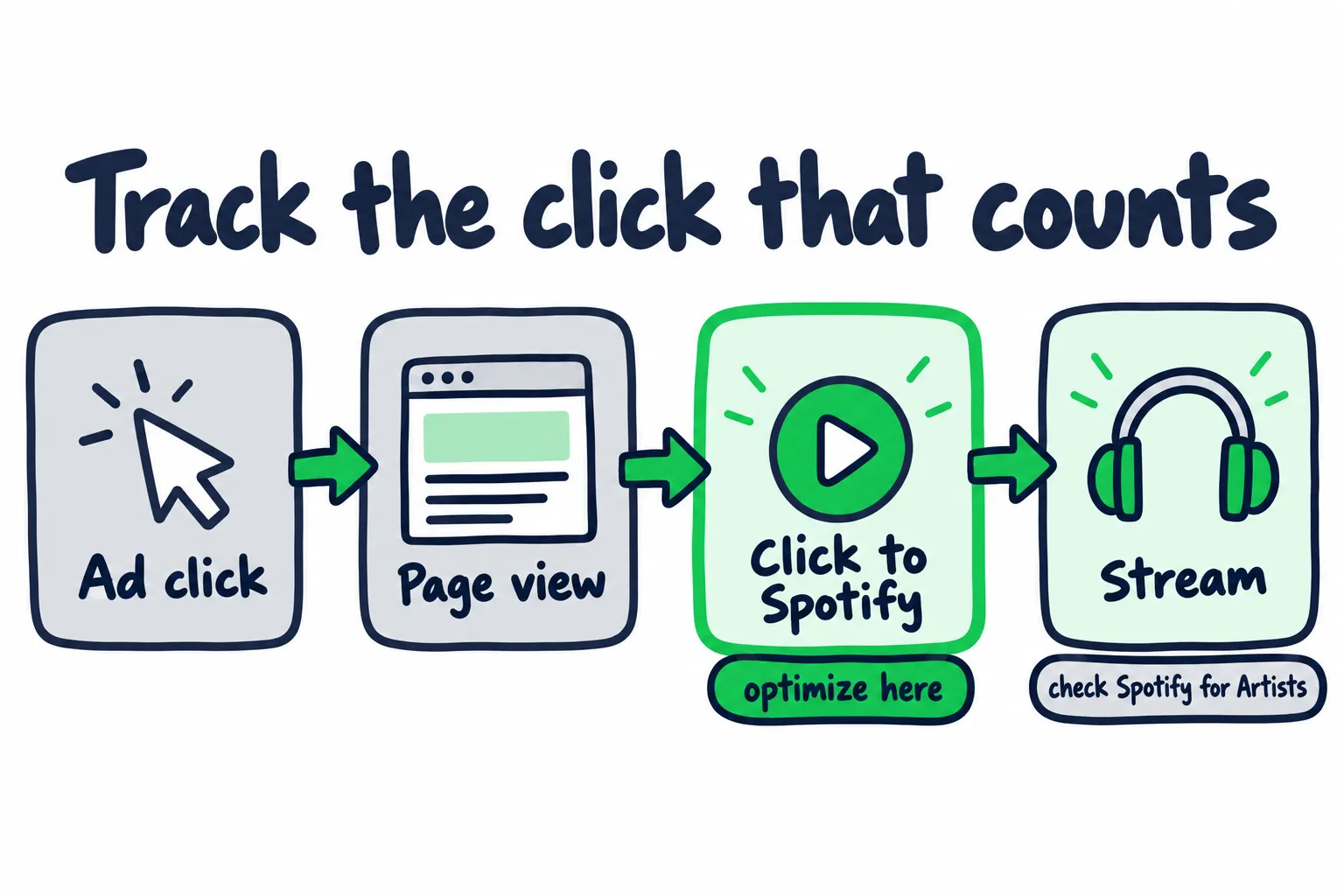
Optimize for the tap to Spotify. Confirm the stream in Spotify for Artists.
- Add your pixel to the link page. Use your own Meta pixel, and your Google tag if you run Google ads.
- Find the Spotify tap event in Meta’s Events Manager. Tap Spotify on your own page and check that the event shows up once per tap. Social icon clicks and page views shouldn’t count.
- Make that event the conversion your campaign optimizes for. If it arrives as a custom event, you may need to create a custom conversion from it first. Meta lets you use custom conversions to optimize campaigns, up to 100 per ad account (Meta).
- Turn on Meta’s Conversions API if your tool offers it. Meta recommends running it alongside the pixel (Meta), and it can catch taps the pixel misses.
- Tag every link with UTM parameters. Google says to always include
utm_source,utm_medium, andutm_campaign(Google). Then check that your link tool or analytics reports them. Our website checklist covers one naming rule for UTMs. - Ask for consent where the law requires it. In the UK, the ICO says using tracking technology for online advertising requires consent (ICO). EU rules work the same way, so expect smaller tracked audiences there.
A tagged link for a Meta ad might look like this:
https://yourlink.page/new-single?utm_source=meta&utm_medium=paid&utm_campaign=new_singleMeta can run one ad on both Instagram and Facebook, so don’t label the source “instagram” unless you’ve limited the ad to Instagram.
Keep your ads on the placements that stream
The 800-conversion story above came from placements the artist didn’t choose. When Meta switched new campaigns to every placement, commenters in that thread recommended account-wide value rules that cut bids on everything except Instagram, and applied them to future campaigns.
Two more habits help:
- Run one country per ad set, so your results line up with the country data in Spotify for Artists.
- Check results by placement and device in Ads Manager before you add budget.
How do you test a smart link before you spend?
Tap your own ad on real phones, the way a stranger would, before any money goes behind it. Most leaks show up in the first five minutes of testing.
| Test | What to check |
|---|---|
| iPhone and Android | The page loads fast and the Spotify button is the first thing you see |
| Spotify app installed, and not installed | The right song, profile, or playlist opens |
| Logged in, and logged out of Spotify | Someone new can still listen |
| Inside the Instagram and Facebook apps | The link opens from the app’s own browser, not only from a regular browser |
| Events Manager | The Spotify tap fires once, not twice, and social clicks don’t count |
The in-app browser is the one most artists miss. One commenter asked how anyone gets around it: from a Facebook ad, people couldn’t stay logged in to Spotify, and opening the app showed warnings. If your own test hits that wall, so will your audience.
Keep the page matched to the ad: the same artwork, song name, and promise. Our website checklist explains message match for campaign pages.
Are pre-save links worth it?
For albums and EPs, yes, if you can use Spotify’s own Countdown Page. For singles, a pre-save mostly reaches fans you already have.
- Countdown Pages are Spotify’s built-in pre-save for new albums and EPs, for artists with at least 3,000 monthly active listeners. Our Countdown Page guide covers setup and timing.
- Third-party pre-saves ask fans to connect their Spotify account to the tool. A HyperFollow pre-save, for example, also follows you and saves the release to the fan’s library (DistroKid).
The connection step is where fans drop off. One band in r/musicmarketing stopped pushing pre-saves because fans were tired of giving a third party access to their Spotify on every release. They asked followers to follow them on Spotify instead.
Skip “follow to unlock” rewards. Spotify’s developer policy bans apps from artificially raising follow counts by giving users compensation, financial or otherwise (Spotify).
The best use of a pre-save page is the email it collects, if your tool gives you emails. Our email marketing guide covers what to send those fans.
How do you read smart link numbers?
Read the chain from ad click to page view to tap to Spotify, then check streams in Spotify for Artists. The link tool can’t see streams, and Spotify for Artists can’t see your link.
Spotify for Artists only shows where streams happened inside Spotify, like your profile, a listener’s library, or a playlist. It has no category for outside links (Spotify). So you line up Meta Ads Manager, your link tool, and Spotify for Artists for the same dates and countries. Our analytics guide shows how to map the handoffs you can see.
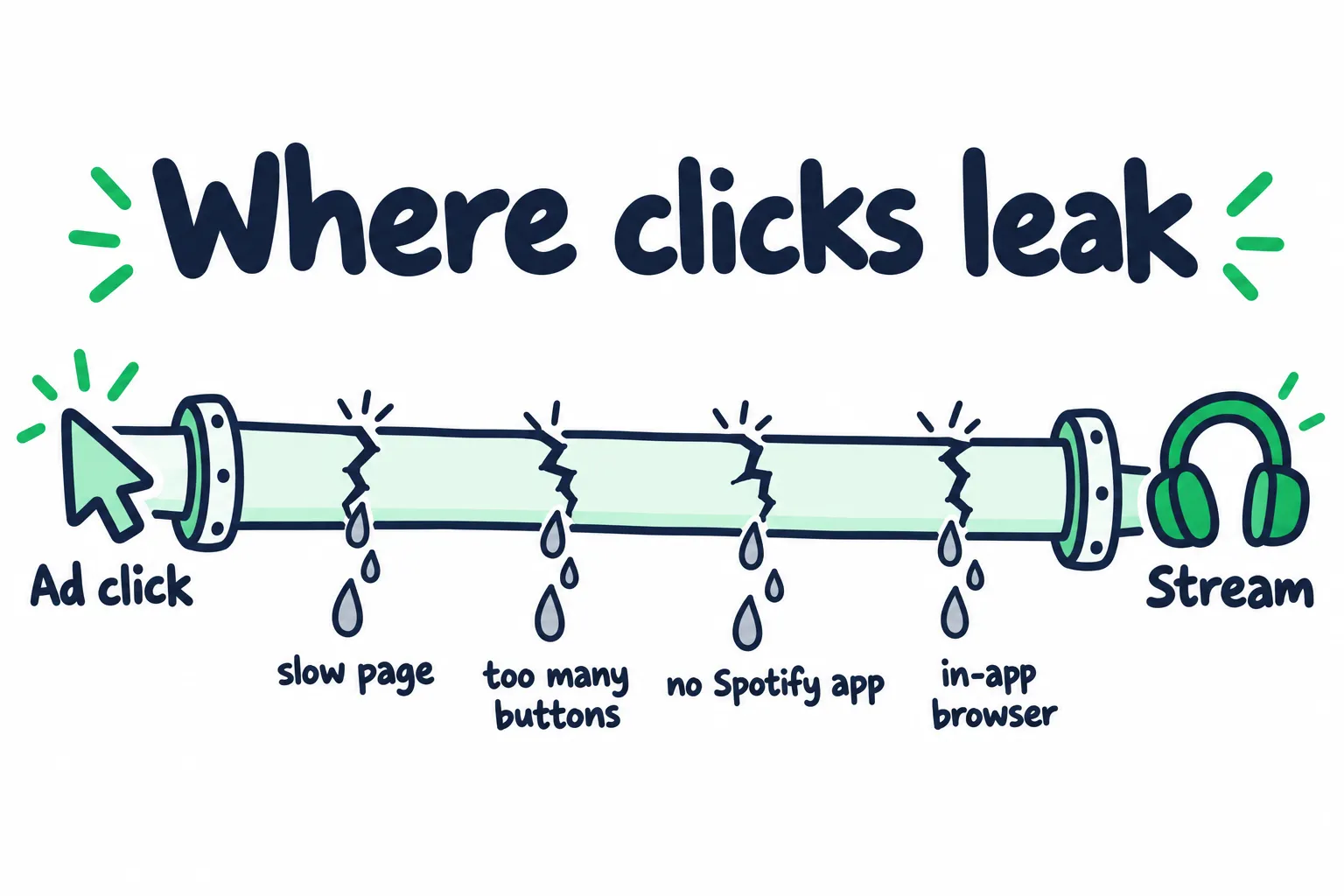
Four places a paid click can drop out before anyone hears the song.
| What you see | Likely cause | What to do |
|---|---|---|
| Lots of ad clicks, far fewer page views | A slow page, or accidental taps | Keep the page light. Google’s research found 53% of mobile visits are abandoned when a page takes over 3 seconds to load (Think with Google) |
| Page views, but few taps to Spotify | The ad and the page don’t match, too many buttons, or the wrong placements | Show the same artwork and song name, use one button, and check placements |
| Taps to Spotify, but no streams | No Spotify app, bots, or the in-app browser | Split results by country, device, and placement in Ads Manager, and cut the ones that never stream |
| Streams, but few saves | The song isn’t landing with that audience | Test a different audience or song before spending more |
There’s no official benchmark for how many page visitors should tap through. Compare your own countries, placements, and ads against each other, and keep the ones that send listeners who save.
Before you raise a budget, check the math with our Meta ads for Spotify calculator. For why clicks and streams never match exactly, see our Meta ads vs playlist pitching guide.
The tap to Spotify is the last thing an ad tool can see. What happens inside Spotify decides whether a campaign worked, and reaching new listeners on Spotify is what our Spotify promotion is for.
FAQ: Smart Links for Musicians
What is the best free smart link for musicians?
If you release through DistroKid, start with HyperFollow. It’s free with its plans and lets you add your own pixels.
For quick sharing with no tracking, song.link builds a free page with every service.
Should my ads link straight to Spotify or to a smart link?
To a landing page with one Spotify button. Meta can’t see inside Spotify, so a direct link only lets it optimize for taps on the ad.
The landing page lets Meta learn who taps through to Spotify, which is the behavior you want more of.
Can I see smart link clicks in Spotify for Artists?
No. Spotify for Artists only shows sources inside Spotify, like your profile, playlists, and listeners’ libraries.
Compare your link tool and Spotify for Artists over the same dates and countries instead.
Are pre-saves worth it for a single?
Not usually on their own. Spotify’s Countdown Pages are only for albums and EPs, and a third-party pre-save for a single mostly reaches fans who already follow you.
Use it to collect follows, and emails if your tool provides them. Those are worth more than the pre-save count.
Do I need a cookie banner for a pixel on my link page?
In the UK and EU, yes. Using tracking tools for advertising needs the visitor’s consent there.
Some link tools ask for it for you. Expect your tracked numbers to be lower than your real clicks in those countries.