
Spotify Discovery Mode: Is It Worth the 30% Cut?
A 50% Spotify Discovery Mode stream lift can produce just a 5% gain in royalties from those streams.
That’s the result when average pay per stream stays the same and Spotify takes its 30% fee.
Before the next renewal
If your tracks already earn from Radio, decide what each one needs to deliver:
- Income: Enough extra earnings to cover the fee on existing and new context streams.
- Demand for the next release: Saves, repeat plays, and catalog listening that justify a planned cost.
What You’ll Learn
- The math: Estimate extra streams, net royalties, and your break-even point.
- Song selection: Match each track to an income or audience goal.
- Listener quality: Read intent rates alongside reach, cost, and repeat plays.
- Renewal: Use a track scorecard to keep, retest, or pause.
How Spotify Discovery Mode works
Spotify Discovery Mode gives your chosen songs more weight when Spotify decides what to suggest. It runs in Spotify Radio, Autoplay, and eligible Mixes. These are the Discovery Mode contexts named in your reports.
The fee is 30% of recording royalties from selected songs in those contexts during the campaign. It covers streams that might have happened without the campaign too. Other sources carry no Discovery Mode fee.
You choose songs, rather than bids or audience targets. Spotify decides whom to reach, and listener response still affects its choices.
Discover Weekly, Release Radar, and editorial playlists are outside these contexts. Keep any gains there separate when reading the campaign report. The algorithmic playlist guide covers those other sources.
What Spotify Discovery Mode’s 30% fee costs your track
Start with the income a song already earns in the affected contexts. Under Spotify’s program terms, those existing streams enter the fee calculation too.
If that income would stay at $300 without the campaign, unchanged results would cost you $90. For a track earning $30 in those contexts, the same lack of growth costs $9.
Your largest song may offer the most upside, but it may also put more steady income at risk.
Turn campaign lift into an estimate of extra streams
Spotify’s reporting guide defines two kinds of lift:
- Campaign lift compares the result with Spotify’s model of what would have happened without the current campaign.
- Historical lift compares with the 28 days before the song’s first campaign.
Use campaign lift for the estimate below. Take the stream count and lift from the same song, dates, and contexts.
In this worked example, a song has 60,000 context streams and +50% campaign stream lift. The model implies about 40,000 streams without the campaign:
Expected: 60,000 / 1.50 = 40,000
Extra: 60,000 - 40,000 = 20,000
The fee applies to all 60,000 streams. It isn’t limited to the estimated 20,000 extra.
Now suppose the royalty report shows $240 from those contexts before the fee. At the same average pay per stream, the 40,000 expected streams would have earned $160.
After the fee, you keep $168. The estimated gain is $8.
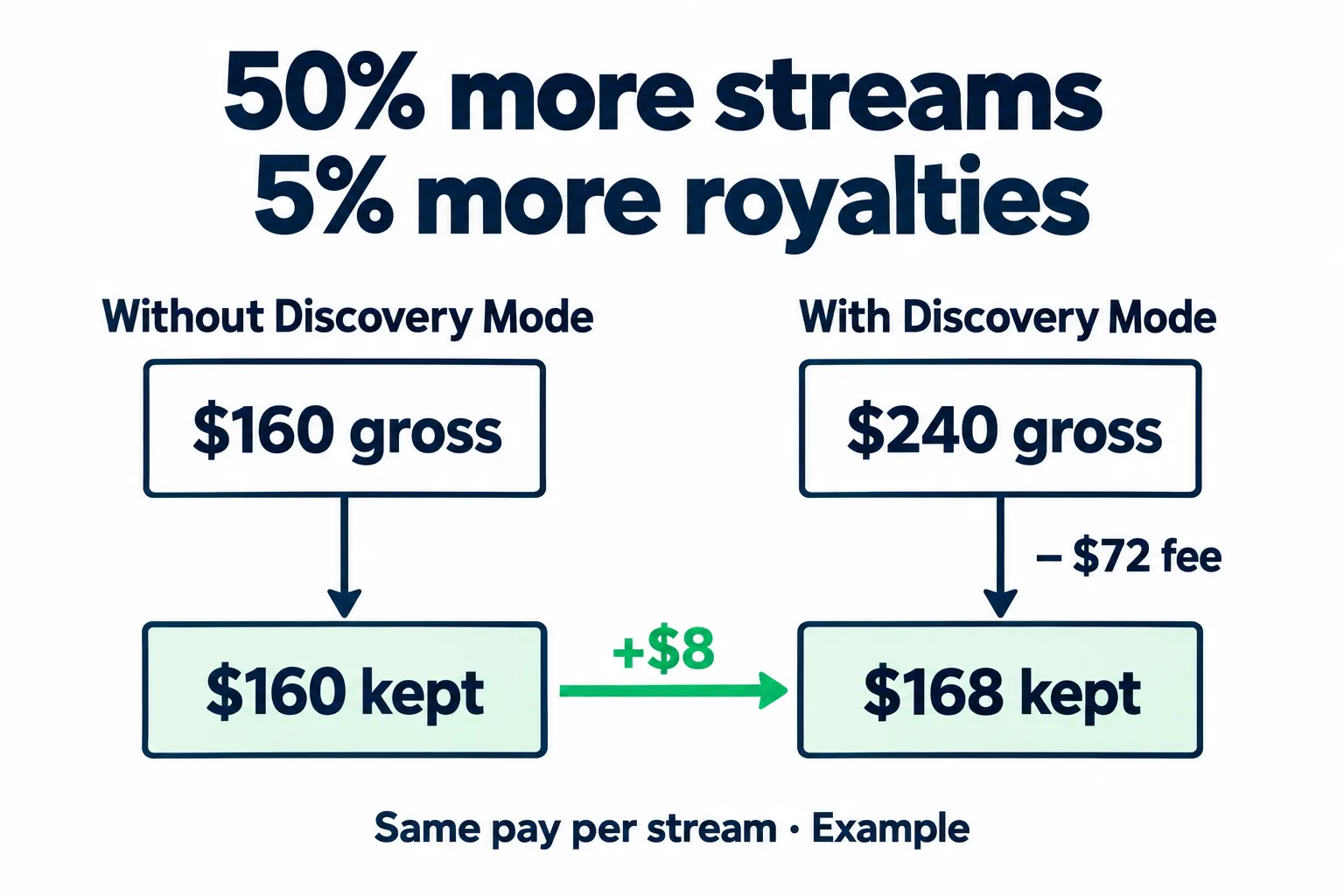
Illustrative royalties from Discovery Mode contexts. Assumes the same average pay per stream, no change in other income, and no further fees or splits.
This is an estimate built from Spotify’s model, not a count of proven extra streams. If the report lacks campaign lift, don’t replace it with historical lift. Campaign stream lift needs at least 500 context streams in the prior month.
Use the 42.9% rule with the right assumptions
At the same average pay per stream, affected streams must grow by about 42.9% to cover the fee. The formula is 1 / 0.70 - 1.
That rule changes when the new streams pay differently. Spotify pays by streamshare, not a fixed rate per stream. Use your earnings and streams to find your average for the period.
| Average gross pay per context stream | Stream growth needed to break even |
|---|---|
| Same as the baseline | About 42.9% |
| 10% lower | About 58.7% |
| 20% lower | About 78.6% |
Here, the baseline is what you expect without the campaign. For these figures, assume no change in income from other sources.
Now assume average pay per stream falls 20%, while streams grow 60%. After the fee, income from those contexts is 10.4% below the baseline: 1.60 × 0.80 × 0.70 = 0.896.
Check average pay per stream when the listener mix changes, especially when more streams come from new markets.
Check the statement before subtracting the fee
Ask your distributor for the song’s gross context earnings, Discovery Mode charge, and net earnings for the same month. Confirm which track versions the report includes.
If the amount shown already has the fee taken out, don’t deduct another 30%. Keep your distributor’s fees and artist splits separate too. The Spotify royalties calculator helps you work through those splits.
Try a range for what the song would have earned without the campaign. In the example above, $168 net could mean an $18 gain against a $150 baseline or a $22 loss against a $190 baseline.
Use the song’s recent trend to set that range. For a cautious check, use the higher credible estimate of what it would earn without the campaign.
If a small change flips your decision, treat the cash result as unsettled. Don’t renew on an $8 estimate as though it were a sure profit.
Which songs belong in your next campaign?
Spotify recommends songs for expected stream lift. You may need something else: cash, new fans, or attention for a sound you’re moving toward.
| Track situation | What to check before renewing |
|---|---|
| A steady catalog earner | Does extra income cover the fee under a cautious baseline? |
| A strong match for the next release | Are listeners saving it and choosing more of your music? |
| An older hit in a different style | Does it serve your current audience goal, or mainly earn cash? |
| A track with little recent data | What useful question would another month answer, and what income could it cost? |
An older track may pay well yet reach fans of a style you’ve moved on from. In a hip-hop catalog, demand for a boom-bap track doesn’t prove demand for a new melodic single.
You can keep the earner running and test the newer sound on its own merits.
In an outside campaign, test different songs with different listener groups. An older track may be the best first listen for one group, even when the next single is a better fit for another.
Don’t treat song selection like a fixed ad budget
Discovery Mode has no cash budget that you divide across selected tracks. Cutting the list from ten songs to two is not, by itself, evidence that those two will get a larger push.
Remove tracks that miss your income or listener goals. Don’t cut a useful catalog track just because someone says you should only promote your newest single.
For each song, write one renewal rule before the results arrive. For example:
- Income: Keep it if net context income beats the cautious baseline.
- Release support: Accept up to a set cash cost while saves and later listening meet your goal.
- Audience test: Run one month to learn whether this sound reaches people who act, then review before extending it.
There is no universal save rate or number of selected songs that proves a campaign is worth keeping.
Judge listener quality as reach grows
In this example, the second campaign reaches three times as many listeners. Its intent rate falls, while more people save or playlist the music.
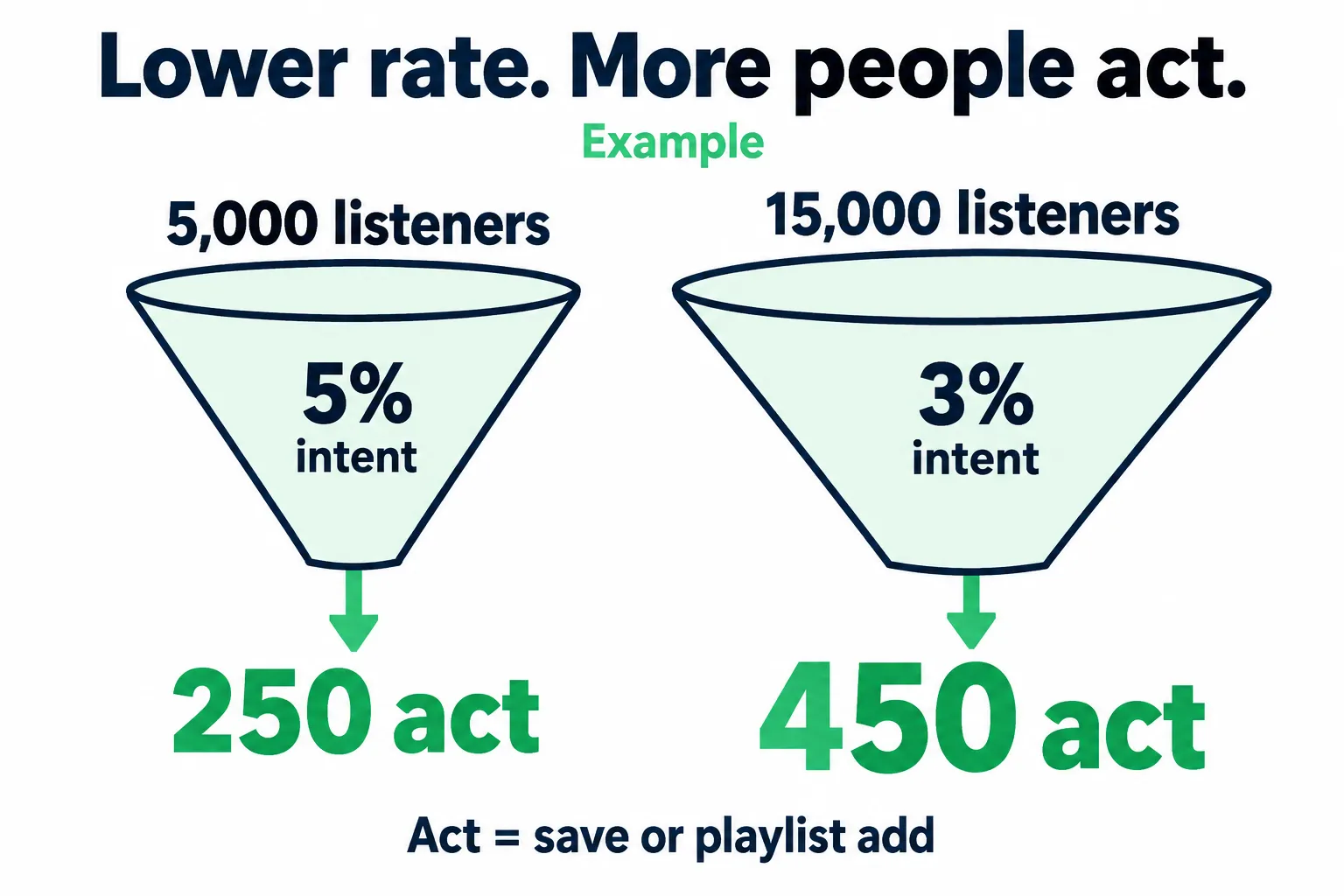
More listeners act in the second campaign. The table below adds the fee per listener who acts.
| Measure | First campaign | Second campaign |
|---|---|---|
| Campaign listeners | 5,000 | 15,000 |
| Intent rate | 5% | 3% |
| Listeners who saved or playlisted | 250 | 450 |
| Discovery Mode fee | $30 | $90 |
| Fee per listener who took either action | $0.12 | $0.20 |
You gained more actions, but paid more for each one. Whether to renew depends on the cost you can support and whether those listeners keep choosing your music.
Don’t stop a track just because its save rate falls as reach grows. Check how many people save or playlist it, what you paid, and whether they listen again.
Keep “new listeners” separate from “new fans”
Intent rate covers listeners who saved or playlisted at least one campaign song. Spotify’s new-listener count uses a different test: no streams of your music on Spotify in the past two years.
The intent rate can include people who already know you. Multiplying new listeners by the overall intent rate does not give you a proven new-fan count.
The fee per listener who saved or playlisted is not the cost of a proven extra fan. Some people may have saved the song without Discovery Mode.
Use Spotify saves to judge the first response. Then look for more active listening through your audience segments. Keep the source, date range, and time allowed for saves the same when comparing results.
Follow the listeners into the rest of the catalog
Open Segmentation > Source of Streams on the song overview. Use Spotify’s source guide to check which groups count as active or programmed listening.
Watch whether people seek out the song from their own library, your profile, or your other releases.
Also check who you’re reaching. A campaign can be good for worldwide catalog income and a weak fit for selling tickets in one city.
Don’t assign every follower gain or extra catalog stream to the campaign. Note releases, ads, press, and playlist changes beside the dates. For a wider drop across tracks, use the algorithmic streams drop guide.
Improve the audience match each month
With Discovery Mode, Spotify chooses who gets a recommendation. In an outside campaign, you can test which listeners choose which songs.
Start with one question: which song would make this group want to hear another?
- Map the audience from your music. Use your catalog, similar artists, and current listener data to choose groups to test. “Hip-hop fans” is broad. Fans of sparse, late-night melodic rap give you a clearer sound to test.
- Test tracks across listener groups. An older guitar-led song may earn repeat listens from one group while a newer synth-heavy track connects with another. Keep both useful matches.
- Make the first listen easy. Use profile imagery and the track you’re promoting in the ad. A mobile ad can open the music in Spotify with one tap. Check that path on your phone before sending traffic.
- Use the response in the next campaign. Record the song, audience, dates, and spend. Compare results over equal windows, then put more of the next budget behind the combinations that earn saves, follows, and repeat listening.
If you use AI for Spotify promotion, check which tracks each listener group responds to and how the system changes next month’s spend. Use those results for the next release.
Check saves, follows, and active listening in your own Spotify for Artists account across the same dates. Note other releases and campaign changes beside them. Use ad delivery to track exposure and Spotify activity to judge the listening response.
For playlist placement, listen to the exact playlist first. Its song mix and listening mood help you judge the fit before adding reach.
Use the Spotify algorithm launch playbook for the wider release plan. Keep cash spend and Discovery Mode’s royalty cost together in your promotion budget. When both campaigns change at once, judge the combined plan.
Test before you renew
Decide what the test should settle: renew this track, pause it, or back another song.
Before the campaign, save its dates, song list, and track versions. Capture recent daily streams and any context data available. Add gross and net royalties when the statements arrive.
Use a baseline that fits the song’s stage
For a stable catalog track, recent daily performance can be a useful starting point. For a new release, the launch spike may be a poor forecast of next month.
Compare daily averages across equal windows. Keep the same song versions and countries in view. If you can’t isolate Discovery Mode contexts, mark that field as unknown rather than using all programmed streams.
Spotify’s campaign-lift model is one estimate. Check it against the song’s recent trend and wider catalog results before making a cash decision.
Leaving a similar track unchanged can help you spot a catalog-wide rise or fall. It won’t give you a clean control group: songs behave differently, and listeners from the campaign may also play that track.
Change one major part of the plan at a time
If you add new tracks, launch ads, and release an EP in the same month, you can judge the whole release plan. You’ll have less basis for saying what Discovery Mode added.
To test Discovery Mode more closely, keep outside promotion as steady as you can. Log any changes you do make. If you’re comparing Spotify’s display tools, use the separate Marquee vs Showcase guide.
An on/off comparison across months can help with a stable catalog track. Use it only if you’re willing to accept a possible loss of reach during the off month.
A fall after pausing is evidence to investigate, not proof of a penalty. Release age, wider demand, and listeners gained in earlier months can all affect the result. There is no reason to assume that a month off “resets” the algorithm.
Review at the right times
- Save the baseline, list the selected songs, and set a cash floor or an audience-growth budget for each.
- Confirm song coverage and read early lift. Avoid comparing fresh engagement figures with fully reported past campaigns.
- Record which tracks stay, which leave, and what evidence would change that choice. Mark any missing royalty data.
- Recheck saves and playlist adds. Finish the cash review once the royalty statement is available.
Engagement uses a 14-day window after first exposure. A fresh campaign has had less time to collect those actions than a finished one. Give both the same follow-up time.
Late royalty reports mean some renewal choices will use estimates. Set the maximum loss you’d accept while waiting. Spotify won’t enforce a cash cap; your limit guides whether to run the next month.
Without that limit, “one more month” can become a standing cost no one reviews.
Your track scorecard
Keep one row per song. A campaign total can hide a weak track behind a large winner.
| What you see | What to do next |
|---|---|
| Net income beats a cautious baseline and listener response holds | Renew; keep watching the payout mix. |
| Stream lift is strong but net income falls | Check average pay and fee scope. Keep it only if the audience gain justifies a stated cost. |
| Historical lift looks good but current results weaken | Judge the latest period. A low starting point can make weak current results look strong. |
| Saves rise but later active listening stays flat | Check audience fit and allow equal follow-up time before extending the test. |
| The result depends on a weak estimate or a tiny sample | Set a cost limit and one question for the next test. |
Use this as the note you review before renewal:
Song / versions / campaign month:
Goal and renewal rule:
Expected context income (off):
Low case / high case:
Campaign streams and campaign lift:
Gross context income / fee / net:
Listeners / intent rate:
Later active listening:
Audience fit / next test:
Other marketing / releases:
Next action and reason:
In the earlier example, the cautious case costs $22 in lost income. Suppose you’ve approved up to $25 for audience growth, and the track also meets your goal for saves and later active listening. Another month may fit your plan.
Record that as audience growth within your budget, not proven profit. If your limit is $10, the same evidence gives you a reason to pause. The numbers haven’t changed; the goal and cost limit have.
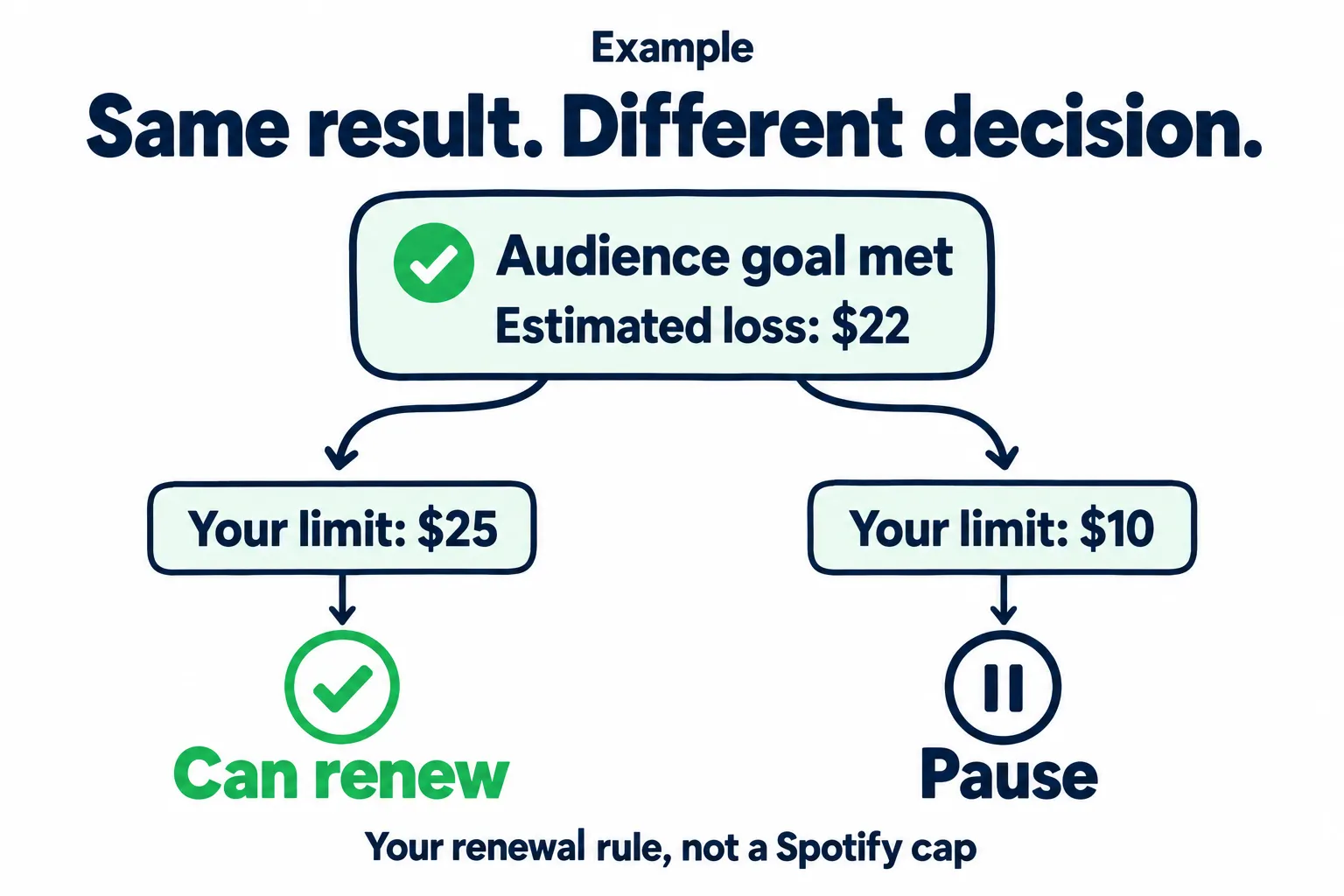
Set the acceptable loss before the results arrive. The audience goal must also be met.
Spotify Discovery Mode eligibility and setup
To use it in Spotify for Artists, Spotify lists at least 25,000 monthly listeners and three eligible songs. Your team must also be registered in a supported country.
Each song must have been out for at least 30 days. It needs 20 streams in Discovery Mode contexts in the last 28 days and must have met the recording royalty rules last month. Check the full access rules for supported partners, release approval, and AI Persona limits.
The recording royalty rules require 1,000 streams in the past 12 months. A minimum number of unique listeners also applies.
Some distributors manage access outside Spotify for Artists. Ask who selects tracks, where you see reports, and how you opt out. For account permissions, use the Spotify for Artists guide.
On the web, go to Campaigns > Discovery Mode as an Admin or Editor. Select songs, review the included versions and duration, then submit.
Setup opens on the 11th. The cutoff is 12 a.m. UTC at the start of the last day of the month. The campaign begins on the first of the next month.
Spotify’s duration settings default to ongoing monthly renewal. Choose one month if you want a firm review point. Normal cancellation leaves an active campaign running until month-end; contact Spotify to stop it early.
Selections can cover the same recording on a single and an album. Confirm the eligible track URIs and rights approvals, especially for shared releases. Add the deadline to your music release checklist.
Spotify Discovery Mode FAQ
Is Spotify Discovery Mode worth it for independent artists?
It can be worth it if the cash gain or lasting listener growth justifies the fee.
- Income goal: At the same average pay per stream, you need about 42.9% more affected streams just to break even.
- Audience goal: Set the income you’re willing to give up, then check saves, repeat plays, and catalog listening.
Judge each song with the track scorecard. A bigger monthly listener count alone isn’t enough.
Does Discovery Mode take 30% of all my Spotify royalties?
No. It applies to selected songs’ recording royalties in Discovery Mode contexts.
- Where: Radio, Autoplay, and eligible Mixes during the campaign.
- Which streams: All affected streams, including those you might have earned anyway.
- Other sources: No Discovery Mode fee.
Example: If those streams still earn $100, you keep $70 after the fee, before other fees or splits.
Use the fee breakdown to check what extra growth needs to cover.
Why is Spotify Discovery Mode not showing up for me?
25,000 monthly listeners alone does not unlock Discovery Mode. Check three more things:
- Your team: A supported country and Admin or Editor access on the web.
- Your catalog: Three eligible songs from a participating distributor.
- Each song: Release age, recent streams in Discovery Mode contexts, and royalty eligibility.
Look under Campaigns > Discovery Mode. Access is still in beta.
If the tab is missing after the eligibility checks, contact support. Your distributor may also manage access outside Spotify for Artists.
How long does Spotify Discovery Mode take to work?
Reports start on day 11 of the active campaign. There is no fixed day when streams should rise.
- Campaign: Runs by calendar month.
- Engagement: Saves and playlist adds keep updating for 14 days after the campaign ends.
- Profit: Wait for the royalty statement before treating stream lift as extra income.
Use the review timeline to compare a full campaign with a fair baseline. Check song selection, listener response, and source mix before renewing weak results.
What happens if I turn off Spotify Discovery Mode?
An active campaign normally continues until month-end.
- Open Campaign settings > Cancel to stop future scheduled campaigns.
- Contact Spotify if you need the active campaign to end sooner.
Radio or Autoplay reach may fall when the extra promotion ends. That drop alone does not prove lasting damage.
Compare net royalties, saves, and active listening over equal periods. Look for listeners who keep choosing your music after the campaign.