
Spotify Marquee vs Showcase: Get More Fans From Your Next Campaign
The campaign with the cheapest clicks can be the most expensive way to grow your audience.
For artists with traction, the Spotify Marquee vs Showcase decision comes down to who you reach, what they do next, and what that result costs.
The Short Answer
- Marquee: A focused push for an eligible new release, inside its launch window.
- Showcase: Flexible timing for new music, catalog, or a later push once a track shows promise.
When both fit, compare the cost per result for your audience goal. Use saves and repeat plays to check the quality of that result.
The Decision This Guide Helps You Make
Use your results to choose which release, country, audience, and format get more budget.
The rules come from Spotify. Worked examples use sample figures, not client results or industry benchmarks.
What You’ll Learn
- Reach: Why access to the tool does not mean room to scale
- Results: How to separate cheap clicks from useful audience growth
- Testing: How to compare formats without mixing up markets or goals
- Timing: When to use both formats around a release
- Next steps: When to add spend, change the plan, or stop
Spotify Marquee vs Showcase: The Differences That Change Your Plan
| Decision | Marquee | Showcase |
|---|---|---|
| Placement | Full screen recommendation on Spotify mobile | Banner on Home on desktop and mobile, plus Browse on mobile |
| Release | Eligible new releases | Eligible new releases and catalog |
| Start window | Within 21 days of release | Any time |
| Maximum run | 10 days | 14 days |
| Creative control | Choice of background color | Choice from Spotify’s supplied headlines |
| Strategic use | A time limited chance to promote a new release | A flexible push tied to demand, a tour, or a catalog moment |
Either campaign can end sooner if its budget runs out. See Spotify’s display campaign overview for the format rules.
Marquee’s start window expires. With Showcase, you can wait for results before putting more spend behind a track.
That makes Showcase useful for new releases too. You can choose it on release day, even if Marquee is available. A larger placement alone is not proof of a better return.
Separate Eligibility From Reachable Demand
Display campaigns require at least 1,000 streams in the past 28 days in one target market. Marquee adds 5,000 monthly active listeners in the country you select. Your team, card, rights, and release must also qualify.
Check the country in Audience > Segments. A large worldwide monthly listener count can hide a small active audience in the market where you want to spend. Our audience segments guide covers the definitions.
Marquee excludes remixes and requires more than half the tracks to be new to that release type. Check eligibility at each stage of a waterfall release. Don’t assume the album qualifies just because the lead single did.
Use Spotify’s release eligibility checklist before assigning budget. Its target market list is separate from the list of countries where teams can buy campaigns.
Passing the Threshold Does Not Mean You Can Spend the Budget
Spotify leaves out people who actively streamed the promoted release in the past 21 days, plus people it predicts will listen anyway. Other bookings and audience changes also affect the forecast.
Your audience can grow while the campaign’s reachable pool shrinks. A strong launch may have already reached many of the people most likely to respond, and adding budget will not create more eligible listeners.
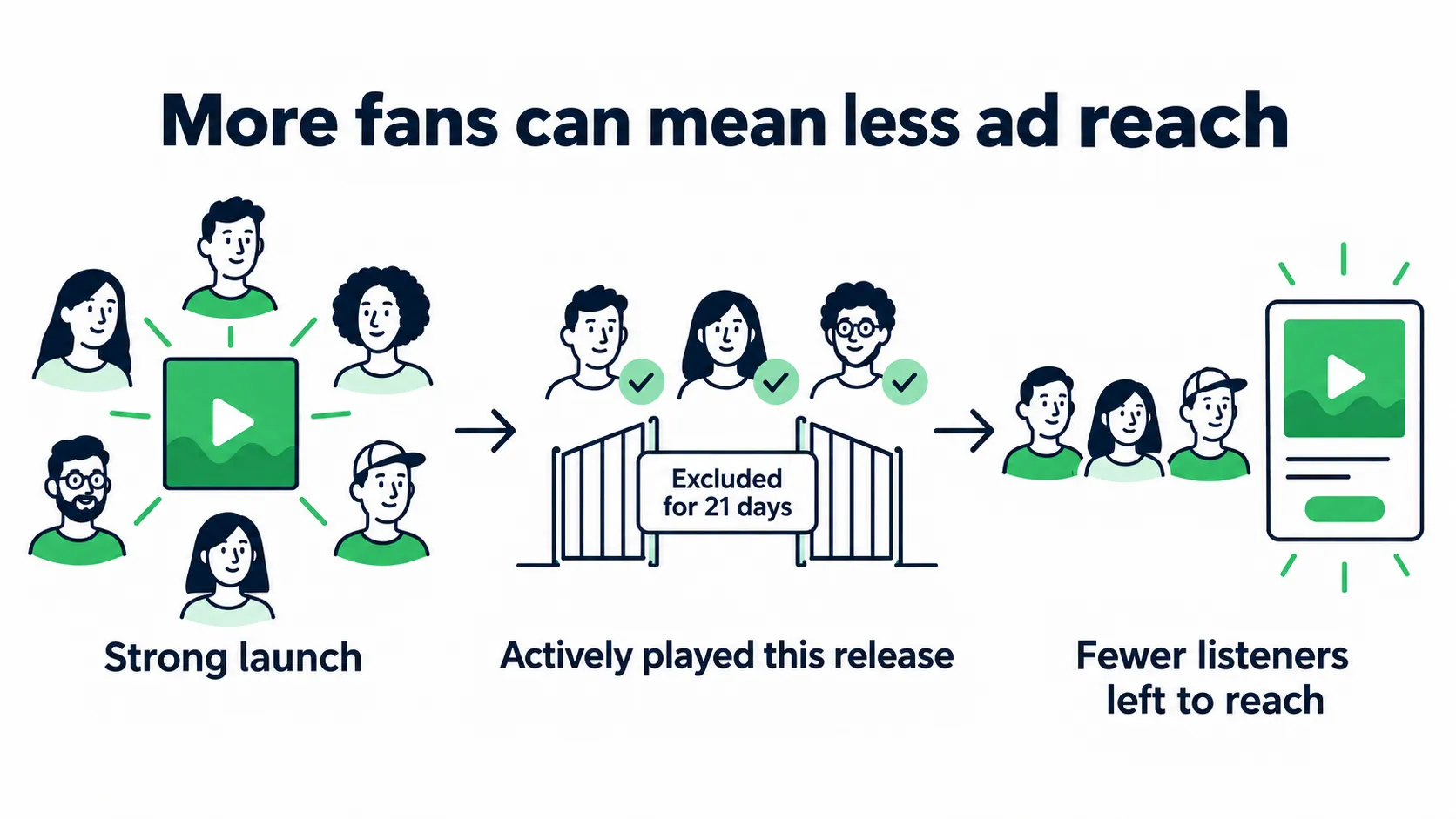
Recent active plays can shrink the audience available for the same release. A larger fanbase does not guarantee a larger ad forecast. View full size
Save the forecast for each country and goal. Use it to check how much spend the audience may support. Recheck it before a follow-up campaign, even if your public listener count has risen.
Choose the Audience You Need to Move
Both formats support growth, engagement, and reactivation. Choose the goal based on who has heard your music and who still chooses to play it.
| What your data suggests | Goal to assess | Main result | What would weaken the case |
|---|---|---|---|
| Lots of playlist reach, few people choosing your music | Grow audience | New active listeners | Cheap streams with weak saves or repeat plays |
| Past fans have gone at least 28 days without actively playing your music | Reactivate listeners | Reactivated listeners | Too few past fans available to reach |
| Active fans still play older music but have not tried this release | Deepen fan engagement | Amplified listeners | Campaign plays stay shallow despite strong clicks |
Spotify’s audience goal guide explains the groups and limits. Some segments will be too small to target alone.
For growth, separate programmed listeners from potential listeners where the report allows. The first group has heard your music through sources such as playlists. The second may be new to your sound. Their response can differ even under the same goal.
A change in that mix can make the next campaign look better or worse even if the format performs the same. Save the segment breakdown, not just the total.
Two artists in the same genre may reach different listeners. Check your own tracks: in which countries do people choose to play them, which songs do they save, and do they explore more of the catalog?
Give Each Goal Its Own Standard
Compare reactivation with earlier reactivation campaigns in the same market. Compare growth with growth. Reaching strangers is a different task from bringing past fans back.
Don’t set one target cost across every audience. Instead, decide what each result is worth to this release. Bringing fans back in a tour market may be useful even when it costs more than reaching new listeners elsewhere. The ad report won’t prove ticket sales, so keep that next step in your wider plan.
Pick the Release and Destination Together
Decide whether you want listeners to hear one track or explore more of the release.
A Single: Test the Entry Point
Promote a single when you want to test how a specific audience responds to that track.
Check whether people responded to the music or to the post around it. A joke, visual hook, or creator trend may earn views without building much interest in the full track. Look for saves and chosen repeat plays in the same market before putting more spend behind it.
For an eligible single, Marquee can send people to an eligible This Is playlist. That route can start three days after release. It gives listeners a path into more of your work, but it also changes what you’re testing.
An Album or EP: Judge Depth Without Inflating the Win
Listeners can play more tracks in one visit to an album. A higher streams-per-listener count alone does not prove they are more likely to return.
Compare album campaigns with other album campaigns where possible. Check the track breakdown: do people move beyond the lead song, or does nearly all the response stay on one track?
If people mostly play and save one track, try it as the entry point for your next push. If they choose several tracks, consider promoting the full release again.
A catalog can have more than one entry track. Your heavier single might draw one group in, while a stripped-back song connects with another. Keep the track and audience paired in your notes. Rotating songs without keeping that link makes it harder to learn why the result changed.
Spotify’s destination and creative rules explain what you can change. Keep the destination consistent when you compare formats. A single page versus a playlist adds a second difference to the test.
Catalog: Follow a Specific Reason to Listen
Showcase can support an old song gaining fresh demand, an album tied to a tour, or a catalog release ahead of new music. Pick the track that fits the moment, even when it isn’t the newest one.
If you’re warming an audience before an album, promote an existing release. Judge that campaign on its own results. A later album lift may support the plan, but it won’t prove those same listeners moved through both campaigns.
Spotify Marquee vs Showcase Cost: Set a Limit for the Next Round
Self-service sub-campaigns cost at least $100, with a $10,000 budget limit. Marquee booked through Spotify’s local representatives starts at $250.
Both charge per click, including billable saves. Prices depend on the setup. Standard pacing spreads delivery across the run; accelerated pacing spends faster. You cannot raise the budget after launch.
Spotify’s budget and forecasting guide covers these terms. Use your account’s quote and forecast when planning spend.
Set Your Cost Ceiling Before Reading the Results
Choose the outcome first: new active, reactivated, or amplified listeners. Then set a cost you can afford to repeat for that goal and country.
For example, a sample $3 ceiling per new active listener means a fully spent $300 test needs at least 100 of them. That is a budget rule you chose, not a market benchmark.
Check saves and active plays alongside cost. Cheap listeners who rarely save or replay the music may not be worth paying for again. Use your own comparable campaigns to judge the result rather than borrowing a universal “good” save rate.
Our music promotion budget calculator helps you set the total. Hold back money for the next decision, not just the next scheduled ad.
Check What the Extra Spend Bought
Suppose the first $200 brings 100 new active listeners, or $2 each. A later $300 campaign brings 60 more, at $5 each.
Combined, that is $500 for 160, or about $3.13 each. The blended figure hides how much worse the second round was.
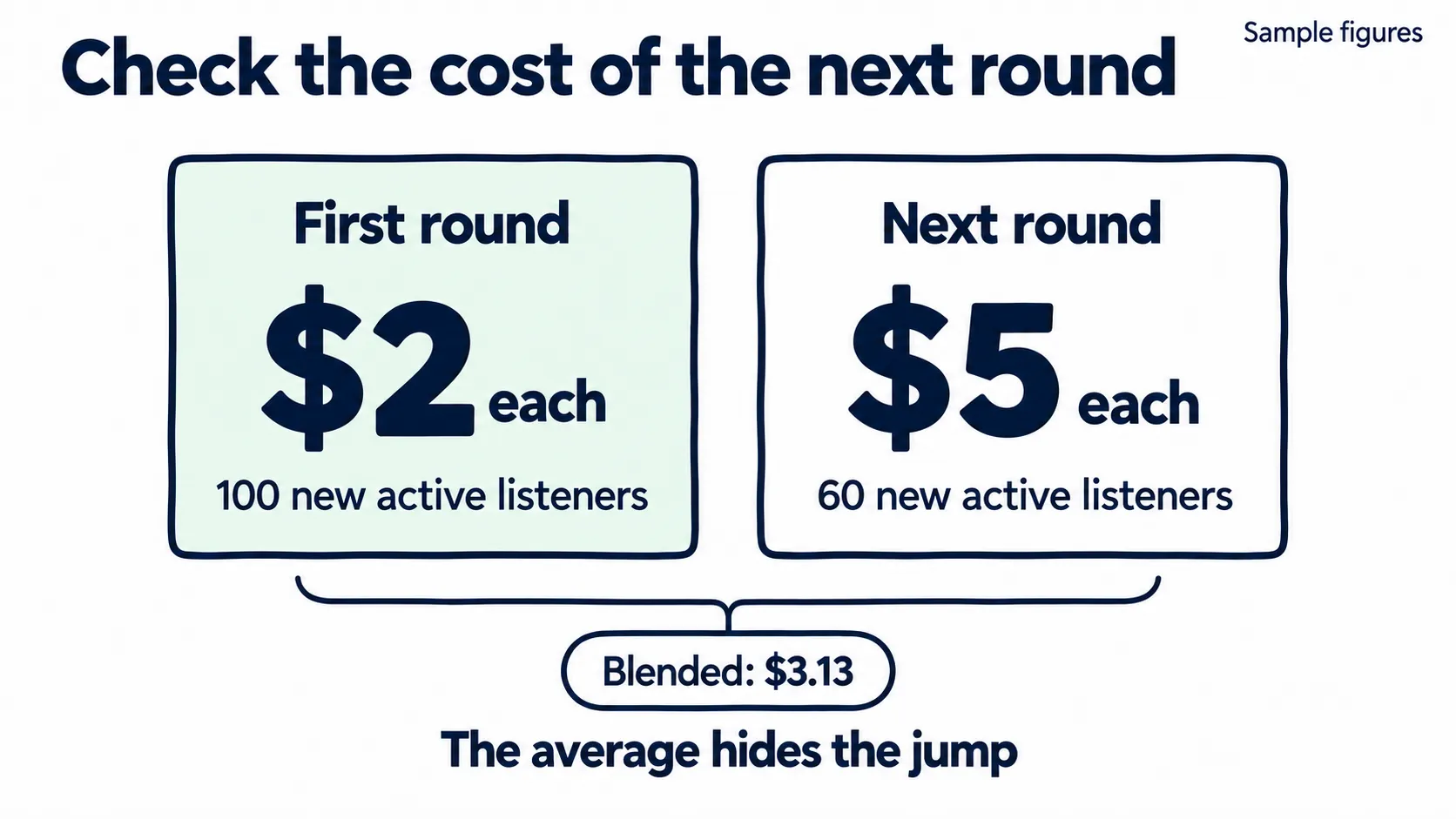
Sample figures: $200 for 100 new active listeners, then $300 for 60 more. The $3.13 blended cost hides a $5 second round. View full size
If your ceiling was $3, the second round missed it. Before repeating, check whether the audience mix, timing, market, or remaining reach changed. Don’t assume the first result will hold as you add spend.
Compare Results at the Audience Goal Level
This sample compares two campaigns for one release in one country. Your aim is to grow the active fanbase. Both campaigns use the same custom selection of new, past, and current listeners, so their totals include more than new fans.
These sample figures represent final reports, not expected outcomes.
| Reported result | Marquee | Showcase |
|---|---|---|
| Actual spend | $200 | $200 |
| Clicks | 500 | 400 |
| Converted listeners | 220 | 160 |
| New active listeners | 40 | 80 |
| Intent rate | 25% | 35% |
| Cost per click | $0.40 | $0.50 |
| Cost per new active listener | $5.00 | $2.50 |
The Marquee report shows more clicks and total converted listeners. Showcase brought twice as many new active listeners at the same spend.
Marquee: cost per new active listener
$5.00
$200 spent / 40 new active listeners
Showcase: cost per new active listener
$2.50
$200 spent / 80 new active listeners
Showcase also has a higher intent rate, but that rate covers all converted listeners. It does not tell you that 35% of the new active listeners saved or playlisted a track. Check segment-level results where available.
Keep These Three Measures Separate
Conversion rate is the share of people reached who chose to stream the promoted release after seeing the campaign. Divide by people reached, not clicks.
Intent rate is the share of converted listeners who saved a track or added one to a playlist. Those actions suggest an interest in listening again. You still need time to see who returns.
Active streams per listener measures how often converted listeners chose to play the release. Read it alongside release type and the track breakdown.
Spotify follows behavior for 14 days after exposure. Final results arrive two weeks after delivery ends. Its reporting guide defines the measures.
What This Comparison Can and Cannot Prove
The sample gives a reason to consider more Showcase spend. It does not prove that the format caused the difference.
Spotify may have reached different people within the selected audience. One campaign may have run during release week; the other may have had support from a new video. Record those differences before calling a winner.
A reported conversion means someone listened after seeing the ad. They might have listened without it. Use cost per reported listener to compare spend, but don’t treat every conversion as extra growth caused by the ad.
Design a Test That Can Change Your Next Decision
| Decision you need to make | Keep as close as possible | Change |
|---|---|---|
| Which format fits this release? | Release, destination, market, goal, dates, and spend | Marquee versus Showcase |
| Which country deserves more spend? | Format, release, goal, and report window | Country |
| Should we reach new or past listeners? | Format, release, country, and dates | Audience goal |
These tests don’t split the same group of listeners at random. Overlap can affect reach when campaigns target the same release and market.
With $300, a focused two-format comparison might use $100 for each and hold $100 for a later step. Splitting that same money across two formats, three countries, and three goals leaves too many questions and too little evidence.
Read Small Results With Care
If one test brings 12 new active listeners and another brings 15, the second has a lower cost at equal spend. Three people may still be too thin a basis for a major shift in budget.
Record the difference. Before a much larger booking, repeat the test in another comparable campaign to see whether the result holds.
Keep Comparable Campaign Records
Keep one row per sub-campaign with:
- Release, destination, country, format, goal, audience selection, dates, and pacing
- Forecast, booked budget, actual spend, reach, and clicks
- The listener outcome tied to the goal, plus intent rate and active streams per listener
- Track and audience breakdowns where available
- Other ads, press, playlists, or content that could explain the response
- The next action and the result that would change your mind
Compare final reports only with other final reports. Use actual spend in the math. Judge each country’s results on their own first. Cheap reach in one can hide high costs in another when you combine the reports.
Sequence Marquee and Showcase Around the Release Clock
Use both when you can reach more likely listeners with the second campaign, or when a new video, tour, or catalog moment gives them a reason to listen.
| Release moment | Option to assess | Why it may fit |
|---|---|---|
| Before new music arrives | Showcase for a relevant existing release | Reintroduce the catalog while you prepare the launch |
| Early launch | Marquee or Showcase | Reach the chosen audience while the release has support |
| Later in the Marquee start window | Marquee, if eligible and still useful | Reach remaining demand before access expires |
| Beyond that window | Showcase | Support a fresh moment or a track that has earned more spend |
You don’t need to book every stage. Each extra campaign needs a reason and enough people left to reach.
The Reporting Delay Changes the Plan
A Marquee campaign launched on release day may run for about 10 days. You may get its final report around day 24. By then, the 21-day window to start another Marquee for that release may have closed.
So a full “test, wait for final results, then scale Marquee” plan may not fit one release cycle.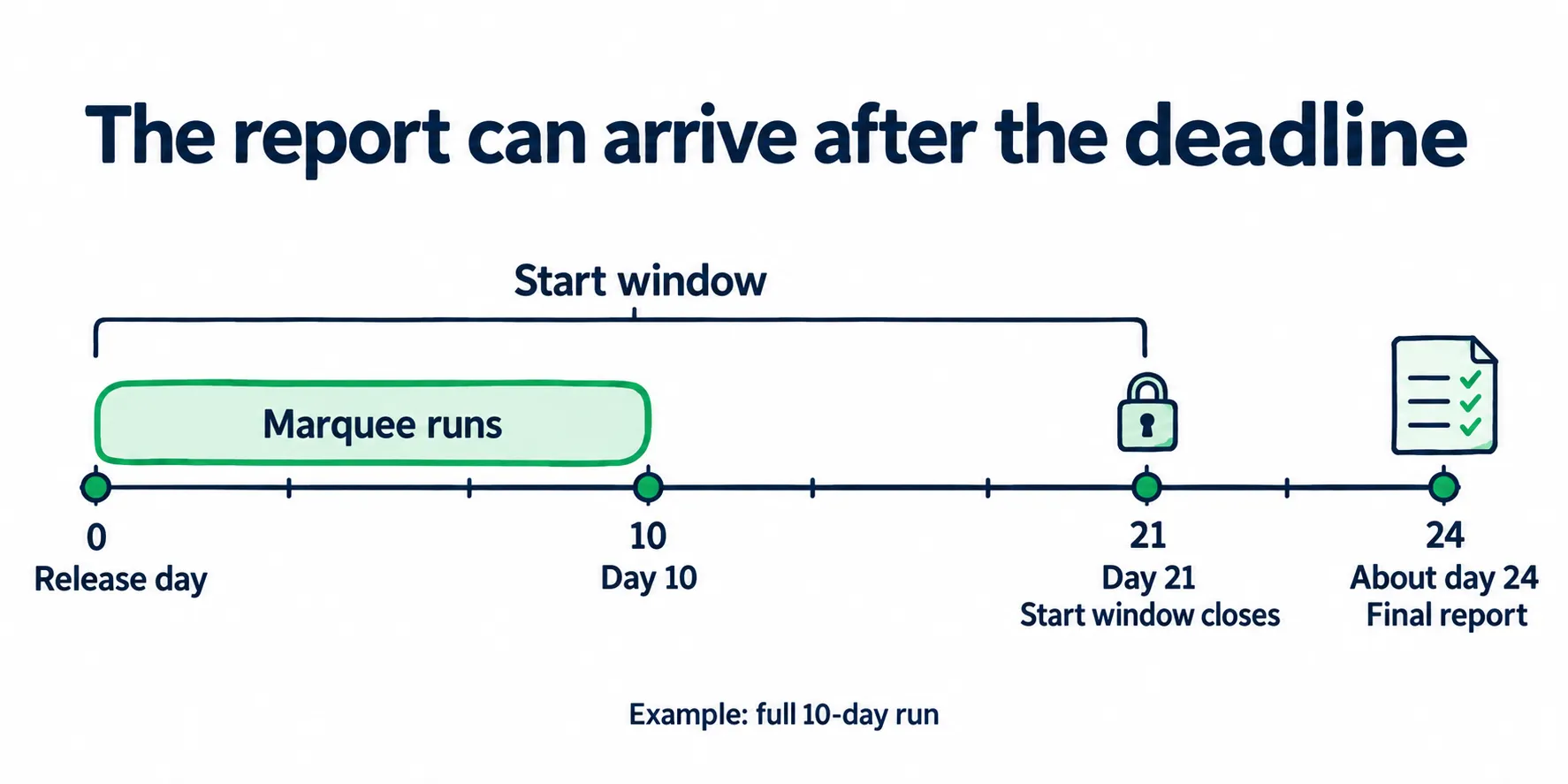
For a full launch-day run, final results can arrive after the window to book another Marquee has closed. View full size
Use prior comparable releases to help set launch spend. If you book several sub-campaigns before final results, set a combined cap in advance. Showcase gives you a later option once the full report is ready.
Add those dates to your music release checklist. The Spotify launch playbook can help place them within the broader release plan.
A Second Format Does Not Mean the Same People See You Twice
Recent active listeners may be excluded from the next campaign. Don’t treat Marquee followed by Showcase as a guaranteed two-step path for each fan.
Check the next forecast and segment choices. If the first push has already reached much of the useful audience, a later date, another relevant market, or another release may be a better use of money.
Decide Whether to Scale, Change, or Stop
| What the report shows | Likely issue to investigate | Next move |
|---|---|---|
| Low spend despite a large booked budget | Limited reach, exclusions, overlap, or competing demand | Recheck the forecast and test one audience or market change |
| Plenty of clicks, few converted listeners | People click but do not go on to listen | Check release and audience fit before adding spend |
| Good listener count, weak saves and shallow plays | Attention without much interest beyond the first listen | Inspect track and segment results; test a better entry track |
| Good depth, few new active listeners | More of the response may come from people who already know you | Review audience mix before judging it as a growth win |
| Strong result in one country | A local fit worth testing further | Keep that country separate and watch the cost of added spend |
| Higher costs on the next round | Less useful reach left, or a change in conditions | Compare setup and audience mix before repeating |
Low spend says little about the song if the ad barely reached anyone. A few saves from a tiny audience are also too little evidence for a large booking.
Before you scale, check three things: the cost fits your cap, saves and chosen plays hold up against similar work, and the next forecast shows room to reach more people.
Key takeaway
Keep the Learning When the Campaign Ends
Keep the results that show which listeners want which parts of your music, even when there are too few people left to reach with the same campaign.
Add each campaign’s track, country, audience, cost, and listening response to one working record for the artist. Over time, you can spot a pattern that a single report would miss.
Match Your Sound to an Audience, Then Test the Fit
Start with the artist profile and catalog: genre, similar artists, listener markets, and tracks people already choose to play. Use these to select your first audience, then adjust your spending based on how people respond.
Spotify’s native tools let you choose from their audience groups. Promotion outside Spotify can use other ways to find likely listeners, including mobile ads that open the music when someone taps. Keep the path from ad to song short, and match the song to the reason the person clicked.
Keep matching listeners to your sound tied to these decisions:
| Start with | Learn from | Change next |
|---|---|---|
| Your profile, sound, and current listener markets | Which groups choose to listen | The audience you put more spend behind |
| A few tracks with different strengths | Track-level saves and active plays where available | Which song introduces each group to your catalog |
| A capped campaign in a relevant market | Cost per goal outcome plus listening quality | The size and focus of the next booking |
| Results from past releases | Whether the pattern holds with new music | What carries forward and what needs a fresh test |
Put more spend behind the track and audience pairs with stronger results. You may need a different song for the same audience, rather than more reach for the song you started with.
Carry Forward the Match, Then Test the New Release
Suppose an older, darker track earns strong saves in one market. Your latest bright pop single gets cheaper clicks there, but few people choose to play it again.
That gives you a reason to keep the older track as an entry point for that audience. Test the new single with a group whose response fits its sound. You can support the new release without forcing every listener through the same song.
When the next record arrives, reuse the evidence that still fits: the market, audience, and sound connection. Give the new track a capped test. Retest the audiences that worked before, and make the next budget depend on how they respond to the new track.
Rotate the catalog based on those results. Across a large catalog, software can help track song and audience pairs and adjust campaigns. You should still be able to see which track reached which audience, how they responded, and what changed in the next round.
Verify What Carries Over in Spotify for Artists
After the final report, review the same market over equal time windows. Are active listeners and catalog plays holding up? Did the next release get a stronger response from that market?
Keep other promotion in the record. The campaign report cannot show that every later listener came from one ad. Use the follow-up to judge whether the wider plan is building demand. The release engagement guide covers that readout.
If people reach the profile but rarely explore another track, check the route into your catalog with the Spotify profile audit. If you also run Meta ads, use the Meta ads for Spotify calculator to keep link clicks and listening outcomes separate.
Before the next booking, name the audience, the track that fits it, and the result that supports more spend.
Spotify Marquee vs Showcase FAQ
Is Spotify Marquee Better Than Showcase?
Neither wins for every release. Choose based on timing, audience fit, and cost:
- Marquee fits an eligible new release within its launch window.
- Showcase works for new music and catalog, including a later push behind a track that is connecting.
When both fit, compare the same release, market, and goal. For growth, judge cost per new active listener, then check saves and active plays.
How Much Do Spotify Marquee and Showcase Cost, and What Does $100 Buy?
Both start at $100 per self-service sub-campaign.
- Booked through Spotify’s local representatives: Marquee starts at $250.
- Billing: You pay for billable clicks, including saves, at the price shown in setup.
- Extra countries: Each needs its own sub-campaign and minimum budget.
At a sample $0.50 per click, a fully spent $100 buys 200 clicks. That is not a forecast of 200 listeners or streams.
Spotify may spend less than the booked budget. Check the reach forecast and current budget rules before you commit.
Why Is Marquee Unavailable Even Though I Have Thousands of Monthly Listeners?
Marquee needs 5,000 monthly active listeners in the country you want to target. Your public worldwide listener count does not show whether you qualify.
Check these three things:
- Country: Open Audience > Segments and select your target market.
- Active count: Check monthly active listeners, not the public total.
- Release: Confirm that it meets Marquee’s new release rules and start window.
You also need the shared display campaign requirements. If Showcase is available but Marquee is not, check the extra audience and release rules in Spotify’s eligibility guide.
Are Marquee and Showcase Better Than Meta Ads for Spotify Growth?
A cheaper click does not prove cheaper listener growth. The routes differ:
- Marquee and Showcase: Reach people already using Spotify.
- Meta ads: Let you test creative and audiences outside Spotify, with an extra step before listening.
Compare the same music and market, then judge listening response alongside spend. Keep social follows separate from Spotify results.
Use the Meta ads for Spotify calculator to compare cost assumptions. A landing-page click is not a confirmed stream.
Will Listeners Keep Streaming After a Marquee or Showcase Campaign Ends?
Saves, playlist adds, and chosen repeat plays offer better clues than clicks alone. They still do not tell you how many people will become regular fans.
Use three checkpoints:
- Before launch: Save the starting audience figures for your target market.
- After delivery: Read the final campaign report.
- Four weeks after delivery: Check whether active listening and catalog plays hold up in the same market.
Log other promotion too, so you don’t credit one campaign for everything. Spotify’s reporting window ends before you can judge lasting fan growth.