
Best Music Distribution Services: Costs and Risks Compared
A cheap music distributor can get expensive fast once you need a real release date, Content ID, or a safe way to leave.
Search for the best music distribution services and you will see a wall of low prices and “100% royalties” claims. That is the easy part of the sale. The terms that decide your real cost sit deeper.
Will your songs stay live if your card expires? Can you reach a person when Apple puts the release on the wrong artist page? What will YouTube take? Can you leave without making a mess of your stream count?
The Short Answer
LANDR gets our top spot based on the terms posted when we checked. Its entry plan costs $24 per year, covers unlimited releases, and takes no cut from normal streaming royalties. The bigger reason is catalog safety. LANDR says released music stays live if you cancel.
It is not the best fit for everyone. If you manage two artist names, Ditto Pro may fit better because it includes clear release protection. If you are releasing one album and want to avoid annual bills, CD Baby may cost less. If your budget is $0, RouteNote works, but it keeps 15%.
Every price and policy below was checked at publication. Plans change, so confirm the final checkout page and terms before paying.
The best music distributor is the service with the lowest total cost and the least catalog risk for the way you release.How This Guide Is Different
Most lists compare store count, price, and royalty share. Nearly every known distributor can reach the big stores, so store count did not help us pick a winner.
Instead, we read real artist questions and complaints. The same worries kept showing up: takedowns after a missed bill, slow help, wrong artist pages, hidden fees, held money, and risky catalog moves. We built the ranking around those problems.
Our sources were public plan pages, help docs, store partner lists, and real artist threads. Where a fact can change, we flag it so you can confirm it before you pay.
What You’ll Learn
- Which distributor fits your release volume, revenue, and catalog size
- How to compare three year cost instead of banner prices
- How to audit exit terms, royalty holds, support, and data exports
- When Content ID or publishing tools create overlap and claims
- When one distributor is enough and when a split catalog can make sense
- How to move a release without risking its play count
Best Music Distribution Services At A Glance
These are public United States prices before tax. When a plan says “100%,” it means you keep the normal store royalties. YouTube, social video, publishing, sync, cash outs, and extra tools may have their own fees.
| Service | Best fit | Public base price | Main issue to verify |
|---|---|---|---|
| 1. LANDR | Strong value for one active artist | $24 yearly, unlimited, normal store royalties kept | Post cancel account control and rights tools |
| 2. Ditto Pro | Two artist names and release protection | $59 yearly, unlimited, normal store royalties kept | Which releases are protected after a plan change |
| 3. DistroKid | Frequent releases with few paid extras | $24.99 yearly, unlimited, normal store royalties kept | Per track extras and catalog protection |
| 4. TuneCore | Reporting and music business tools | From $24.99 yearly, unlimited | Different cuts across social and publishing income |
| 5. CD Baby | Albums and slower release schedules | $9.99 per single or $14.99 per album, then 9% | Commission growth as revenue rises |
| 6. Amuse | Mobile first release management | $23.99 yearly, unlimited | Post cancel royalty cut |
| 7. UnitedMasters | Brand and sync opportunities | $19.99 yearly, unlimited | Higher plan value and Content ID terms |
| 8. Symphonic | Support, splits, and deeper reporting | $29.99 yearly, unlimited | Starter does not include store team pitching |
| 9. RouteNote | No upfront distribution bill | $0 upfront, artist keeps 85% | Commission cost as income grows |
| 10. AWAL | Artists with proven traction | Application and custom deal | Selection, term, recoupment, and exit rights |
Spotify has a list of providers it knows and recommends. Apple has its own music partner list.
These lists confirm that a company can send music to the stores. They do not tell you if its price, support, or exit terms will work for you.
How We Ranked The Best Music Distributors
Almost every service here can reach Spotify, Apple Music, Amazon Music, and YouTube Music. We treated store count as a basic check and ranked on everything else.
YouTube’s guide to music distributors also shows why clean song data, clear reports, Content ID, and channel help matter.
We scored the decision across six areas:
- Catalog continuity: What happens after a failed payment, cancel request, or move
- Full cost: Base fee, royalty cuts, extras, cash out fees, currency fees, and renewal
- Release control: Dates, times, territories, credits, splits, ISRCs, and artist IDs
- Issue handling: How fast a person can fix a late release, bad match, or false claim
- Rights coverage: Content ID, social video, publishing, sync, and any overlap
- Data control: Whether you can export statements, IDs, store links, and split history
The 10 Best Music Distribution Services Compared
1. LANDR: Best Overall On Published Terms
LANDR ranks first because it pairs a low base price with strong exit terms. Basic costs $24 per year. You can release as much music as you want and keep the normal store royalties.
LANDR also says released music stays live if you cancel, so one failed card should not force a rushed catalog move. Still, “stays live” is not full control. Ask how reports, payouts, tax changes, metadata fixes, and takedowns work after cancellation.
LANDR Basic fits one active artist who needs core delivery. If you need Content ID or deeper team tools, price the full stack before calling it the cheapest.
2. Ditto Pro: Best For Built In Release Protection
Ditto’s $19 Starter plan is cheaper, but the $59 Pro plan is the stronger business offer. Pro covers two artist names and adds Content ID, faster help, publishing tools, exact release times, and Release Protection.
Release Protection is the main value. Ditto says protected releases stay in stores after a missed bill or cancellation. Starter does not protect every release the same way, so check each release after joining or changing plans.
The two artist limit suits a band member with a solo alias or a producer running two projects. Publishing and sync income carry 15% cuts, so keep those separate from normal store royalties.
3. DistroKid: Best For Frequent Releases
DistroKid works best when release volume is high. With one or two uploads a year, you will not use its main advantage.
The Musician plan starts at $24.99 per year for one artist. Uploads are unlimited, normal store royalties have no distributor cut, and Spotify lists DistroKid as a preferred provider.
The risk is extra cost. Release dates, Content ID, cover licenses, discovery tools, and catalog protection can raise the bill. Some extras are charged by track or release. If 30 tracks need one annual extra, model that cost across all 30.
DistroKid is a weaker fit when an older catalog needs paid protection release by release.
4. TuneCore: Best For Reporting And Admin Tools
TuneCore suits artists who want distribution and admin tools in one account. It supports splits, reporting, social revenue tools, and a separate publishing service. Unlimited plans start at $24.99 per year.
Do not read “100% royalties” as “100% of every revenue type.” Social video and publishing follow other terms. Publishing also needs a conflict check, because a second admin can create duplicate claims and slow payment.
TuneCore works best when you will use the wider account. If you only need store delivery, judge the entry plan alone.
5. CD Baby: Best For Albums And Slow Release Schedules
CD Baby charges once for each release, then takes part of future income. A single costs $9.99 and an album costs $14.99. CD Baby then keeps 9% of stream and download money.
That can work for a small catalog with modest income. It becomes expensive as revenue or release volume rises.
An album earning $300 over three years would cost $41.99 on CD Baby, against $72 on a $24 annual plan. At $3,000, CD Baby would cost $284.99, and the same annual plan would still cost $72.
Social video, publishing, sync, and faster review have separate terms.
6. Amuse: Best Mobile First Workflow
Amuse offers a strong mobile workflow and a simple entry price. The Artist plan starts at $23.99 per year for one artist. It includes unlimited releases, daily numbers, and normal store royalties. Higher plans add more artists, faster help, better audio files, and no Content ID cut.
Leaving has a cost. Amuse says old music stays live, but it may take 25% from those songs. That cut equals $23.99 when a catalog earns about $96 per year, so above that point, keeping the plan may cost less.
The entry plan can also take 15% from Content ID and some collaborator splits. Model those income lines separately.
7. UnitedMasters: Best For Brand And Sync Paths
UnitedMasters DEBUT+ costs $19.99 per year. It covers unlimited releases, and you keep the normal stream money. SELECT costs $59.99, and its main draw is access to brand and sync deals.
Access is not a placement. Brand fit, clean rights, audience proof, and strong visuals matter more than access to an application page.
On DEBUT+, Content ID costs $4.99 per release, and you keep 80% of that money. Count it across the full catalog.
8. Symphonic: Best For Support And Detailed Data
Symphonic combines support, splits, data, and release tools in one account. Starter costs $29.99 per year for one main artist. It includes unlimited releases, free splits, reports, and a campaign planner.
Starter does not include pitches to store teams. That service sits in the selective Partner plan, so buy Starter for its support and operations. Electronic artists should also add the Beatport cost.
9. RouteNote: Best Free Music Distribution Service
RouteNote Free removes the upfront bill. You can upload unlimited releases, then keep 85% of store income. Content ID uses the same split, and you can move a release to Premium later.
Premium starts at $10 for a single and $30 for an album. Each release then renews at $9.99 per year, so a ten release catalog would cost $99.90 yearly after its first fees. A 15% cut reaches $99.90 at $666 of annual income. Below that point, Free may cost less.
Run the math across the whole catalog. A renewal can work for one album and fail for 40 singles.
10. AWAL: Best Application Based Step Up
AWAL is a selective distribution and label services path. You apply, and the company decides if the project fits. It suits artists with proven demand, a clear release plan, and a team that can use the extra support.
There is no simple public deal for everyone. Ask what services are promised, what gets recouped, what approval rights apply, how long the term runs, and what happens to the catalog after exit.
Judge the offer on its own terms, and have a music lawyer review it before signing.
Flat fees protect margin as revenue grows. Percentage deals reduce upfront risk. Pick the model that fits where your catalog sits today and where it is likely to go.Build A Distributor Scorecard For Your Catalog
Your release volume, revenue, and rights needs decide which service wins for your catalog. This scorecard turns them into one number you can compare.
Score each service from 1 to 5 in the six areas below. Multiply the rating by the weight. A perfect total is 500.
| Area | Weight | What earns a 5 |
|---|---|---|
| Catalog continuity | 25 | Clear grace period, safe exit, and no forced rush to move music |
| Issue handling | 20 | A person owns store errors, claims, and urgent release problems |
| Full cost | 20 | The three year bill stays low at your release and revenue level |
| Release control | 15 | You control dates, IDs, credits, territories, and updates |
| Rights coverage | 10 | The tools you need are included with no rights conflict |
| Data control | 10 | Reports, IDs, balances, splits, and store links can be exported |
Then add your deal breakers: features that block the release if they are missing. Examples include an exact release date, Beatport delivery, a cover song path, a required language, a safe exit, or reuse of an existing ISRC.
A high score cannot rescue a deal breaker. Remove any service that fails a requirement before comparing totals.
Find Your Best Distributor With The Catalog Exit Test
Before you pay, send real operating questions to support. Keep the reply with your account records.
| Risk | Ask this | Strong answer | Warning sign |
|---|---|---|---|
| Missed payment | How many days pass before a takedown request? | A clear grace period and warning process | Immediate removal or no written timeline |
| Cancellation | Which releases stay live, and what cut applies? | Release level rules with future account access explained | “Your music is safe” with no details |
| Royalty hold | What triggers a hold, and how do I appeal? | Named evidence, review steps, and response times | No appeal path or open ended review |
| Catalog move | Can I export IDs and reuse my original ISRC? | Full exports and a clear migration process | Manual copying or blocked identifiers |
| Store problem | Who fixes a wrong artist page or missing release? | A human owner and a clear escalation path | Generic help articles with no case owner |
| Getting paid | Which cash out, tax, currency, and balance rules apply? | Country specific fees and payout limits in writing | Important charges appear only at withdrawal |
Also ask how much notice you get before a price or contract change.
Skip broad questions like, “Is your support good?” Give them a real problem.
Try this support test:
I have one single with a nonexclusive beat license,
two main artists, an existing ISRC, and a planned Content ID claim.

Which parts are allowed on this plan?
What proof will review need?
What happens if I cancel?
A strong support team should catch the Content ID problem, because a nonexclusive beat will often fail YouTube’s rights test.
The reply should name the plan, policy, proof, and next step. If you get a sales pitch that misses the rights conflict, you have learned how support handles real problems.
Key takeaway
What happens to your old songs when you cancel is part of the price.
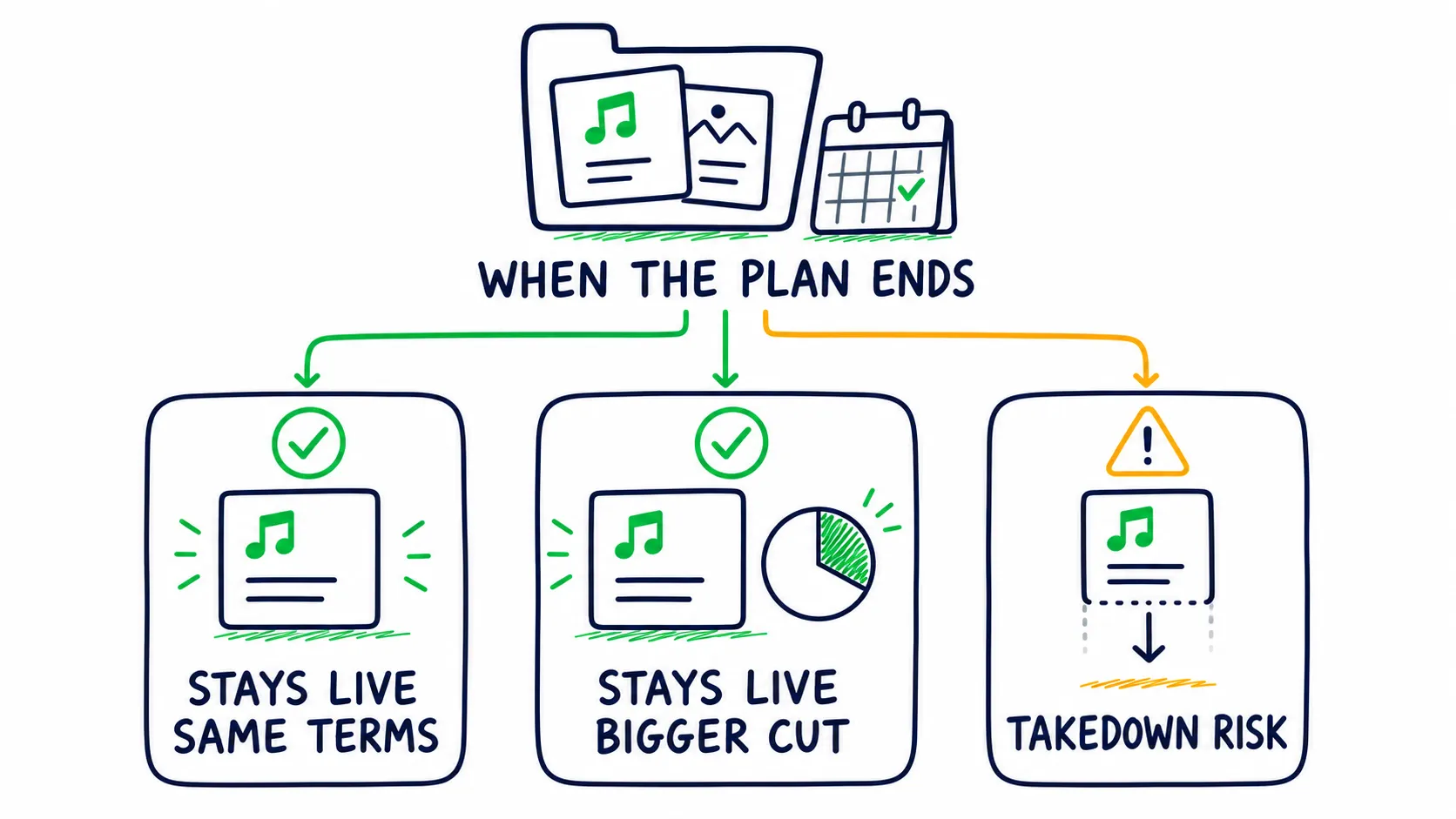
The cancel rule belongs in the price comparison. The same low fee can lead to three very different catalog outcomes.
Build A Rights And Promotion Evidence File
A royalty hold can start with a rights complaint, unusual streaming pattern, false Content ID claim, or store fraud report. Online complaints rarely show the full account history, so build your evidence before you need to defend the release.
Keep one private evidence folder for each release with:
- Final audio and artwork sent to the distributor
- Beat licenses, sample clearances, cover licenses, and feature approvals
- Signed master and songwriting splits
- ISRC, UPC, artist IDs, label name, credits, and delivery date
- Promotion invoices, campaign dates, provider promises, and traffic sources
- Monthly store reports, royalty statements, and balance exports
- Support tickets, claim notices, and the reply to each one
If streams jump without a clear cause, check the playlist, country, and source. Stop any campaign that cannot explain its traffic, save the evidence, and contact the distributor in writing.
Withdraw royalties on a schedule that makes sense after cash out fees and tax. Do not use a distributor account as a long term bank account.
Calculate The Real Cost Before You Choose
Use this model:
Three year cost =
base fees + release fees + renewals
+ catalog extras + revenue cuts
+ cash out fees + currency fees + move cost
Project the catalog you expect to have, not only the release in front of you.
A 15% cut of $160 is $24. Once revenue passes $160 yearly, that cut costs more than a $24 annual plan, though extras can still change the answer.
| Pricing model | When it can win | What makes cost grow | Main risk |
|---|---|---|---|
| Flat annual fee | Frequent releases or rising revenue | Higher plans and optional extras | Catalog rules after cancellation |
| Release fee plus commission | Small catalog with modest income | Release count and future revenue | A winning song becomes expensive |
| No upfront fee plus commission | Testing demand without a starting bill | Every dollar the catalog earns | The free plan costs more at scale |
| Per release renewal | A small stable catalog | Every release kept live | Back catalog cost compounds |
The scenarios below compare base distribution cost only. They leave out taxes, cash out fees, and optional tools.
| Three year scenario | CD Baby | RouteNote Free | $24 flat plan |
|---|---|---|---|
| One album, $500 total revenue | $59.99 | $75 | $72 |
| Twelve singles yearly, $15,000 total revenue | $1,709.64 | $2,250 | $72 |
| Existing catalog, $9,000 total revenue | $810 plus old release fees | $1,350 | $72 |
The table compares pricing models, not service quality. It shows how a model can win at low revenue and lose badly at scale. Commission, renewals, and per track extras grow in different ways.
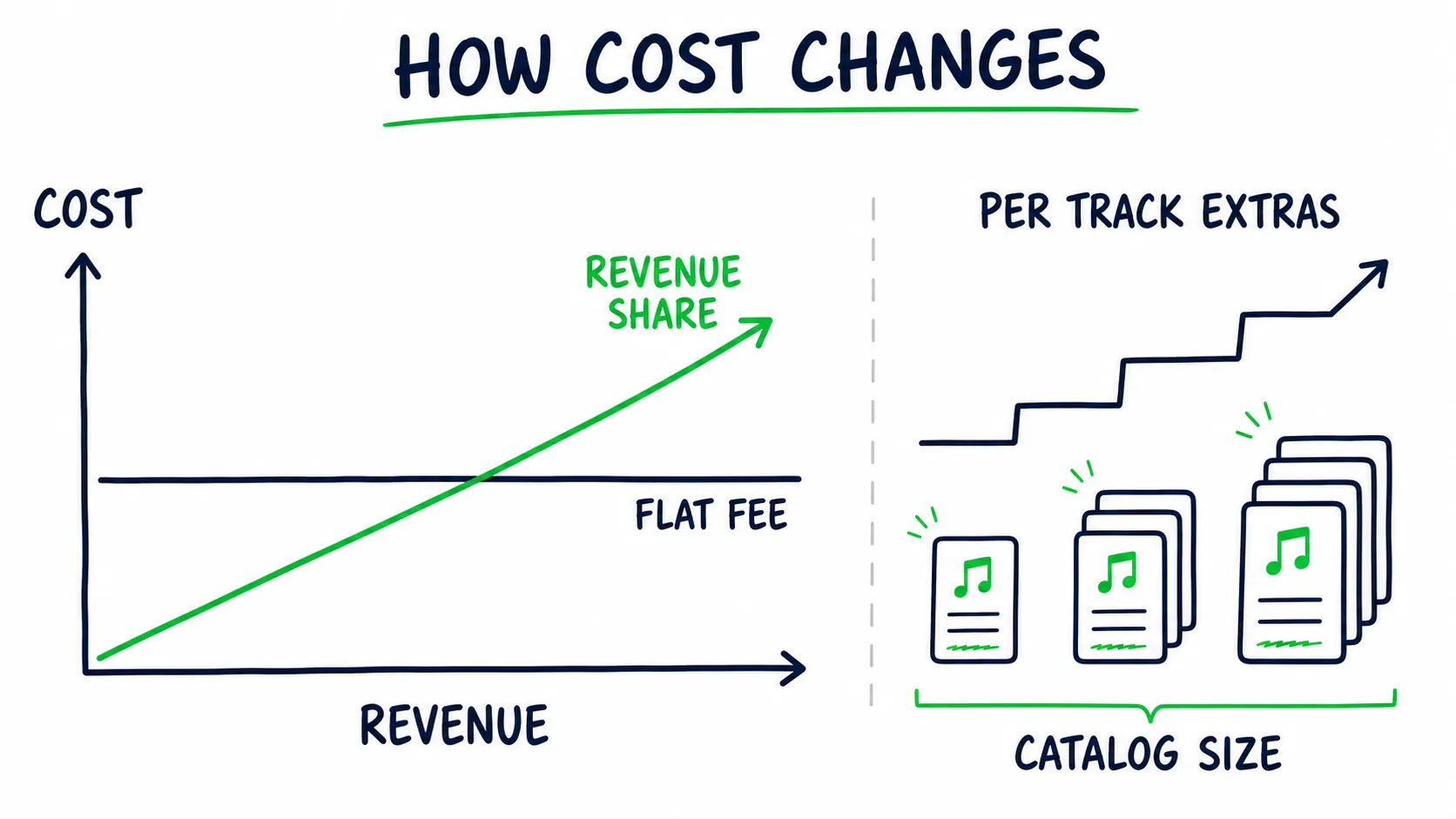
Model both income and catalog size. A flat plan, commission deal, and per track pricing grow in different ways.
The $24 plan can also lose once required extras are added across a large catalog. Run the same model with the exact features you need.
Before choosing, write down:
- Releases planned each year
- Store and social video income expected each year
- How many artist names you manage
- Need for exact release dates and times
- Need for Content ID, cover licensing, Beatport, splits, or Dolby Atmos
- Cost to keep old music live, export its data, or move it
You can test your take home pay with our Spotify royalties calculator.
A distributor does not collect every type of music money. It often collects money for the recording, while songwriter and digital radio money may go somewhere else. Read music royalties explained for the full map.
The MLC explains United States streaming mechanicals. SoundExchange explains digital radio royalties.
Features That Can Change The Deal
A feature claim is useful only when you know what it controls, what it costs, and what it does not guarantee.
| Feature claim | What it may include | What it does not prove | What to check |
|---|---|---|---|
| 100% royalties | Normal store streams and downloads | Every revenue type is free from cuts | YouTube, social, publishing, sync, cash out, and currency fees |
| Unlimited releases | No base fee for each upload | Every release tool is included | Release dates, cover licenses, protection, and per track extras |
| Content ID included | Delivery into YouTube’s rights system | Your recording is eligible or conflict free | Exclusive rights, beat terms, samples, and current administrators |
| Playlist pitching | A selective label service for chosen releases | A placement or guaranteed editor access | Who pitches, which releases qualify, and what is promised |
| Fast delivery | Files may leave the distributor quickly | Stores will publish the release correctly or on time | Lead time, artist mapping, rejections, and support response |
A Distributor Does Not Guarantee Editorial Playlists
Some selective plans may pitch chosen songs to store teams. That is a label service, separate from the standard artist pitch inside Spotify for Artists.
Once your distributor sends the song, it can show up in Spotify for Artists, and you can pitch an eligible song to Spotify yourself. No distributor can promise that an editor will add it. Our Spotify editorial playlist guide walks through that pitch.
Content ID Is Not Basic Copyright Registration
Do not turn on Content ID just because it is in the feature list. It can find videos that use your recording, but your distributor may charge for that or take a cut.
YouTube also says you need full rights. Common loops, beats sold to many people, mashups, and some remixes may not qualify.
Read YouTube’s Content ID rules before you enable it.
Our YouTube monetization guide for musicians explains Art Tracks, Content ID, channel pay, and claims.
Only one company should control Content ID for the same recording. Two claims can freeze income, claim your own channel, or create a dispute between administrators.
Royalty Splits Do Not Prove Ownership
An automatic split sends money, but it does not prove ownership. Keep a signed split sheet or rights agreement, and keep the master split and songwriting split separate. The recording and composition are different rights, and a producer may own part of one, both, or neither.
Also check what happens if a collaborator never opens an account, fails tax review, or changes an email address. You need to know where that unpaid share sits and who can edit it.
Fast Delivery Is Not A Safe Release Plan
A “live in 24 hours” claim should not become your release plan. A service may send the files in a day, but you still need time to fix metadata, map every artist ID, pitch Spotify, test links, and clear a store rejection.
Spotify says a delivered song can take about 48 hours to show in the Upcoming tab. Use our music release checklist and give the stores time.
Should You Use More Than One Music Distributor?
One distributor per recording is the safe rule. Different projects can still sit with different distributors.
Using separate distributors can make sense when:
- A side project needs different stores or rights tools
- A label wants to test support before moving the main catalog
- One genre needs Beatport or another specialist store
- An older catalog has a good permanent deal that is not worth moving
The cost is more admin. Reports, tax forms, payouts, artist IDs, and support histories sit in different places, which also makes royalty review harder.
Do not send the same recording through two distributors unless you are running a controlled move. Two active deliveries can create duplicate releases, ownership conflicts, and Content ID claims.
If you split the catalog, keep one master sheet with every recording, ISRC, UPC, distributor, release date, store link, rights admin, and current status.
How To Switch Music Distributors Safely
When you move, put the new copy live before you remove the old one. Do not try this during release week. Pick a quiet week when you have time to check every store.
- Save the old audio, artwork, song info, ISRC, UPC, release date, credits, and store links.
- Send the exact same audio and song info through the new distributor.
- Reuse the original ISRC for the same recording.
- Wait until the new delivery is live and the play counts match.
- Check Spotify, Apple Music, YouTube Music, and the stores that pay you most.
- Ask the old distributor to remove its copy only after the match is confirmed.
- Export final statements and withdraw the remaining balance.
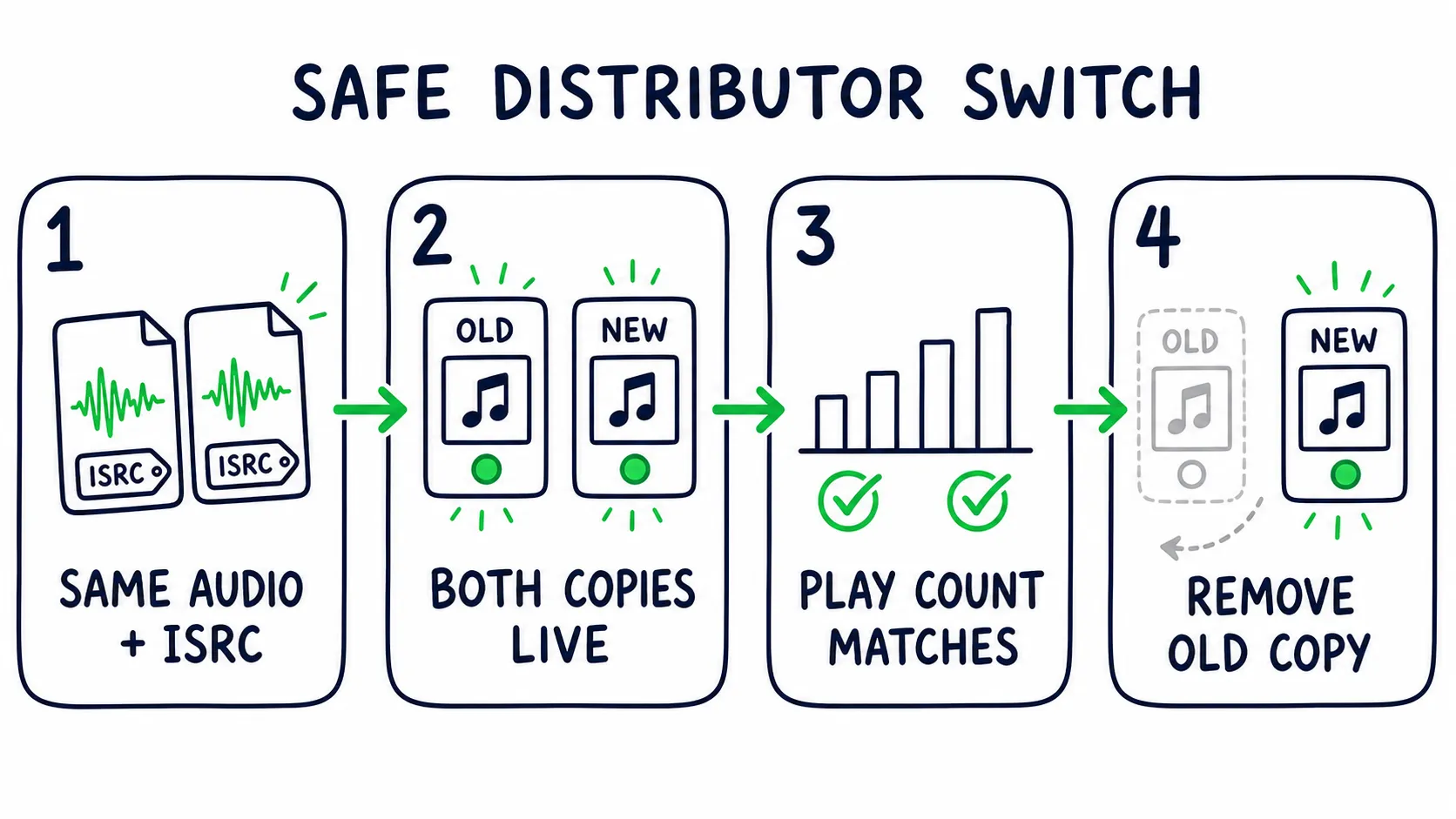
The safe order is match, overlap, confirm, then remove. Reversing it can break continuity.
Spotify calls this track linking. Its guide to sending music again says the audio and song info should match, including the song length, title, and artist name.
The play counts can join when the data matches. It is not promised, so keep both copies live while you check.
What To Do After Distribution
Distribution puts your song on the shelf. Getting people to look for it is a separate job.
First, make sure the song landed on the right artist pages. Claim and clean up your account with our Spotify for Artists guide. Then use a pre release plan with one clear audience, message, and timeline. If you are deciding how much to spend, use the music promotion budget calculator.
Once the track is live, the free Spotify audit can show where the profile needs work. When the song and profile are ready, paid promotion should reach listeners matched to the artists and scenes you already sound like, with results you can check in your own Spotify for Artists.
Keep that order. Get the song live and fix the profile first, then pay to bring in people who may want to come back.
Best Music Distribution Services FAQ
Which Music Distributor Should I Use For My First Release?
Choose for the next two years, not one upload. Estimate release count, revenue, artist names, Content ID needs, and the cost of leaving.
LANDR is our top pick from public terms. CD Baby can win for one low earning album. RouteNote can win when avoiding an upfront bill matters more than giving up 15%.
Will My Music Disappear If I Stop Paying The Distributor?
It depends on the exact plan and release. LANDR says released music stays live. Ditto Pro includes Release Protection.
Amuse says music stays live, but a 25% cut may apply after cancellation. DistroKid may remove music unless the release has its legacy option.
Confirm account access, future royalty terms, edits, and takedown control too.
Can I Switch Distributors Without Losing Streams And Playlists?
Often, yes, but it is not guaranteed. Send the same audio and metadata with the old ISRC. Keep both deliveries live until track linking is confirmed.
Check play counts and store pages before removing the old copy. Move Content ID control too, so two admins do not claim the same recording.
Does My Distributor Pitch My Song To Spotify Editorial Playlists?
Most artists pitch an eligible song inside Spotify for Artists. Some selective plans pitch chosen releases as a label service.
No distributor can promise a placement. Delivery still needs to happen early enough for the song to appear in the Upcoming tab.
Is Free Music Distribution Really Free?
It can have no upfront bill and still become expensive. RouteNote Free keeps 15% of income.
To compare that cut with a flat plan, divide the annual plan cost by the commission rate. A $24 plan divided by 15% equals $160 in annual revenue.
Key takeaway
Choose the distributor that protects the catalog you are building.
Model three year cost, audit the exit rule, test support, and keep control of every file, ID, statement, and agreement.